

Pennstagram is a photo sharing social networking MERN app. This app allows users to upload posts publicly or keep the posts only visible to themselves. Pennstagram also allows users to browse other users' profile contents, like and comment photos and mention other users in a post. Users can follow/unfollow other users and they can get personal follower suggestions according to our recommendation rules. Session management and Security setting are also considered in our app.
- Main Tech Stack
- Features
- Deployment
- Remainder for Deployment
- Run Locally
- UI Design
- Rest API Design
- Demo
- Contributors
- React (Frontend)
- Express (Backend)
- Node.js (Backend)
- MongoDB (Database)
✅ User registration ✅ Login/Auth ✅ Session management ✅ Security: account lockout policy ✅ @mentions in comments
✅ Create post/Photo upload ✅ Editing/Deleting Posts (photo) & Comments ✅ Activity feed ✅ Photo likes & unliking
✅ Follow/unfollow users ✅ Follower suggestions ✅ Live updates ✅infinite scroll ✅ Privacy / Visibility control on photos
https://pennstagram-481b2302c61d.herokuapp.com
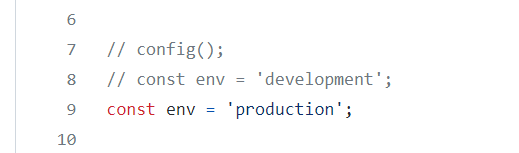
Before you try to run the code in the localhost, you should change the env variable into 'development' mode in <mockapi.js> file.
Before you try to deploy the app in heroku, you should change the env variable into 'production' mode in <mockapi.js> file.
Please contact me if you want run locally:
- Ask for DB_USERNAME and DB_PASSWORD for DB connection
- Ask for contact_your_ta_to_get_the_key and contact_your_ta_to_get_the_secret_key for AWS S3 connection
To run the app backend:
- Open a command prompt in the "backend" folder
- Add .env file at the root and create four variables (DB_USERNAME, DB_PASSWORD, contact_your_ta_to_get_the_key and contact_your_ta_to_get_the_secret_key) in the file.
- Run the command npm install and npm start
To run the app frontend:
- Open a command prompt in the "pennstagram" folder
- Follow the instructions in Remainder
- Run the command npm install and npm start
- A browser will open with the app
Wireframes:
- Check the wireframes for all the pages in the link below. https://www.figma.com/file/hcvBmBlkprIlLE2zYBkVXh/Wireframes?node-id=509%3A23
Prototypes:
-
Successful registration (include the homepage). https://www.figma.com/file/1mJ5ntXHg8miUl6NgVg1bv/User-Story?node-id=0%3A1
-
Login -> homepage -> Profile page. https://www.figma.com/file/1mJ5ntXHg8miUl6NgVg1bv/User-Story?node-id=1%3A2
-
Login -> homepage -> upload a photo or a video. https://www.figma.com/file/hTUCqSL5pm1C2beY54iVTI/P3?node-id=52%3A7
-
Login -> homepage -> find and follow a user -> see their activity/posts on the main activity page. https://www.figma.com/file/hcvBmBlkprIlLE2zYBkVXh/Wireframes?node-id=557%3A29
We use the MVC (Model-View-Controller) Restful architecture. Our interactive documentation of the Rest API is in the link below. https://app.swaggerhub.com/apis/cis557group32/Pennstagram/1.2.0
The demo video is uploaded here. The demo is just for simple demonstration. It does not contain all the features we have. If you want to know more about the features, feel free to contact me.
This is a group project done by myself and other two teamates.