
The scryber engine is an advanced, complete, pdf creation library for dotnet core (including support for Blazor WASM)
It supports the easy definition of document templates with, pages, content, shapes and images using html, and svg. Bring your data in from an api or object model. Bind with handlebars syntax and full complex expression support. Layout with styles including calculated and relative values, and binding to your data. Finally with a couple of lines of code, output the document to a stream or file.
With a styles based template layout, it is easy to create good looking, paginated and flowing documents. With dynamic content from your applications or sites it is easy to add dynamic data, and repeaters.
The easiest way to begin is to use the Nuget Packages here
scryber.core package (Base libraries for GUI or console applications)
OR for asp.net mvc
scryber.core.mvc package (Which includes the scryber.core package).
Check out the documentation for more information on how to use the library.
- standard html body, tables, lists, divs and spans and many newer html5 tags
- flowing and flexible layout with multiple pages in css sizes, along with page headers, footers and breaks, and page numbering
- cascading styles: linked, embedded or inline using css syntax and priority.
- databinding for dynamic content or style on simple and complex object models with repeating templates and conditional logic with if else-if else
- embedding of external content, and attaching of external files or streams.
- sizing and positioning of elements inline, block, relative or absolute.
- images and colours with text and shape fills, backgrounds and borders.
- multiple fonts, including google fonts, supporting text alignment; spacing; leading; decoration.
- Graphics support with SVG for drawing and paths and text.
- Password security and restrictions on pdf files.
- Modifications of existing files using frames and framesets
- Full code support either as a whole document, or partial content, and controllers, along with the html/css templates.
- Document Controllers (https://scrybercore.readthedocs.io/en/latest/document_controllers.html) for complete control of the layout
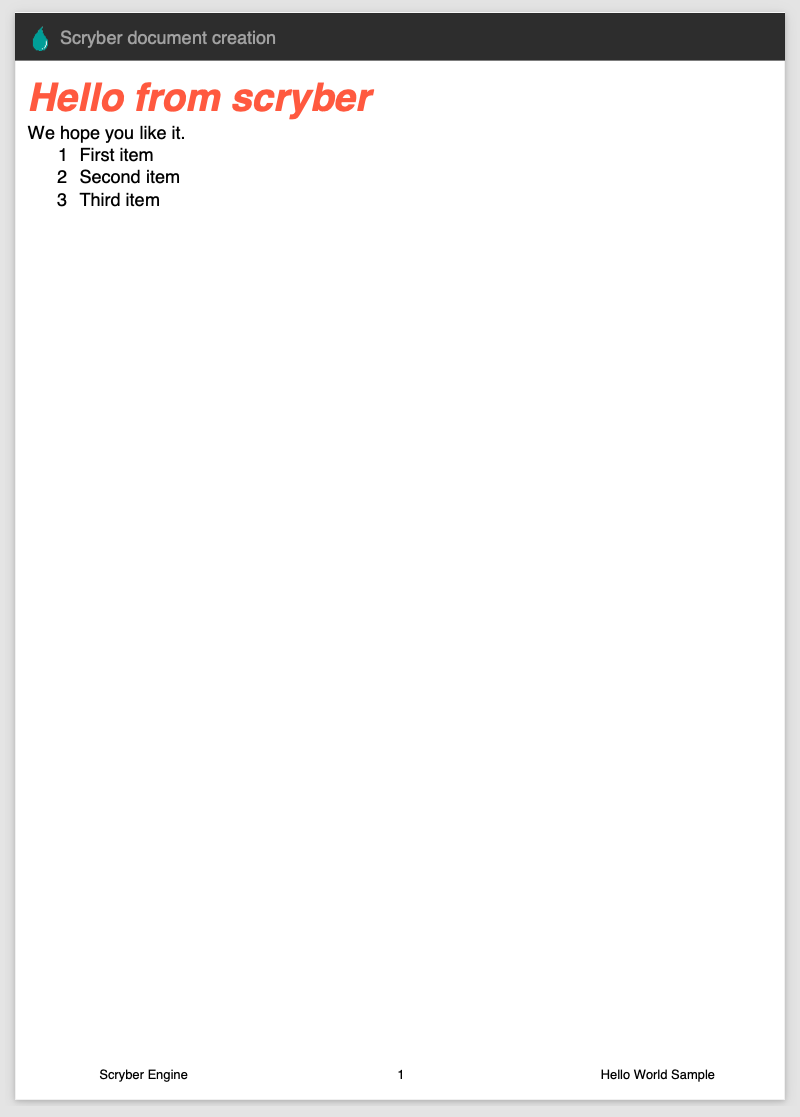
Create a new html template file with your content.
    <!DOCTYPE HTML >
    <html lang='en' xmlns='http://www.w3.org/1999/xhtml' >
        <head>
            <!-- support for standard document attributes -->
            <meta charset='utf-8' name='author' content='Richard Hewitson' />
            <title>Hello World</title>

            <!-- support for complex css selectors (or link to external style sheets )-->
            <style>
                /* use of css variables that can be changed at generation time */
                :root{
                    --head-bg: #FFF;
                    --head-txt: #000;
                    --head-logo: url('../html/images/ScyberLogo2_alpha_small.png');
                    --head-space: 20px;
                }

                body{
                    font-family: sans-serif;
                    font-size: 14pt;
                }

                p.header {
                    color: var(--head-txt);
                    background-color: var(--head-bg);
                    background-image: var(--head-logo);
                    background-repeat: no-repeat;
                    background-position: var(--head-space) var(--head-space);
                    background-size: 20pt 20pt;
                    margin-top: 0pt;
                    padding: var(--head-space);
                    padding-bottom: calc(--head-space + 25pt); /* full calc support */
                }

                .foot td {
                    border: none;
                    text-align: center;
                    font-size: 10pt;
                    margin-bottom: 10pt;
                }

            </style>
        </head>
        <body>
            <header>
                <!-- document headers -->
                <p class="header">Scryber document creation</p>
            </header>
            <!-- support for many HTML5 tags-->
            <main style="padding:10pt">

                <!-- binding style and values on content -->
                <h2 style="{{model.titlestyle}}">{{model.title}}</h2>
                <div>We hope you like it.</div>
                <!-- Loop over or nested items binding in the parameters -->
                <ol>
                    <template data-bind='{{model.items}}'>
                        <!-- and bind the name value in the current object -->
                        <li>{{.name}}</li>
                    </template>
                </ol>
            </main>
            <footer>
                <!-- footers and page numbers -->
                <table class="foot" style="width:100%">
                    <tr>
                        <td>{{author}}</td>
                        <td><page /></td>
                        <td>Hello World Sample</td>
                    </tr>
                </table>
            </footer>
        </body>
</html> //using Scryber.Components
static void Main(string[] args)
{
//Load your template from a
var path = System.Environment.CurrentDirectory;
path = System.IO.Path.Combine(path, "../../../Content/HTML/READMESample.html");
//create our sample model data.
var model = new
{
titlestyle = "color:#ff6347",
title = "Hello from scryber",
items = new[]
{
new { name = "First item" },
new { name = "Second item" },
new { name = "Third item" },
}
};
using (var doc = Document.ParseDocument(path))
{
//pass values to the document, including css using params
doc.Params["author"] = "Scryber Engine";
doc.Params["--head-bg"] = "#333"; //Override for the header background
doc.Params["--head-txt"] = "#FFF";
//pass data paramters as needed, supporting simple values, arrays or complex classes.
doc.Params["model"] = model;
//And save it to a file or a stream
using (var stream = new System.IO.FileStream("READMESample.pdf", System.IO.FileMode.Create))
{
doc.SaveAsPDF(stream);
}
}
} //using Scryber.Components
//using Scryber.Components.Mvc
public async IActionResult HelloWorld(string title = "This is the title")
{
using(var doc = Document.ParseDocument("[input template]"))
{
doc.Params["author"] = "Scryber Engine";
doc.Params["--head-bg"] = "#333"; //Override for the header background
doc.Params["--head-txt"] = "#FFF";
doc.Params["model"] = GetMyParameters(title);
//This will output to the response inline.
return await this.PDFAsync(doc); // inline:false, outputFileName:"HelloWorld.pdf"
}
}
We would love to hear your feedback. Feel free to get in touch. Issues, ideas, includes are all welcome.
If you would like to help with building, extending then happy to get contributions