VirusTotal Intelligence (VTI) allows one to search through VirusTotal's entire dataset accordingly to many different variables, from binary properties, antivirus detection verdicts, behaviour patterns such as outgoing communication, and more.
VTI provides powerful search capabilities with mulitple search modiferes to search across the different data corpus of Files, Domains, IP Address, URLs.
All search terms is structured as modifier:value. The image below from VirusTotal's blog provides the basis of how information is structured.
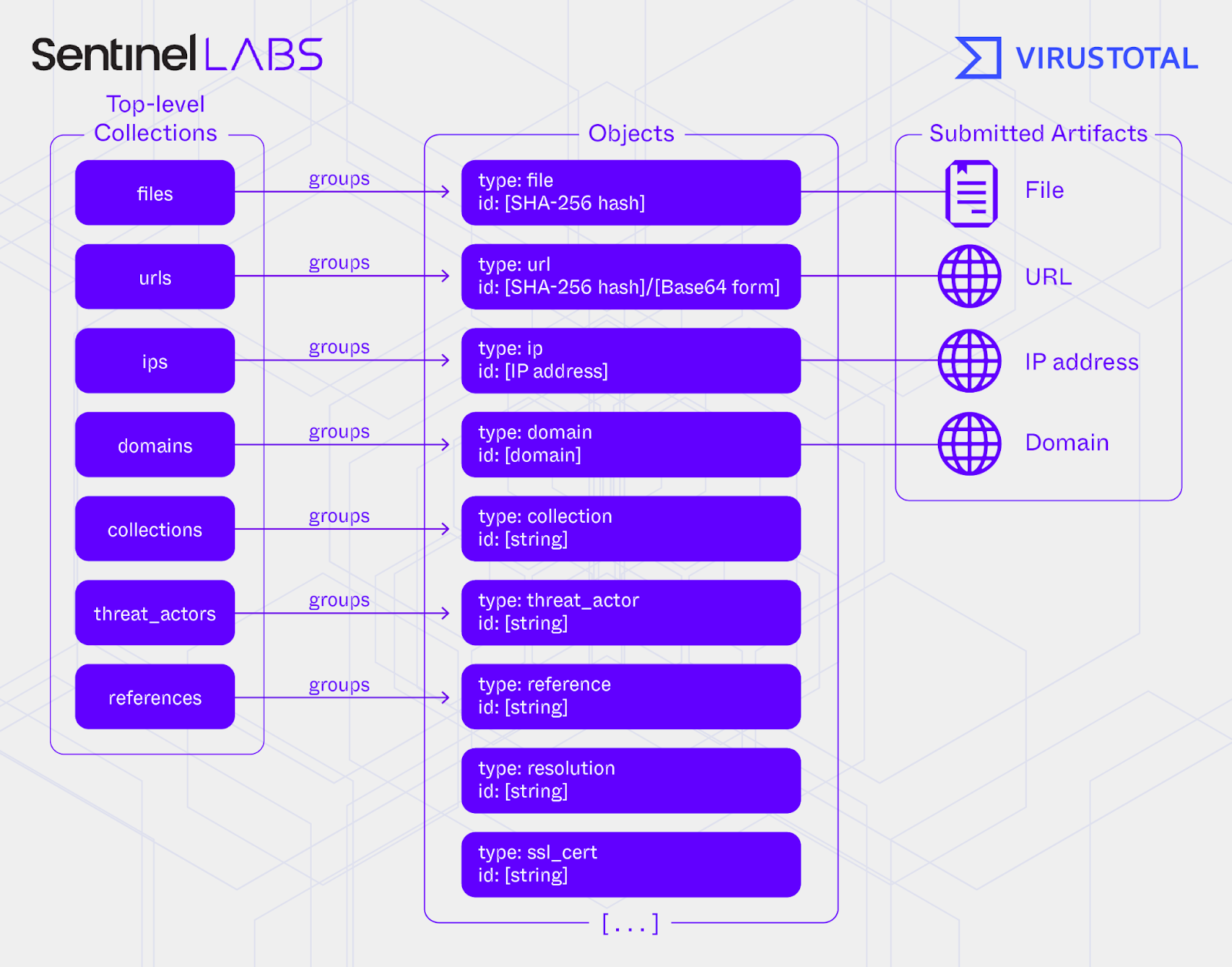
Exploring the VirusTotal Dataset
This document will list searches that are relevant for threat hunting on VT.
Searching for files with at least 10 detections
entity:file p:10+
Searching for files with at least 10 detections that have been detected as a malware (in this case, ransomware)
modifier engines is use for malware family names, malware types (eg, info-stealers, trojans, etc), or malware categories
entity:file p:10+ engines:ransom
Searching for any filenames starting the string mimi
(the "entity:file" modifer is not required as the modifier "name" implies searching through the File corpus, but is included for clarity and consistency sake)
entity:file name:mimi*
Searching for pe files submitted to VT with 20 detections, submitted in Singapore
entity:file type:pe p:20+ submitter:sg
Searching for excel files between 1-5 detections that have macros
entity:file type:excel p:1+ p:5- tag:macros
Searching for files weaponised that exploits any vulnerability in 2024 last seen in the past 14 days
tag:cve-2024-* ls:14d+
Searching for any exploits
tag:exploit
Showing all lummac samples last seen in the past 7 days
engines:lummac ls:7d+
Searching for all sliver samples last analysed in the past 14 days
engines:sliver la:14d+
Searching for trojans observed in Taiwan, with > 10 submissions, and >10 unique sources
engines:trojan AND submitter:tw AND submissions:10+ AND sources:10+
Searching for email attachments
entity:file tag:attachment
Search for all macOS (macho or dmg) malware
entity:file type:macho engines:malicious
Search for all malicious linux executables found
entity:file type:elf engines:malicious
Files with specific strings:
content:"UploadSmallFileWithStopWatch"
Content / Binary Seaches
content:"{ 46 69 6C 65 43 6F 6E 74 61 69 6E 65 72 2E 46 69 6C 65 41 72 63 68 69 76 65 }"
Files hosted on a .gov with at least 5 detections
itw:"*.gov" p:5+
Files communicating with IP address
behaviour:"8.8.8.8"
Files communicating with microsoft.com (alternative method that's more precise)
behaviour_network:"microsoft.com"
Suspicious powershell useage
behaviour_files:"-enc" AND behaviour_files:"FromBase64String"
Suspicious command executions from powershell (note that VT doesn't have parent-child links in the search modifiers. It could very well be a separate process in the search below, though rare)
(behaviour_command_executions:powershell.exe AND (behaviour_created_processes:rundll32.exe OR behaviour_created_processes:powershell.exe))
Suspicious LOLbins - CertUtil
behaviour_processes:"certutil -urlcache -split -f http"
Suspicious LOLbins - MSTHA
behaviour_processes:"mshta *.hta"
Files that run specific processes
(this example hunts for known ransomware behaviours - deleting shadow copies)
behaviour_processes:"\\vssadmin.exe delete shadows /all /quiet"

behaviour_processes:"\\vssadmin.exe resize shadowstorage"
Files with specific command executions (this hunts for command line execution using the "get-wmiobject" command)
behaviour_command_executions:"Get-WmiObject Win32_Shadowcopy | ForEach-Object {$_.Delete();}" NOT engines:ransom
RDP being enabled
behaviour_command_executions:"Set-ItemProperty -Path 'HKLM:\System\CurrentControlSet\Control\Terminal Server' -name "fDenyTSConnections" -value 0"
RDP - Disabling NLA
behaviour_registry:"HKLM\System\CurrentControlSet\Control\Terminal Server\WinStations\RDP-Tcp\UserAuthentication"
TeamViewer network activity:
behaviour_network:"*.teamviewer.com"
Searching for any URLs that have been categorised or detected as phishing
entity:url (engines:phishing or category:phishing)
Searching for typo-squatting domains (leverging fuzzy searches) that looks like Googles but not from the legitimate Google domain
entity:domain fuzzy_domain:google.com NOT parent_domain:google.com
Searching for websites that uses the same favicon as a brand's page:
entity:domain p:1+ main_icon_dhash:"f8e4f23369f0b2f0"

entity: domain (fuzzy_domain:facebook.com OR main_icon_dhash:"f8e4f23369f0b2f0") NOT parent_domain:facebook.com
Leveraging tags to hunt for multiple-redirects
entity:url tag:multiple-redirects (fuzzy_hostname:www.microsoft.com NOT (parent_domain:microsoft.com)) response_code:200