Note: this repository is a copy of our private repository which was maintained by me and coauthors: @poyuH, @Raghav. We had to create a new repsotiory since a lot of our API Keys and URLs were already commited and hardcoded in it.
We build a Dining Concierge chatbot, that sends you restaurant suggestions given a set of preferences that you provide the chatbot with through conversation.
We implement this using serverless and microservice driven architecture provided by AWS.
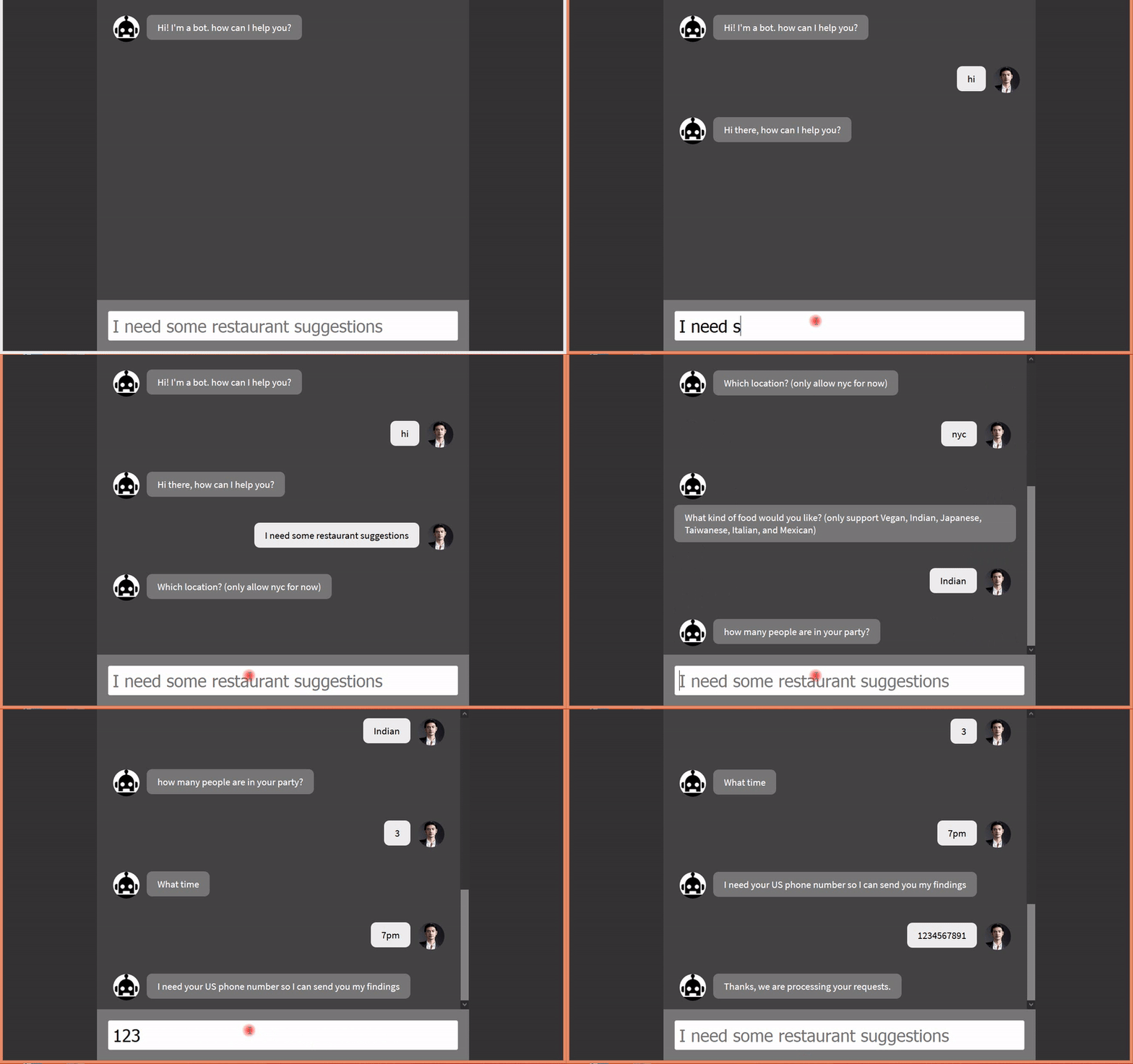
A live working demo of our project is shown below:
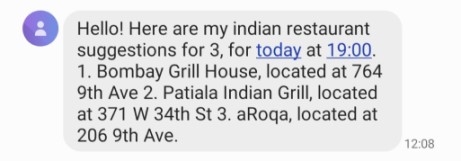
After getting all the information,the chatbot sends a text message to the user with 3 restuarants based on his suggestion:
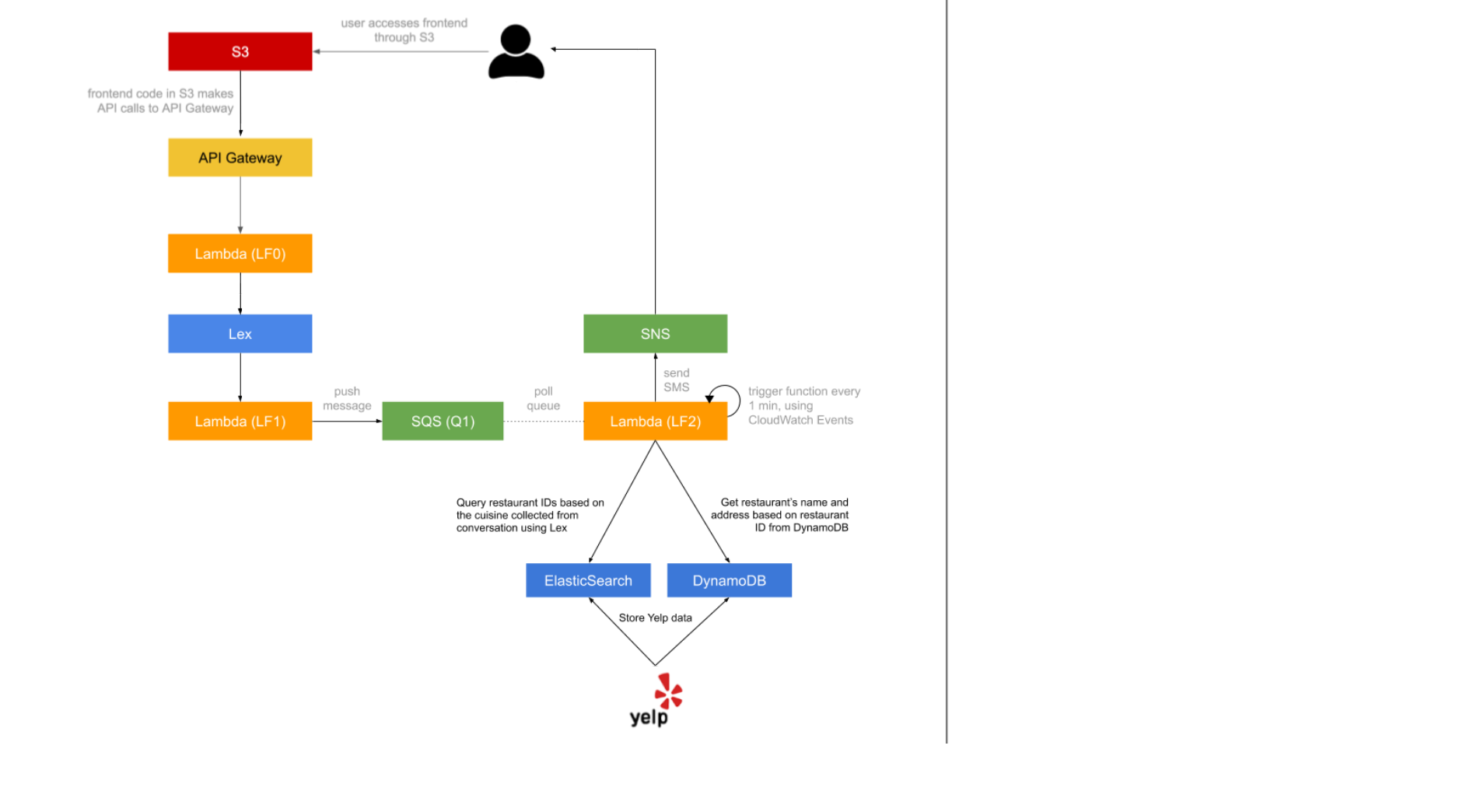
The architecture of our project is as follows:
The steps to reproduce are as follows:
-
Build and deploy the frontend of the application a. Implement a chat user interface, where the user can write messages and get responses back. b. Host your frontend in an AWS S3 bucket: https://docs.aws.amazon.com/AmazonS3/latest/dev/HostingWebsiteOnS3Setup.html c. The code is available in the folder
frontend -
Build the API for the application a. Use API Gateway to setup the API, use Swagger. b. Import the Swagger file into API Gateway: https://docs.aws.amazon.com/apigateway/latest/developerguide/api-gateway-import-api.html c. The code for the API is present in
swagger.yamld. Create a Lambda Function LF0 which peforms the chat operation (lf0.py) NOTE- You will need to enable CORS on your API methods: https://docs.aws.amazon.com/apigateway/latest/developerguide/how-to-cors.html
- API Gateway can generate an SDK for your API, which you can use in your frontend. It will take care of calling your API, as well as session signing the API calls -- an important security feature https://docs.aws.amazon.com/apigateway/latest/developerguide/how-to-generate-sdk-javascript.html
-
Build a Dining Concierge chatbot using Amazon Lex.
-
Create a new bot using the Amazon Lex service. Read up the documentation on all things Lex, for more information: https://docs.aws.amazon.com/lex/latest/dg/getting-started.html
-
Create a Lambda function (LF1) (
LF1.py) and use it as a code hook for Lex, which essentially entails the invocation of your Lambda before Lex responds to any of your requests -- this gives you the chance to manipulate and validate parameters as well as format the bot’s responses. More documentation on Lambda code hooks at the following link: https://docs.aws.amazon.com/lex/latest/dg/using-lambda.html -
Bot requirements: It needs to have 3 intents:
- GreetingIntent
- ThankYouIntent
- DiningSuggestionsIntent.
For the
DiningSuggestionsIntent, you need to collect at least the following pieces of information from the user, through conversation:- Location
- Cuisine
- Dining Time
- Number of people
- Phone number
-
Based on the parameters collected from the user, push the information collected from the user (location, cuisine, etc.) to an SQS queue (Q1). More on SQS queues here: https://aws.amazon.com/sqs/. Also confirm to the user that you received their request and that you will notify them over SMS once you have the list of restaurant suggestions.
-
-
integrate the lex chatbot into API
- Use the AWS SDK to call your Lex chatbot from the API Lambda (LF0).
- When the API receives a request, you should 1. extract the text message from the API request, 2. send it to your Lex chatbot, 3. wait for the response, 4. send back the response from Lex as the API response
-
Collect the restaurant data using Yelp API (
scraper.py). You'll need to generate your own Yelp API key. -
Put the data in DynamoDB
- Create a DynamoDB table and named “yelp-restaurants”
- Store the restaurants you scrape, in DynamoDB (one thing you will notice is that some restaurants might have more or less fields than others, which makes DynamoDB ideal for storing this data)
- With each item you store, make sure to attach a key to the object named “insertedAtTimestamp” with the value of the time and date of when you inserted the particular record.
-
Create an ElasticSearch instance using AWS ElasticSearch Service
- Create an ElasticSearch index called “restaurants”
- Create an ElasticSearch type under the index “restaurants” called “Restaurant”
- Store partial information for each restaurant scraped in ElasticSearch under the “restaurants” index, where each entry has a “Restaurant” data type. This data type will be of composite type stored as JSON in ElasticSearch. https://www.elastic.co/guide/en/elasticsearch/guide/current/mapping.html. You only need to store RestaurantID and Cuisine for each restaurant
-
Build a suggestions module, that is decoupled from the Lex chatbot..
- Create a new Lambda function (LF2) (
LF2.py) that acts as a queue worker. Whenever it is invoked it 1. pulls a message from the SQS queue (Q1), 2. gets a random restaurant recommendation for the cuisine collected through conversation from ElasticSearch and DynamoDB, 3. formats them and 4. sends them over text message to the phone number included in the SQS message, using SNS https://docs.aws.amazon.com/sns/latest/dg/SMSMessages.html.- Use the DynamoDB table “yelp-restaurants” (which you created from Step 1) to fetch more information about the restaurants (restaurant name, address, etc.), since the restaurants stored in ElasticSearch will have only a small subset of fields from each restaurant
- Modify the rest of the LF2 function if necessary to send the user text/email
- Set up a CloudWatch event trigger that runs every minute and invokes the Lambda function as a result: https://docs.aws.amazon.com/AmazonCloudWatch/latest/events/RunLambdaSchedule.html. This automates the queue worker Lambda to poll and process suggestion requests on its own.
- Create a new Lambda function (LF2) (
Based on a conversation with the customer, your LEX chatbot will identify the customer’s preferred ‘cuisine’. You will search through ElasticSearch to get random suggestions of restaurant IDs with this cuisine. At this point, you would also need to query the DynamoDB table with these restaurant IDs to find more information about the restaurants you want to suggest to your customers like name and address of the restaurant. Please note that you do not need to worry about filtering restaurants based on neighbourhood in this assignment. Filter only using the cuisine.
NOTE: Currently the suggestions provided by the chatbot are random suggestions which satisfy the requirements set by the user. We can build a recommender system to make it better. But this was not the aim of the project. The project was done to help us get familiar with various AWS services
LF2.pyrequires aws_requests_auth to be installed