Rich text rendering for Matplotlib - Create beautiful multi-color, multi-style text in a single line.


Standard Matplotlib only supports single-color text. To create multi-colored text, you need to manually position each piece and calculate spacing - tedious and error-prone!
mpl-richtext solves this by letting you specify colors and styles for each text segment in one simple function call.
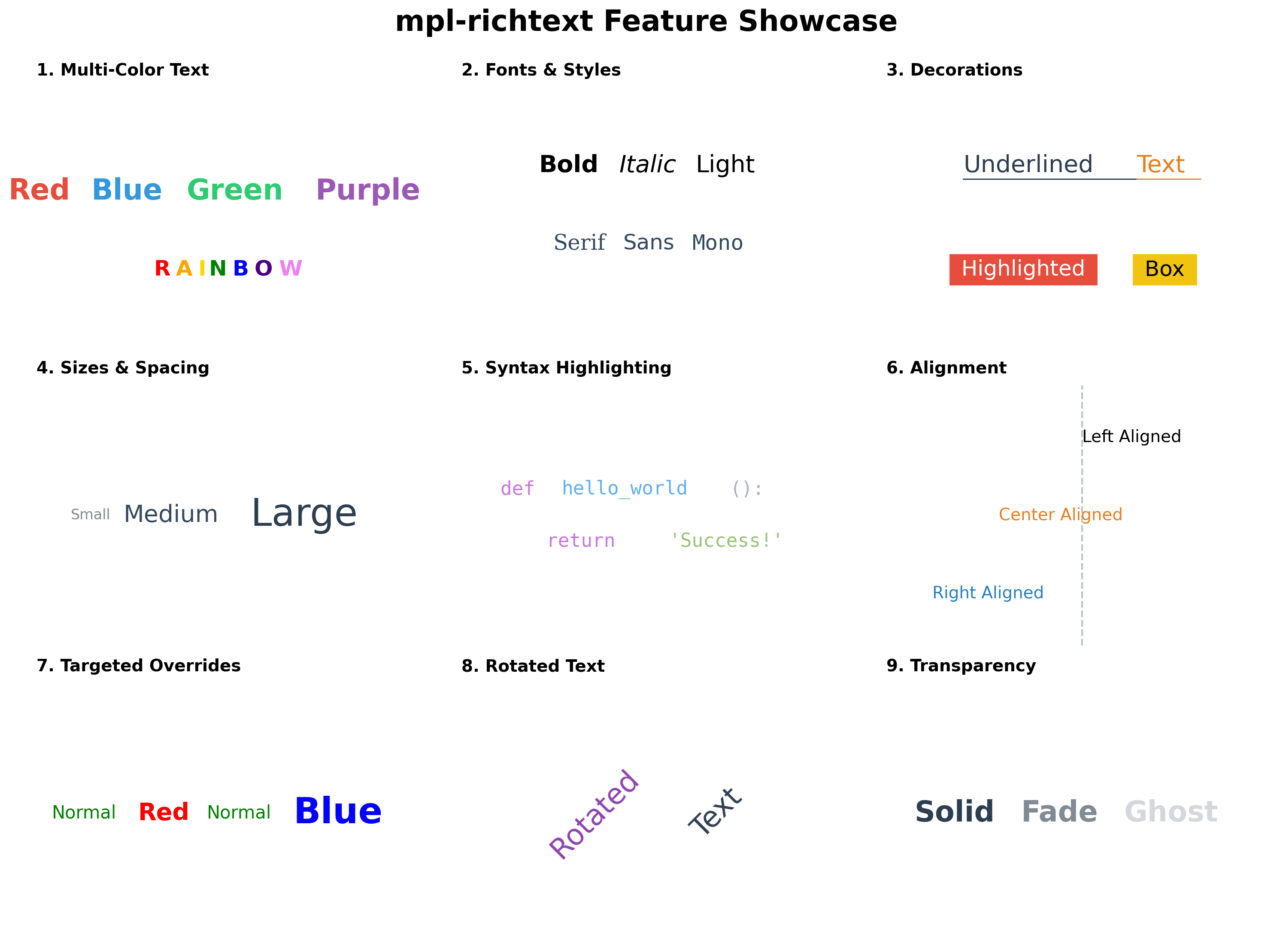
pip install mpl-richtextimport matplotlib.pyplot as plt
from mpl_richtext import richtext
fig, ax = plt.subplots()
# Create multi-colored text in one line!
richtext(0.5, 0.5,
strings=["hello", ", ", "world"],
colors=["red", "blue", "green"],
ax=ax, fontsize=20, transform=ax.transAxes)
plt.show()✨ Multi-color text - Different colors for each word or character
🎨 Multi-style text - Mix font sizes, weights, families, and styles (italic/oblique)
🚀 Index-based styling - Cleaner API with property aliases (NEW in v0.2.0)
🇳🇵 Nepali/Devanagari support - Native complex script rendering with HarfBuzz
📦 Flexible input - Lists, dicts, or tuples for colors and properties
📏 Auto word-wrapping - Specify box_width for automatic text wrapping
🎯 Full alignment - Left, center, right horizontal and vertical alignment
✨ Decorations - Support for underlines and background colors
🔄 Transformations - Support for text rotation
👻 Transparency - Support for alpha values per segment
⚡ Easy to use - Simple API, works with any Matplotlib axes
Parameters:
-
x, y :
float
Starting position of the text -
strings :
list of str
List of text segments, e.g.,["hello", ", ", "world"] -
colors :
str,list, ordict, optional
Colors for each segment. Can be:- Single string:
"red"(applies to all) - List:
["red", "blue", "green"](one per segment) - Dict:
{0: "red", 2: "green"}(specific indices) - Tuple keys:
{(0, 2): "red"}(multiple indices same color)
- Single string:
-
ax :
matplotlib.axes.Axes, optional
Axes to draw on. IfNone, uses current axes. -
kwargs : Additional properties
- Global:
box_width,linespacing,ha,va,transform,zorder - Per-segment:
fontsize/fontsizes,fontweight/fontweights,fontfamily/fontfamilies, etc. - Any property can be:
- Single value (applies to all)
- List (one per segment, auto-extends)
- Dict (specific indices)
- Global:
Returns:
list of Text- List of created matplotlib Text objects
For complex multi-style text, use the styles parameter for cleaner, more readable code:
richtext(x, y, ["Company", " (Category)"],
         colors={0: 'blue', 1: 'gray'},
         fontsizes={0: 14, 1: 10},
fontweights={0: 'bold', 1: 'normal'})richtext(x, y, ["Company", " (Category)"],
{0: {'color': 'blue', 'size': 14, 'weight': 'bold'},
1: {'color': 'gray', 'size': 10, 'weight': 'normal'}})Use friendly short names instead of full matplotlib property names:
| Alias | Full Name | Example |
|---|---|---|
size |
fontsize |
{'size': 20} |
weight |
fontweight |
{'weight': 'bold'} |
family |
fontfamily |
{'family': 'monospace'} |
style |
fontstyle |
{'style': 'italic'} |
Combine global defaults, property dicts, and styles dict for maximum flexibility:
richtext(x, y, ["A", "B", "C", "D"],
         fontsize=10,                           # Global default
         colors={1: 'orange'},                  # Target specific segment
         styles={2: {'color': 'purple', 'size': 18, 'weight': 'bold'}},
         ax=ax)
Priority Order: styles dict > individual kwargs > global defaults
Apply the same styles to multiple indices using tuple keys:
richtext(x, y, ["A", "B", "C", "D", "E"],
         {(0, 2, 4): {'color': 'red', 'size': 20, 'weight': 'bold'},
          (1, 3): {'color': 'blue', 'size': 12}},
         ax=ax)

# Results: A, C, E are red/20/bold
#          B, D are blue/12
This is more concise than repeating the same styles:
# Instead of this verbose version:
{0: {'color': 'red', 'size': 20},
 2: {'color': 'red', 'size': 20},
 4: {'color': 'red', 'size': 20}}

# Use this:
{(0, 2, 4): {'color': 'red', 'size': 20}}Title and Subtitle:
richtext(x, y,
         ["Main Title", " (Subtitle)"],
         {0: {'size': 14, 'weight': 'bold', 'color': '#2C4A6E'},
          1: {'size': 10, 'weight': 'normal', 'color': '#556B2F'}},
         ha='center', va='center', ax=ax)
Syntax Highlighting:
richtext(x, y,
         ["def ", "function", "(", "arg", "):"],
         {0: {'color': '#C678DD', 'weight': 'bold'},
          1: {'color': '#61AFEF'},
          2: {'color': '#ABB2BF'},
          3: {'color': '#E06C75'},
          4: {'color': '#ABB2BF'}},
fontsize=14, family='monospace', ax=ax)mpl-richtext provides native support for complex scripts including Nepali, Hindi, Sanskrit, and other Devanagari-based languages through HarfBuzz text shaping.
Devanagari script requires complex text shaping where:
- Characters combine and transform based on context
- Ligatures form automatically (e.g., क + ् + ष = क्ष)
- Vowel marks (matras) position correctly
- Rendering order differs from logical order
Standard matplotlib struggles with these complexities. mpl-richtext automatically handles this!
✅ Automatic Detection - Detects Devanagari characters and applies proper shaping
✅ Accurate Metrics - Correct width and height measurements for layout
✅ Font Support - Works with Noto Sans Devanagari, Devanagari fonts
✅ Zero Config - Just use Nepali text, it works automatically!
import matplotlib.pyplot as plt
from mpl_richtext import richtext
import matplotlib.font_manager as fm

# Set up Nepali font
plt.rcParams['font.family'] = 'sans-serif'
plt.rcParams['font.sans-serif'] = ['Noto Sans Devanagari', 'DejaVu Sans']

fig, ax = plt.subplots()

# Create Nepali text with styling
richtext(0.5, 0.7,
         ["मुख्य शीर्षक", " (उपशीर्षक)"],
         {0: {'size': 14, 'weight': 'bold', 'color': '#2C4A6E'},
          1: {'size': 10, 'weight': 'normal', 'color': '#556B2F'}},
         ha='center', va='center', ax=ax)

plt.show()richtext(0.5, 0.5,
["Hello: ", "नमस्ते संसार ", "2082 माघ 24"],
{0: {'size': 16, 'weight': 'bold', 'color': 'orange'},
1: {'size': 14, 'weight': 'normal', 'color': 'blue'},
2: {'size': 14, 'weight': 'bold', 'color': 'green'}},
ax=ax)Install Noto Sans Devanagari:
# Ubuntu/Debian
sudo apt-get install fonts-noto

# macOS
brew install --cask font-noto-sans-devanagari

# Windows
# Download from Google Fonts: https://fonts.google.com/noto/specimen/Noto+Sans+Devanagari
Using Custom Fonts:
import matplotlib.font_manager as fm

# Load custom Nepali font
nepali_font = fm.FontProperties(fname='/path/to/NepaliFont.ttf')

richtext(x, y, ["नेपाली पाठ"], {},
         fontproperties=nepali_font,
fontsize=16, ax=ax)- Shaping Engine: Uses uharfbuzz for OpenType shaping
- Supported Scripts: Devanagari (U+0900–U+097F), Devanagari Extended, Vedic Extensions
- Automatic Fallback: Falls back to native matplotlib if HarfBuzz unavailable
- Performance: Efficient caching and optimized rendering
Contributions are welcome! Please feel free to submit a Pull Request.
- Fork the repository
- Create your feature branch (
git checkout -b feature/AmazingFeature) - Commit your changes (
git commit -m 'Add some AmazingFeature') - Push to the branch (
git push origin feature/AmazingFeature) - Open a Pull Request
This project is licensed under the MIT License - see the LICENSE file for details.
- PyPI: https://pypi.org/project/mpl-richtext/
- GitHub: https://github.com/ra8in/mpl-richtext
- Issues: https://github.com/ra8in/mpl-richtext/issues
Made with ❤️ for the Matplotlib community