

caracas is available on CRAN and can be installed as usual:
install.packages('caracas')
Two more steps must be completed before caracas can be used:
caracas uses python (and in particular the python library SymPy).
Therefore python (version > 3) must be installed, which can be done as
follows: Go here and download the
version for your computer.
For windows users: During installation you can check “add python to the computers path” or similar. It is important that you check this box.
Please ensure that you have SymPy installed, or else install it:
if (!caracas::has_sympy()) {
  caracas::install_sympy()
}To build and install from Github with vignettes run this command from
within R (please install remotes first if not already installed):
# install.packages('remotes')
remotes::install_github("r-cas/caracas", build_vignettes = TRUE)
You can also install the package without vignettes if needed as follows:
remotes::install_github("r-cas/caracas")
The caracas package uses the
reticulate package (to run
Python code). Thus, if you wish to configure your Python environment,
you need to 1) load reticulate, 2) configure the Python environment,
and 3) load caracas. The Python environment can be configured as
described
here.
Again, this need to be done before loading caracas.
For linux users, specifically, do:
library(reticulate)
reticulate::import("sympy")
reticulate::py_install(packages="sympy")
reticulate::import("sympy")
If the prompt says Module(sympy) things should be fine.
See https://github.com/r-cas/caracas.
See https://r-cas.github.io/caracas/.
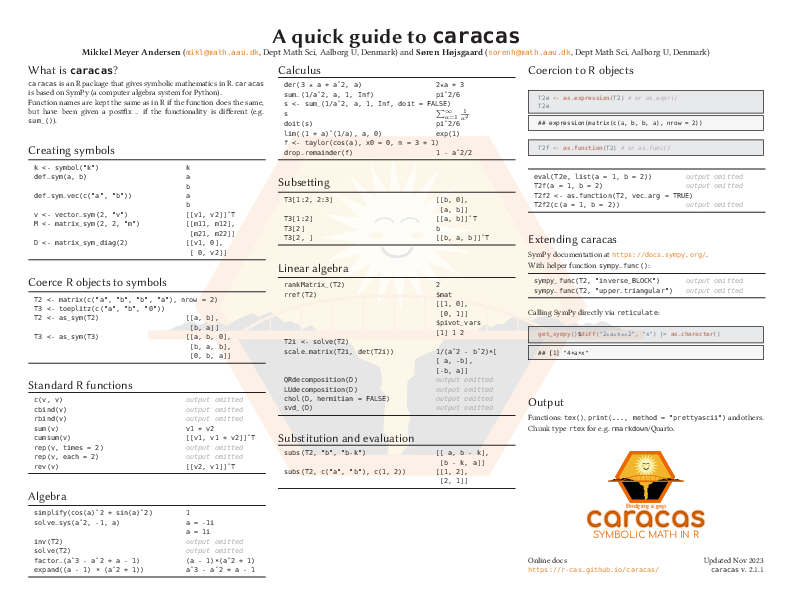
Reference card available at https://raw.githubusercontent.com/r-cas/caracas/master/refcard/caracas_refcard.pdf.
The name “caracas” is intended to mean “(inter)face to computer algebra system(s)” - notice that “cara” is Spanish (Castellano to be precise) for “face”.
Please note that the caracas project is released with a Contributor
Code of Conduct (available in CODE_OF_CONDUCT.md). By contributing to
this project, you agree to abide by its terms.
library(caracas)
# options(caracas.print.prettyascii = TRUE)
x <- symbol('x')
eq <- 2*x^2 - x
eq
#> c: 2
#> 2⋅x - x
as.character(eq)
#> [1] "2*x^2 - x"
as_expr(eq)
#> expression(2 * x^2 - x)
tex(eq)
#> [1] "2 x^{2} - x"solve_sys(eq, x)
#> x = 0
#> x = 1/2
der(eq, x)
#> c: 4⋅x - 1
subs(eq, x, "y")
#> c: 2
#> 2⋅y - yA <- matrix(c("x", 2, 0, "2*x"), 2, 2)
B <- as_sym(A)
B
#> c: ⎡x 0 ⎤
#> ⎢ ⎥
#> ⎣2 2⋅x⎦
Binv <- inv(B)
Binv
#> c: ⎡ 1 ⎤
#> ⎢ ─ 0 ⎥
#> ⎢ x ⎥
#> ⎢ ⎥
#> ⎢-1 1 ⎥
#> ⎢─── ───⎥
#> ⎢ 2 2⋅x⎥
#> ⎣ x ⎦
tex(Binv)
#> [1] "\\left[\\begin{matrix}\\frac{1}{x} & 0\\\\- \\frac{1}{x^{2}} & \\frac{1}{2 x}\\end{matrix}\\right]"eigenval(Binv)
#> [[1]]
#> [[1]]$eigval
#> c: 1
#> ─
#> x
#>
#> [[1]]$eigmult
#> [1] 1
#>
#>
#> [[2]]
#> [[2]]$eigval
#> c: 1
#> ───
#> 2⋅x
#>
#> [[2]]$eigmult
#> [1] 1Please find more examples in the other vignettes available at https://r-cas.github.io/caracas/.
Please use the issue tracker at https://github.com/r-cas/caracas/issues if you want to notify us of an issue or need support. If you want to contribute, please either create an issue or make a pull request.