Easily convert Markdown files to Word documents using C# and Blazor WebAssembly - all processing happens locally in your browser!
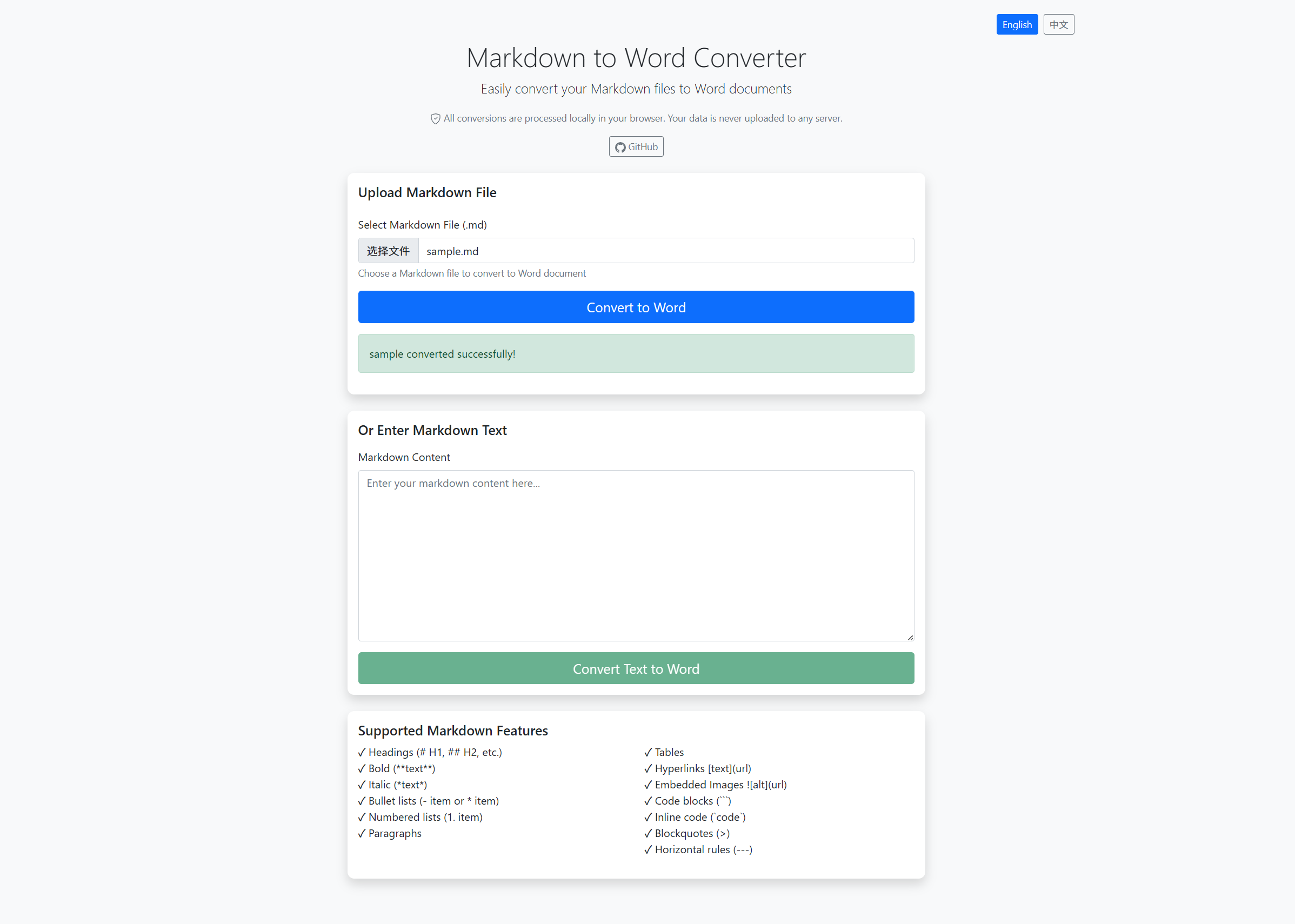
- 🔒 Privacy First: All conversions are processed locally in your browser. Your data is never uploaded to any server!
- 🌐 Bilingual Support: Built-in language switching between English and Chinese (中文)
- 📁 File Upload: Upload
.md,.markdown, or.txtfiles for conversion - 📝 Text Input: Paste or type markdown content directly in the browser
- 🎨 Rich Formatting: Full support for headers, bold, italic, lists, tables, links, images, code blocks, and more
- 💻 Modern Web UI: Clean, responsive interface built with Bootstrap
- ⚡ Fast Conversion: Uses Markdig and DocumentFormat.OpenXml for efficient processing
- 📦 No Backend Required: Pure client-side application - can be hosted as static files
- ✓ Headings (# H1, ## H2, ### H3, etc.)
- ✓ Bold text (**text**)
- ✓ Italic text (*text*)
- ✓ Bullet lists (- item or * item)
- ✓ Numbered lists (1. item)
- ✓ Paragraphs with proper spacing
- ✓ Tables - Full table support with headers
- ✓ Links - text format with styled hyperlinks
- ✓ Images -
format - automatically downloads and embeds images from web URLs
- ✓ Code blocks - Fenced code blocks with ```
- ✓ Inline code -
codeformat with styling - ✓ Blockquotes - > quote format
- ✓ Horizontal rules - --- separator
- Blazor WebAssembly: Client-side web framework running on WebAssembly
- ASP.NET Core 8.0: .NET runtime
- Markdig: High-performance Markdown parser
- DocumentFormat.OpenXml: Create Word documents (.docx)
- Bootstrap 5: Responsive UI framework
- C# in Browser: All conversion logic runs client-side via WebAssembly
- .NET 10.0 SDK or later
-
Clone the repository:
git clone https://github.com/qiuhaotc/MarkdownToWord.git cd MarkdownToWord/MarkdownToWordWeb -
Run the application:
dotnet run
-
Open your browser and navigate to:
https://localhost:7144
Note: Since this is a Blazor WebAssembly application, the first load may take a moment as it downloads the .NET runtime to your browser.
To build the application for production deployment as static files:
cd MarkdownToWordWeb
dotnet publish -c Release -o ./publish
The published files in ./publish/wwwroot can be hosted on any static file hosting service like:
- GitHub Pages
- Netlify
- Vercel
- Azure Static Web Apps
- AWS S3 + CloudFront
- Any web server (nginx, Apache, IIS, etc.)
Switch between English and Chinese (中文) using the language buttons at the top of the page.
- Click the "Choose File" button
- Select a Markdown file (.md, .markdown, or .txt)
- Click "Convert to Word"
- The Word document will be downloaded automatically
- Scroll to the "Or Enter Markdown Text" section
- Type or paste your Markdown content in the text area
- Click "Convert Text to Word"
- The Word document will be downloaded automatically
Try converting this markdown:
# My Document

## Introduction

This is a **bold** statement and this is *italic*.

### Features

* First feature
* Second feature
* Third feature

### Steps

1. First step
2. Second step
3. Third stepMarkdownToWord/
├── MarkdownToWordWeb/ # Blazor WebAssembly application
│ ├── Pages/ # Razor components
│ │ └── Index.razor # Main conversion page
│ ├── Services/ # Business logic
│ │ └── MarkdownToWordConverter.cs # Conversion service
│ ├── Shared/ # Shared components
│ │ └── MainLayout.razor # App layout
│ ├── wwwroot/ # Static files (CSS, JS, libs)
│ │ ├── index.html # Entry HTML page
│ │ ├── js/ # JavaScript files
│ │ └── css/ # Stylesheets
│ ├── App.razor # Root component
│ ├── Program.cs # Application entry point
│ ├── _Imports.razor # Global using statements
│ └── MarkdownToWordWeb.csproj # Project file
└── README.md # This file
- Markdig (0.44.0): Markdown parsing
- DocumentFormat.OpenXml (3.3.0): Word document generation
- Microsoft.AspNetCore.Components.WebAssembly (8.0.0): Blazor WebAssembly framework
This application uses Blazor WebAssembly to run C# code directly in your browser:
- Client-Side Processing: The entire conversion happens in your browser using WebAssembly. No data is sent to any server.
- Privacy & Security: Your markdown content and generated Word documents never leave your computer.
- Offline Capable: Once loaded, the application can work offline (except for downloading images from URLs).
- Image Handling: Images referenced in markdown (via URLs) are downloaded and embedded into the Word document.
Since this is a static Blazor WebAssembly application, you can deploy it anywhere:
- Build:
dotnet publish -c Release -o ./publish - Copy contents of
./publish/wwwrootto your GitHub Pages repository - Add a
.nojekyllfile to prevent Jekyll processing
- Build:
dotnet publish -c Release -o ./publish - Deploy the
wwwrootfolder from./publish/wwwroot
- Build:
dotnet publish -c Release -o ./publish - Copy contents of
./publish/wwwrootto your web server - Configure server to handle client-side routing (all routes should serve
index.html)
This project is open source and available under the MIT License.
Contributions are welcome! Please feel free to submit a Pull Request.
If you encounter any issues or have questions, please open an issue on GitHub.