A Flask-based proxy that enables Cursor to use locally hosted Ollama models by translating OpenAI API calls to Ollama API calls, with real-time visualization of all traffic between Cursor and your local models.
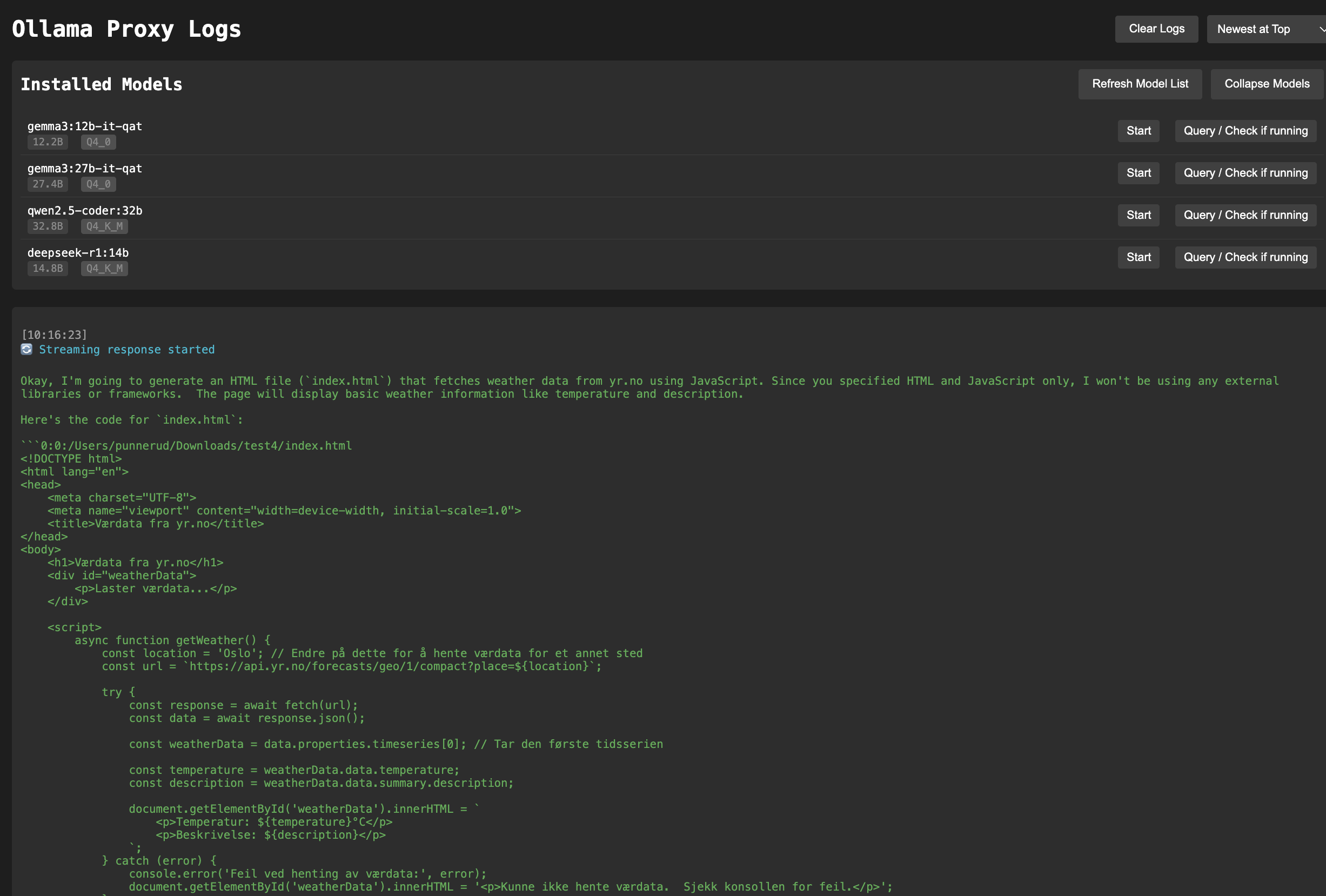

- OpenAI API compatibility layer for Ollama
- Real-time web-based log viewer
- Streaming response support
- Docker support
- Colored console output
- Response timing information
- Ollama installed and running locally on port 11434
- Docker installed
- Clone this repository
- Make sure your local Ollama instance is running
- Run the proxy:
docker-compose up -d
The following ports will be exposed:
7005: Proxy server (OpenAI API compatible endpoint + web logs)
The proxy will automatically connect to your local Ollama instance running on port 11434.
- Expose the proxy using ngrok or similar:
ngrok http 7005
-
Copy the ngrok URL (e.g.,
https://357c-171-123-237-18.ngrok-free.app/v1) and paste it into Cursor's OpenAI API settings:- Open Preferences
- Go to Cursor Settings
- Under Models, paste the URL into the OpenAI API Key setting
-
Add your Ollama model name (e.g., "gemma3:12b-it-qat") to the models list in Cursor settings
-
Select the model in the chat window after activating
Access the real-time log viewer at:
http://localhost:7005/logs
The proxy supports OpenAI API-compatible endpoints. Use it as you would use the OpenAI API, but with your local URL:
import openai

# Point to your proxy
openai.api_base = "http://localhost:7005/v1"
# Any string will work as the API key
openai.api_key = "not-needed"

# Make API calls as usual
response = openai.ChatCompletion.create(
    model="gemma3:12b-it-qat",  # or any other Ollama model you have installed
    messages=[
        {"role": "user", "content": "Hello, how are you?"}
    ],
    stream=True  # streaming is supported!
)If you want to run without Docker:
-
Make sure Ollama is running locally on port 11434
-
Install Python dependencies:
pip install -r requirements.txt
-
Run the proxy:
python app.py
OLLAMA_BASE_URL: URL of your Ollama instance (default: http://localhost:11434)
To build and run just the proxy:
docker build -t ollama-proxy .
docker run -d -p 7005:7005 \
  --add-host=host.docker.internal:host-gateway \
  -e OLLAMA_BASE_URL=http://host.docker.internal:11434 \
ollama-proxy/v1/chat/completions: OpenAI-compatible chat completions/chat/completions: Alternative endpoint without v1 prefix/logs: Web-based log viewer/v1/models: List available models
MIT