
The Linux TAR stands for tape archive, it is used to create Archive, extract the Archive files and list files present in Archive.
./tar [mode] [absolute path]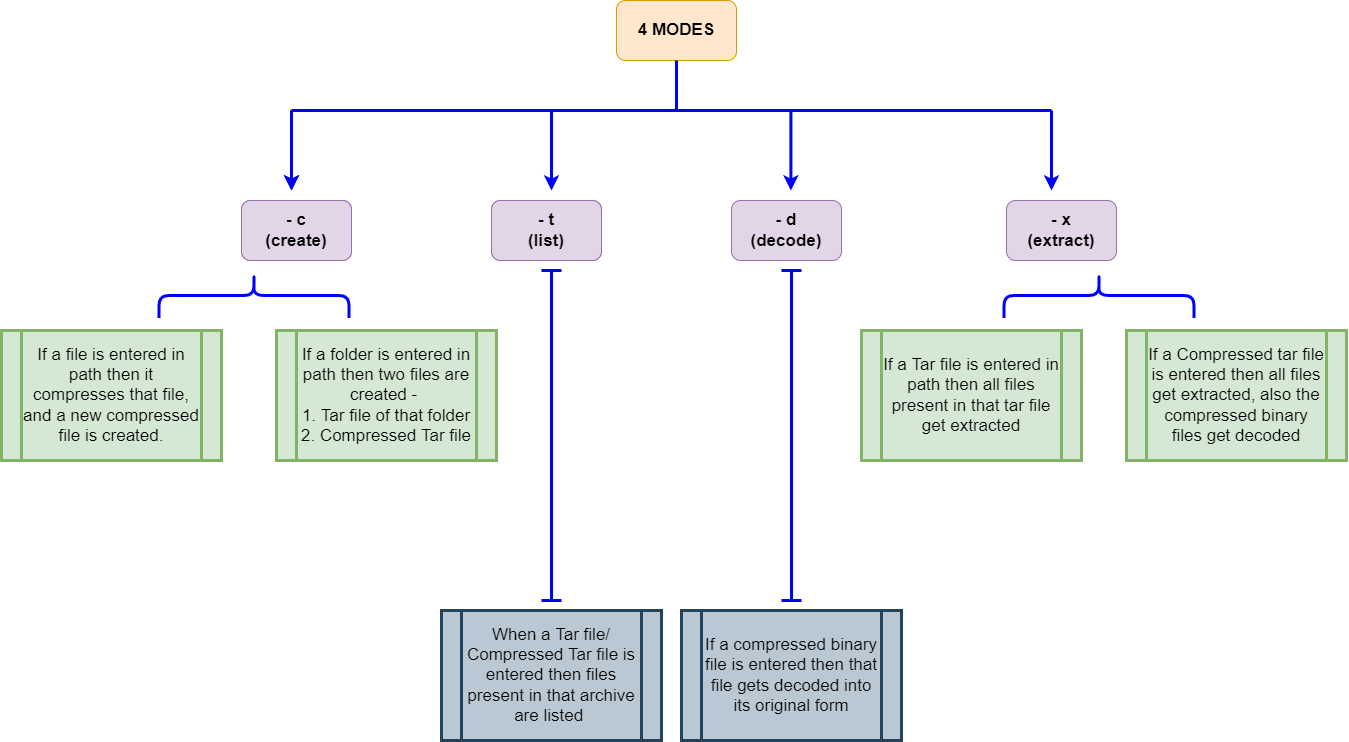
- Create an Archive for a folder
./tar -c /home/prernatulsiani/Desktop/DatasetsNote : After this commands two tar files are created. Datasets.tar is original tar file whereas Datasets_c.tar is compressed tar file (With upto 45% reduction in size)
- Compress a file
./tar -c /home/prernatulsiani/Desktop/Datasets/part3.txt- List all files present in an Archive
./tar -t /home/prernatulsiani/Desktop/Prerna/DSA2/DSA_Project/Datasets_c.tar- Extract files present in an Archive
./tar -x /home/prernatulsiani/Desktop/Prerna/DSA2/DSA_Project/Datasets_c.tar- Decode a compressed file
./tar -d /home/prernatulsiani/Desktop/Prerna/DSA2/DSA_Project/part3- Clone the repository
git clone "https://github.com/pt3002/TAR_command"- At the project root run:
make- Then as per your requirements run the commands given above !