- author: Sebastien Mosser
- revision: 10.17
- Strongly inspired by the awesome documentation provided by Flowable:
We consider a simple business process to support vacation approval.
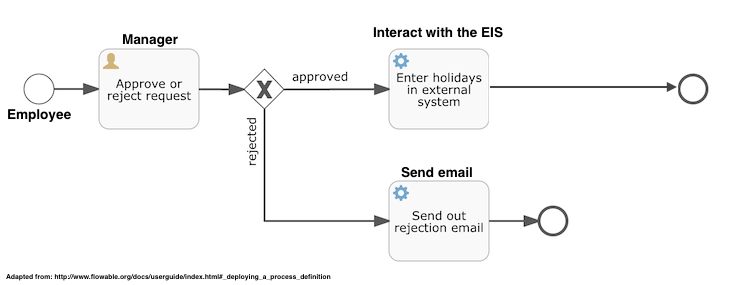
English version: an employee starts a process instance by sending a request containing her name, the number of days requested and a reason associated to this request. A manager can then validate a pending request. If the request is legit, the system transfers the request to the Enterprise Information System which log the vacations. If the manager rejects the request, a rejection email is sent to the employee. The BPMN implementation is available in the file holiday-request.bpmn20.xml.
In this section, we will embed a process engine in a regular Java application. We use Maven to support the project definition.
The pom.xml basically loads the process engine (Flowable) and an in-memory database engine (h2)
<dependency>
  <groupId>org.flowable</groupId>
  <artifactId>flowable-engine</artifactId>
  <version>6.1.2</version>
</dependency>
<dependency>
  <groupId>com.h2database</groupId>
  <artifactId>h2</artifactId>
  <version>1.3.176</version>
</dependency>
We will use the classical Maven structure for source code: src/main/java for java classes and src/main/resources to store resource files (e.g., logging properties and process definitions).
The application is simple. We start by initialising the engine and deploying the holiday process. Then, the user can chose if she wants to act as a manager or an employee, and acts consequently. When the program is terminated, it will display some metrics about the remaining process instances.
public static void main(String[] args) {
  initializeEngine();
  deployResourceAsProcess("holiday-request.bpmn20.xml");
  while( choseRole() ) {
    switch (currentRole) {
      case MANAGER:  beAManager(); break;
      case EMPLOYEE: beAnEmployee(); break;
    }
  }
  metrics();
  ProcessEngines.destroy();
}The engine initialisation is a purely technical code. Based on a ProcessConfiguration bound to an H2 embedded database, we create a ProcessEngine.
private static void initializeEngine() {
  ProcessEngineConfiguration cfg = new StandaloneProcessEngineConfiguration()
    .setJdbcUrl("jdbc:h2:mem:flowable;DB_CLOSE_DELAY=-1")
    .setJdbcUsername("sa")
    .setJdbcPassword("")
    .setJdbcDriver("org.h2.Driver")
    .setDatabaseSchemaUpdate(ProcessEngineConfiguration.DB_SCHEMA_UPDATE_TRUE);
  processEngine = cfg.buildProcessEngine();
}We request the RepositoryService, and deploy the process definition as a resource (the file is located in src/main/resources).
private static void deployResourceAsProcess(String resourceName) {
  RepositoryService repositoryService = processEngine.getRepositoryService();
  repositoryService.createDeployment()
    .addClasspathResource(resourceName)
    .deploy();
}When acting as an Employee, we trigger a new process instantiation. We read from the CLI the needed information to trigger a request, and then asks the RuntimeService to create an instance of the holidayRequest process using these data.
private static void beAnEmployee() {
  // Reading employee name, numberOfHolidays and description from the command line

  RuntimeService runtimeService = processEngine.getRuntimeService();
  Map<String, Object> variables = new HashMap<String, Object>();
  variables.put("employee", employee);
  variables.put("nrOfHolidays", nrOfHolidays);
  variables.put("description", description);
  ProcessInstance inst = runtimeService.startProcessInstanceByKey("holidayRequest", variables);
  System.out.println("Process started, #" + inst.getId());
}We asks the TaskService to send the list of tasks waiting for an action from the managers group. A task is assigned to a given group using the flowable:candidateGroups="managers" attribute in the BPMN definition.
  TaskService taskService = processEngine.getTaskService();
  List<Task> tasks = taskService.createTaskQuery().taskCandidateGroup("managers").list();
  System.out.println("You have " + tasks.size() + " tasks:");
  for (int i=0; i<tasks.size(); i++) {
    System.out.println(i + ") " + tasks.get(i).getName() + " #" + tasks.get(i).getProcessInstanceId());
}Considering a given task, we can access to the variables associated to it (here the holiday request). We complete the task by calling the complete method on the TaskService, with the task identifier and the variable produced by this human task (here the approval or rejection of the request).
  Task task = tasks.get(taskIndex);
  Map<String, Object> processVariables = taskService.getVariables(task.getId());

  System.out.println(processVariables.get("employee") + " wants " +
    processVariables.get("nrOfHolidays") + " of holidays. Do you approve this? (y/n)");
  boolean approved = scanner.nextLine().toLowerCase().equals("y");

  Map<String, Object> variables = new HashMap<String, Object>();
  variables.put("approved", approved);
taskService.complete(task.getId(), variables);By using the flowable:class attribute, one can declare the Java class to be triggered to process the task automatically. In our example, we simply print something on the standard output.
public class SendRejectionMail implements JavaDelegate {

  public void execute(DelegateExecution execution) {
    System.out.println("Sending rejection email for " + execution.getVariable("employee"));
  }

}The POM is configured to start the HolidayRequest class by default. We simply asks maven to compile (package) and then execute the program (exec:java).
azrael:5A-BPM-Demo mosser$ mvn -q package exec:java
We rely on the Docker image provided by Flowable. To start the REST server, simply start a container bound to the official image. The default user is named kermit, and the password os also kermit.
$ docker run -p8080:8080 flowable/flowable-rest
To check engine availability, send a GET request to a basic route and check the response.
$ curl --user kermit:kermit http://localhost:8080/flowable-rest/service/management/engine
The server requests JSON data, and will answer JSON data. Consider the json_pp tool to pretty print the responses received from the server.
To deploy a process, we use the -F parameter to send a file content as the request body to the deployments resource.
$ curl --user kermit:kermit -F "file=@./src/main/resources/holiday-request.bpmn20.xml" http://localhost:8080/flowable-rest/service/repository/deployments
To list the available processes:
$ curl --user kermit:kermit http://localhost:8080/flowable-rest/service/repository/process-definitions
Instantiating a process:
$ curl --user kermit:kermit -H "Content-Type: application/json" -X POST -d '{ "processDefinitionKey":"holidayRequest", "variables": [ { "name":"employee", "value": "John Doe" }, { "name":"nrOfHolidays", "value": 7 }]}' http://localhost:8080/flowable-rest/service/runtime/process-instances
Retrieving pending tasks for managers
$ curl --user kermit:kermit -H "Content-Type: application/json" -X POST -d '{ "candidateGroup" : "managers" }' http://localhost:8080/flowable-rest/service/query/tasks
Completing a task (where ID is replaced by a valid task identifier):
$ curl --user kermit:kermit -H "Content-Type: application/json" -X POST -d '{ "action" : "complete", "variables" : [ { "name" : "approved", "value" : true} ] }' http://localhost:8080/flowable-rest/service/runtime/tasks/ID
Problem: The task ends in error, as the custom class are not available in the server!
We simply need to create a docker image that contains our custom class in the execution context of the process engine.
Flowable is bundled as a WAR file, which need to be hosted in a servlet container. We will use TomEE, the same container as the one used in the micro-services course (others are available, e.g., TomCat, Jetty). We extend the image published for TomEE+ 7.0.3, with JRE8. The root directory for TomEE is /usr/local/tomee
FROM tomee:8-jre-7.0.3-plus
WORKDIR /usr/local/tomee/
We need to install the JDK in addition to the JRE, as we will use the jar command to tweak the Flowable app with our custom classes.
RUN apt-get update \
      && apt-get --no-install-recommends install -y openjdk-8-jdk \
      && rm -rf /var/lib/apt/lists/*
Then, at build time, we download the Flowable engine, unzip it, and deploy it as a web app in TomEE (i.e., copy it into the webapp directory).
RUN wget https://github.com/flowable/flowable-engine/releases/download/flowable-6.1.2/flowable-6.1.2.zip \
      && unzip flowable-6.1.2.zip \
      && cp ./flowable-6.1.2/wars/flowable-rest.war ./webapps/.
If no custom classes are required, the deployment can stop here. However, in our case, we need to add in the web app class path our custom classes to implement the service tasks. The easiest way to perform this task is to extract the contents of the war file, and add our custom classes as a jar file in the WEB-INF/lib directory.
RUN cd ./webapps \
    && mkdir flowable-rest \
    && cd flowable-rest \
    && jar xf ../flowable-rest.war \
    && cd .. \
    && rm -rf ./flowable-rest.war \
    && cd ..

COPY ./target/flowable-demo-1.0-SNAPSHOT.jar ./webapps/flowable-rest/WEB-INF/lib/custom-classes.jar
To build the image (this can be quite long, as the flowable engine is quite large):
$ docker build -t petitroll/holidays .
To start a container using this image:
$ docker run -p8080:8080 petitroll/holidays