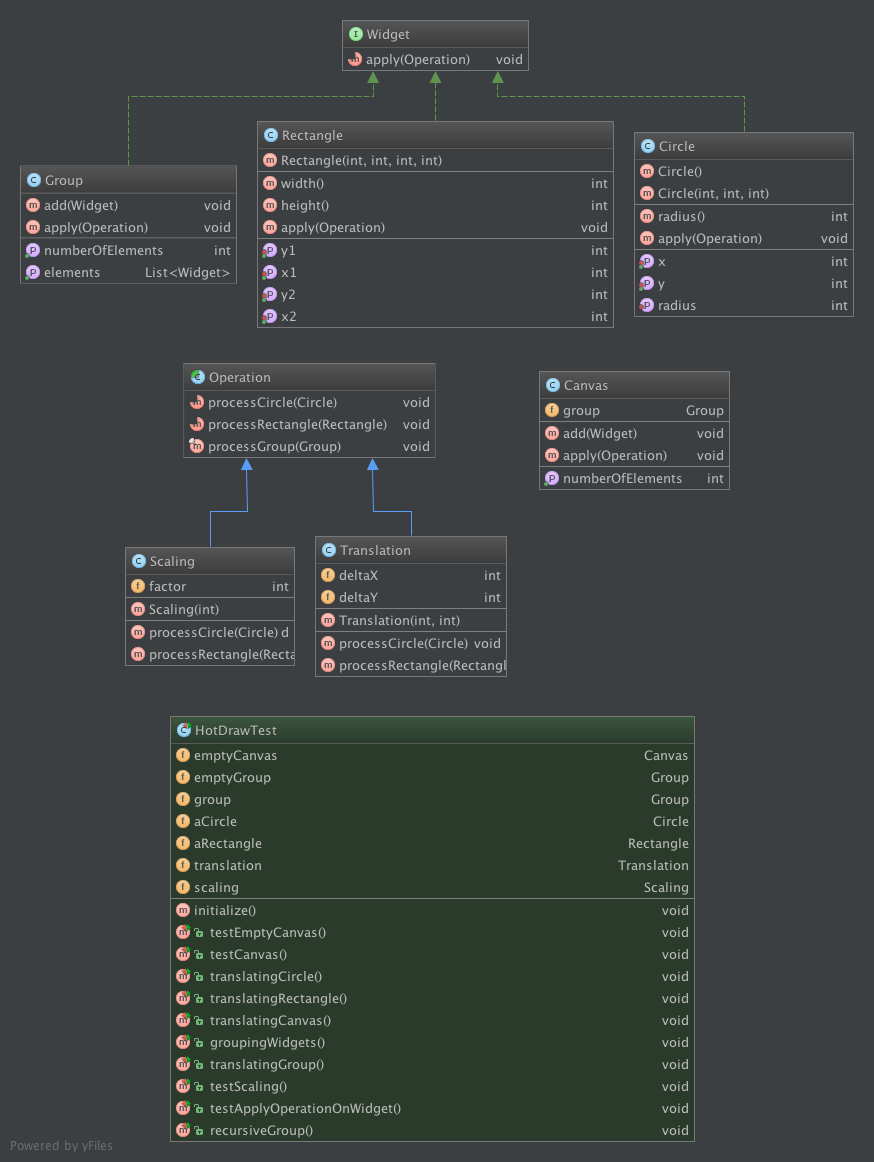
This Kata is based on a lecture designed by Alexandre Bergel (University of Chile). I used Alex's slides as an initial material, and introduced minor modifications in the way the kata is defined. The major modification I made was to hide the visitor pattern Alex is introducing in his lecture at step #8, because my audience might not know this pattern at the time of the kata. I added the description of the pattern as a discussion, for those who know what we are talking about here. There is now no pre-requisites about design pattern for this kata.
It builds a two-dimensional graphics framework, using a test-driven approach. The framework has the following features
- As a user, I want to model widgets such as Circles and Rectangles so that they can be displayed on the console
- As a user, I want to apply operations such as translation to widgets so that I can work with the widgets.
- Creating a canvas to contain widgets
- Introducing some widgets
- Cleaning the test suite
- Applying operations to widgets
- Canvas support for operations (e.g., translation)
- Grouping widgets
- Canvas refactoring
- Introducing widget scaling
- Refactoring and cleaning the code to support extensibility
- Recursive groups
The intention is to define a Canvas that will contains graphical objects.
- Create a Java Test, e.g.,
HotDrawTest - Specify the behavior of such a
Canvasin a test (e.g.,testEmptyCanvas):- A
canvascan be instantiated as an object - A
canvasis empty by default
- A
- Define the class Canvas that implements such a behavior
- It only defines a
getNumberOfElementsmethod, always returning zero. testEmptyCanvasshould be green now
- It only defines a
- Specify how elements can be added to a canvas in another test (e.g.,
testCanvas())- A method
add(Object o)is used on a canvas to add elements
- A method
- Introduce the
addmethod in the canvas- The method takes an
Objectas parameter, and does nothing. - Code compile but the newly introduced test is obviously red.
- The method takes an
- Introduce a List of Objects in the canvas as a private attribute (no getter or setter needed for now)
- Adapt the
addbehavior to fill the list - Adapt the
getNumberOfElementsto retrieve the size of the list - Kudos, both tests are green!
- Adapt the
To retrieve the code obtained at the end of this step: git checkout step1
- Adapt the
testCanvasspecification to addCircleandRectangleinstead ofObject - Create two empty classes,
CircleandRectangle- Tests are greens!
- Specify in the
testCanvastest how Circle and Rectangle should be created- A circle is defined by a couple of coordinates (
x,y) and a radiusr; - The default circle is located at (0,0) with a radius of 1
- A rectangle is defined by two couples of coordinates (
x1,y1) and (x2,y2) representing two opposite corners.
- A circle is defined by a couple of coordinates (
- Add the needed constructors for Circle and Rectangle
- We do not need attributes for now, as no one is reading the contents of the graphical objects
- Tests are green => the specifications are OK (e.g., minimize effort to maximize value)
To retrieve the code obtained at the end of this step: git checkout step2
- Identify duplications in the code to avoid it becoming a mess
- Here, we are instantiating the very same canvas two times
- Clean it!
- Declare the canvas as a private attribute of the test
- Introduce an
@Beforein the code to only instantiate it once - Refactor the variable name into something more correct (e.g.,
emptyCanvas)
To retrieve the code obtained at the end of this step: git checkout step3
Remarks:
- There is no superclass nor common interface for Circle and Rectangle. We didn't see the need for such a thing based on how we are using the objects. And we are still compliant with the specification modeled in our test. Being test-driven allows us to stay on track, minimizing our effort by only developing what is needed.
- Your code is not elegant because it has a lor of inheritance or is full of getters and setters. Your code is elegant if, as a developer, I can use it efficiently and naturally to support my needs. Being test-driven means to focus on the way the code will be used (it is written in the test).
- The test is then used (i) to model the specifications and (ii) to show how one can use the code in such a context. Congratulations, you have just defined without any effort an operational documentation
- We want to introduce the translation of graphical objects.
- It is defined as the following operation:
translate(deltaX, deltaY)
- It is defined as the following operation:
- First, we create a test (e.g.,
translatingCircle) to model such an operation usage. The test protocol is simple:- create a circle,
- retrieve its location,
- apply the translation,
- and assess that the new coordinates are the expected ones.
- Edit the Circle definition to support the new requirements with minimal modifications:
- we need to access to
xandy, so we need two getters here (still nothing for radius); the getters can return 0, as we work with the default circle - we need to add the
translatemethod, but for now doing nothing - Assess that the newly defined test is red
- Modify the translate operation to perform the translation
- Tests are green now. Note that we are still not exploiting the radius, no one needs to use it for now.
- we need to access to
- Secondly, we create a test (e.g.,
translatingRectangle) to model such an operation for Rectangle- The test protocol is similar to the one defined for circle;
- Edit the Rectangle definition to support this new requirements:
- We need access to
x1,y1,x2,y2. - We need to support the
translatemethod, but doing nothing for now; - Assess the test is red
- Implement the behavior for rectangle translation
- We need access to
To retrieve the code obtained at the end of this step: git checkout step4
We want to translate all the objects contained in a canvas by simply translating the canvas
- We define a test (e.g.,
translatingCanvas) to model such requirements- Creating a circle and rectangle
- Adding it into a canvas
- Performing a translation at the canvas level
- Assessing the new location of the circle and the rectangle
- Define the
translatemethod in the Canvas class- assess that the test is red
- Problem: the canvas contains a list of Object, and Object does not understand the
translatemessage
- Only now, we need to introduce a common interface that Circle and Rectangle will share
- This is an interface as it is purely behavioral (i.e,
translatemethod definition), not structural
- This is an interface as it is purely behavioral (i.e,
- Create a Widget interface defining this method;
- Modify Circle and Rectangle to implement this interface
- Modify Canvas to use a List of Widget instead of a list of Object
- Assess that the previous tests are still green after this deep modification of the model (non-regression)
- Implement the translation of a canvas by propagating the translation to the contained widget
- Assess that all the tests are now green.
To retrieve the code obtained at the end of this step: git checkout step5
- We define now the concept of Group of Widgets, used to contain objects. A new test (e.g.,
groupingWidgets) is defined to model this requirements - Define the Group class to support the expressed requirements:
- an operation to
addobjects to a group - an operation to retrieve the number of contained elements (e.g.,
getNumberOfElements) - remark : we are talking about objects, not widgets (there is no need to specify the content as object for now)
- Need a proof? the tests are green! Period.
- an operation to
- To support the translation of a Group, we first create a test to model the specification (
translatingGroup)- The test will be tricky to write. This is a red flag: if the test is complicated, then the code does not support our understanding of the program
- Here, we refactor the test code to clean it up! The
initialize()method (@Before) is enhanced to define a better context for our tests - Then, we can define the specification for group translation
- And assess that the test modeling the specification is red
- Support for translation in Group
- The
Objectassumption does not hold anymore. We need to refine our code to a list of Widgets - Then, we can propagate the
translatemessage to the contained elements - And assess that the tests are green.
- The
To retrieve the code obtained at the end of this step: git checkout step6
There is a lot of redundancy between Canvas and Group. Actually, a Canvas should contain a group in order to be as simple as possible. Such a deep modification can be done without stress, as the tests represents the specifications already implemented. If something goes wrong with this modification, the test belt will go red.
- We modify Canvas:
- to contain a group of Widget,
- and to delegate its public interface to the one defined by Group
To retrieve the code obtained at the end of this step: git checkout step7
- We introduce the scaling operation, to change the size of an object. The operation is specified by a test (e.g.,
testScaling). After scaling,- the radius of a circle is multiplied by the scale factor;
- The width and height of a rectangle are multiplied by the scale factor
- We need to modify the widget model to support the scale operation
- Widget needs to define the
scaleoperation - Circle needs to define a
radiusoperation, and to implementscale - Rectangle needs to define a
widthandheightoperations, and to implementscale - Group needs to define the
scalemethod, and propagate it to its contained elements
- Widget needs to define the
- Assess that the specification is OK.
- Tests are green! Kudos! \o/
Discussions: the tests are green, OK. But think for a minute about the cost of adding the scale operation with
our current design. We had to modify Widget, Circle, Rectangle and Group. In addition, there is a lot of code
duplication in the Group class (translate and scale follow the very same pattern).
There is something rotten in the kingdom of Widgets...
To retrieve the code obtained at the end of this step: git checkout step8
Our intention when talking about extensibility here is to reduce the cost of introducing a new operation in our widget model. Another point of view on extensibility might focus on adding new shapes to the widget models, and might lead to other design choices.
- We create a test to support the specification
- A
Scalingobject is created, declared as an Operation, and then applied toaCircleandaRectangle
- A
- We create the Operation interface, and the Scaling empty implementation
- An operation can process a circle and a rectangle (two separated method:
processCircleandprocessRectangle)
- An operation can process a circle and a rectangle (two separated method:
- We modify the widget so that it can apply an operation
- An
applymethod is defined in the interface - The implementation in Circle points to
processCircle, and the one in Rectangle points toprocessRectangle
- An
- We can now implement the Scaling operation for the two defined widgets
- There is a need to set from the outside of a Circle its radius (first time a setter is necessary)
- Same for x1, x2, y1 and y2.
- And assess that all the tests are green
- We should now focus on duplication. There is 2 ways to perform a scale: using the Scaling class or calling the scale
methods. Our intention is to reduce the cost of introducing new operations => we remove the methods defined in the
different widgets. Introducing a new operation means to define a single class, that's all.
- We thus remove the
scaleoperation in Widget, Circle and Rectangle. The Group definition ofscalemust be adapted to create a Scaling and apply it to the contained elements. - Tests are green! the modification was deep, but the specifications are still complete!
- We thus remove the
- We can do the very same for Translation.
- We modify the tests that perform translation to use an Operation instead of the method
- There is a need in Circle to set the x and y attribute (only now!)
- We can remove the translate method in the Widget interface, and adapt the Group implementation of translate
- Talking about duplication, the
translateandscalemethod of a group are almost the same!- We specify this in the test suite,
- We introduce an apply method at the level of a group,
- and remove the scale and translate implementations.
- during the process, we also adapt the Canvas to rely on Operation instead of methods
- The tests are quite ugly by always defining a new Translation or Scaling
- Let's clean it up using the initialize method to instantiate a translation and a scaling object only once.
Discussions: If you are aware of Object-oriented design pattern, we had just defined a Visitor pattern. An operation is a visitor (defining one method per object it is allowed to visit), and widgets are visitable elements (linking the visitor to the correct method call). We gain immediate benefits from this structure: adding a new operation means to only add a single class, the Visitor-based implementation of our operation. We obviously lose extensibility from a domain point of view: adding a new widget means to modify all the operations. There is no silver bullet...
To retrieve the code obtained at the end of this step: git checkout step9
- We first start by writing a test to model how a group can be added to another one
- A group can contain other groups, and operations are propagated to the contained elements
- Does it mean that a group is a widget? Well, it was almost the case in the code ...
- Defining a Group as a widget trigger the issues identified in step #9:
- Operation, Translation and Scaling need to be modified
- Moreover, processing a group is actually common to all operations => Operation cannot be an interface anymore
- We modify the Operation interface to transform it into an abstract class
- processCircle and processRectangle are abstract and defined in subclasses
- processGroup is implemented here, propagating the operation to the contained elements. We declare it as final: it is the responsibility of the system to propagate, not the the developer of an operation.
To retrieve the code obtained at the end of this step: git checkout step10