A Python interface for Suprema Biomini fingerprint scanners.
The original SDK was provided for Microsoft .NET Framework and Java. This package helps you to access Suprema Biomini fingerprint scanners using Python.
This package uses Python.Net (pythonnet). So please check platform related dependencies.
Note: Only tested against Suprema Biomini and Biomini Plus variants.
Important: Copy .NET Framework SDK files, e.g. Suprema.UFScanner.dll, Suprema.UFMatcher.dll, UFScanner.dll, UFMatcher.dll, etc. in your source directory or any directory added to PYTHONPATH.
Important: Be careful about compatibility of SDK, Python and libraries. For example, if you are using a 32-bit version of Biomini SDK, you should use a 32-bit version of Python and libraries.
Install package using pip
pip install python-biominiFor more image functionality, install the package with the PIL dependency so that Pillow is installed:
pip install "python-biomini[pil]"If you want to use QImage and QPixmap classes, you can install the package with PyQt/PySide dependencies:
pip install "python-biomini[pyqt5]"
pip install "python-biomini[pyqt6]"
pip install "python-biomini[pyside6]"from biomini import Biomini, match_enrolls
bm = Biomini()
n = bm.detect_scanners() # Detects scanners and returns number of them.
if n > 0:
scanners = bm.scanners()
bm.current_scanner = scanners[0]
enroll_1 = bm.enroll()
enroll_2 = bm.enroll()
if enroll_1.success and enroll_2.success:
match_result = match_enrolls(enroll_1, enroll_2)
if match_result:
print('Fingerprints matched.')
else:
print('Fingerprints didn\'t match.')
enroll_1.save_image('/home/enroll_1.png')
enroll_2.save_image('/home/enroll_2.png')
bm.uninit()>>> from biomini import Biomini, TemplateType, match_enrolls, match_templates
>>> bm = Biomini()
>>> # Call 'detect_scanners' method to detect Biomini scanners connected to the device.
>>> # Call this method before using any other methods or attributes.
>>> # Call this method to detect newly connected scanners and/or refresh the list of detected scanners.
>>> # Returns number of detected Biomini scanners.
>>> c = bm.detect_scanners()
>>> c
1
>>> # Returns number of detected Biomini scanners.
>>> n = bm.scanners_count()
>>> n
1
>>> # Returns a list of detected scanners.
>>> scanners = bm.scanners()
>>> scanners
[<Suprema.UFScanner object at 0x063CF968>]
>>> # You can iterate over detected scanners like below.
>>> for s in bm.scanners():
... print(s.Serial)
... print(s.ScannerType)
... print(str(s.ScannerType))
... print(s.ID)
'SBBioMIni14300000000000XXXXXX'
<UFS_SCANNER_TYPE.SFR300v2: 1003>
'SFR300v2'
'SBBioMIni14300000000000XXXXXX'
>>> # There are three ways to set current/default scanner.
>>> # 1. using scanner object
>>> # 2. using scanner's index in scanners() list
>>> # 3. using scanner's serial number
>>> bm.current_scanner = bm.scanners()[0]
>>> bm.current_scanner = 0
>>> bm.current_scanner = 'SBBioMIni14300000000000XXXXXX'
>>> # Use this attribute to access default/selected scanner.
>>> # Default value is None unless only one scanner is connected to your device.
>>> cs = bm.current_scanner
>>> cs
<Suprema.UFScanner object at 0x063CF968>
>>> # Enrolls/Scans fingerprint.
>>> # Returns an instance of 'biomini.Enroll' class.
>>> # 'template_type' sets template standard for enrollment. Default is ISO 19794-2 (2002).
>>> # Accepted template types are Suprema (2001), ISO 19794-2 (2002) and ANSI378 (2003).
>>> # 'image_format' accepts 'png', 'jpg', 'bmp' and 'gif'. Default is 'png'.
>>> enroll = bm.enroll(template_type=TemplateType.ISO19794, image_format='png')
>>> # True if enrollment was successful, otherwise False.
>>> enroll.success
True
>>> # Extracted fingerprint template as a bytearray object.
>>> # Suitable for saving fingerprints in databases and matching them.
>>> enroll.template
bytearray(b'FMR\x00 20\x00\x00\x00\x018\x00\x00 ...')
>>> # Template type standard.
>>> enroll.template_type
2002
>>> # Template size in bytes.
>>> enroll.template_size
312
>>> # Quality of enrolled fingerprint.
>>> enroll.enroll_quality
85
>>> # Image of scanned fingerprint as a bytearray object.
>>> enroll.image
bytearray(b'\x89PNG\r\n\x1a\n\x00\x00\x00\rIHDR\x00\x00\x0 ...')
>>> # Format/Extension of the fingerprint image e.g. png.
>>> enroll.image_format
'png'
>>> # Size of the fingerprint image in bytes.
>>> enroll.image_size
77002
>>> # Fingerprint scanner serial number.
>>> enroll.scanner_serial
'SBBioMIni14300000000000XXXXXX'
>>> # Fingerprint scanner type.
>>> enroll.scanner_type
'SFR300v2'
>>> # Fingerprint scanner id. Usually equivalents to the serial number.
>>> enroll.scanner_id
'SBBioMIni14300000000000XXXXXX'
>>> # Enrollment time as a datetime.datetime object.
>>> enroll.enroll_time
datetime.datetime(2025, 1, 5, 9, 32, 34, 962909)
>>> # Resolution of the fingerprint image.
>>> enroll.resolution
500
>>> # Returns the enroll object as a dictionary.
>>> d = enroll.to_dict() # template and image attributes are bytearray objects.
>>> b64_d = enroll.to_dict(encoding='base64') # template and image attributes are base64 encoded.
>>> hex_d = enroll.to_dict(encoding='hex') # template and image attributes are hex encoded.
>>> # Returns the enroll object as a json string.
>>> # Default encoding is base64. Hex is also accepted.
>>> b64_j = enroll.to_json(encoding='base64')
>>> hex_j = enroll.to_json(encoding='hex')
>>> # Returns the fingerprint image as an io.BytesIO object.
>>> bytes_io = enroll.bytes_io_image()
>>> # Returns the fingerprint image as a PIL (Pillow) image.
>>> # Pillow should be installed.
>>> pil_image = enroll.to_pil_image()
>>> # Returns enrolled fingerprint image as a PyQt/PySide QImage.
>>> # PyQt5/PyQt6/PySide6 should be installed.
>>> pyqt5_image = enroll.to_pyqt5_image()
>>> pyqt6_image = enroll.to_pyqt6_image()
>>> pyside6_image = enroll.to_pyside6_image()
>>> # Returns enrolled fingerprint image as a PyQt/PySide QPixmap.
>>> # PyQt5/PyQt6/PySide6 should be installed.
>>> pyqt5_pixmap = enroll.to_pyqt5_pixmap()
>>> pyqt6_pixmap = enroll.to_pyqt6_pixmap()
>>> pyside6_pixmap = enroll.to_pyside6_pixmap()
>>> # Saves scanned fingerprint image in the specified path.
>>> # Install PIL (Pillow) to use this method.
>>> # You can choose any format supported by PIL (e.g. JPG, PNG, BMP, etc.)
>>> enroll.save_image('finger_print.png')
>>> enroll.save_image('finger_print_2.jpg')
>>> # Accepts two enroll objects and matches them.
>>> # Returns True if enrolls are matched.
>>> # Both enroll objects should have the same template type.
>>> # 'security_level' sets the security level used in verification. Default is 4.
>>> # 'security_level' should be between 1 and 7. Higher values means more severity.
>>> enroll_2 = bm.enroll()
>>> match_result = match_enrolls(enroll, enroll_2, security_level=3)
>>> match_result
True
>>> # Accepts two templates and matches them.
>>> # Returns True if templates are matched.
>>> # Both templates should have the same template type.
>>> # Default 'security_level' is 4 and 'template_type' is TemplateType.ISO19794 (2002)
>>> template_match_result = match_templates(template_1=enroll.template,
template_2=enroll_2.template,
security_level=4,
template_type=TemplateType.ISO19794)
>>> template_match_result
True
>>> # Call 'uninit' when you want to stop using Biomini's interface
>>> # After uninit, call 'detect_scanners' method again to reuse interface.
>>> bm.uninit()After installing the package using pip, you can run demos in the examples directory:
cd examples
python demo.py
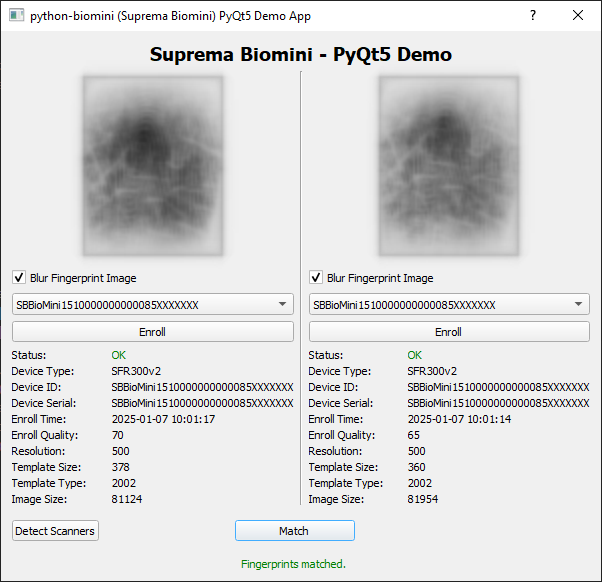
A GUI demo using PyQt5 is also provided. Make sure that dependencies are installed.
cd examples
python pyqt5_demo.py