1) Install Python and Configure Python
2) Install Docker and Configure Docker
3) Configure all other necessary tools (like Travis CI, Linting options)
git clone <repo_name>
docker-compose build
3) If you want to check whether unit tests and linting pass or not (I wrote 51 tests and all of them passed):
docker-compose run --rm app sh -c "python manage.py test && flake8"docker-compose up
Note: This project was constructed following all rules of PEP8 and TDD(Test Driven Development) process.
- Created custom user model, and custom user manager.
- Applied the feature to login trough email instead of username
- Added custom create_user and create_superuser functions (meaning that the user can be created by using email field)
- Added permission roles, meaning that Super User has full rights provide to simple users staff status, or Full control over Django Admin Panel (aka. Django database admin panel)
- Token authentication. Added an extra layer of authentication in terms of token authentication.
- Generate Token to each user
- Added features "create, update, validate" users
- Unit testing all the features mentioned above
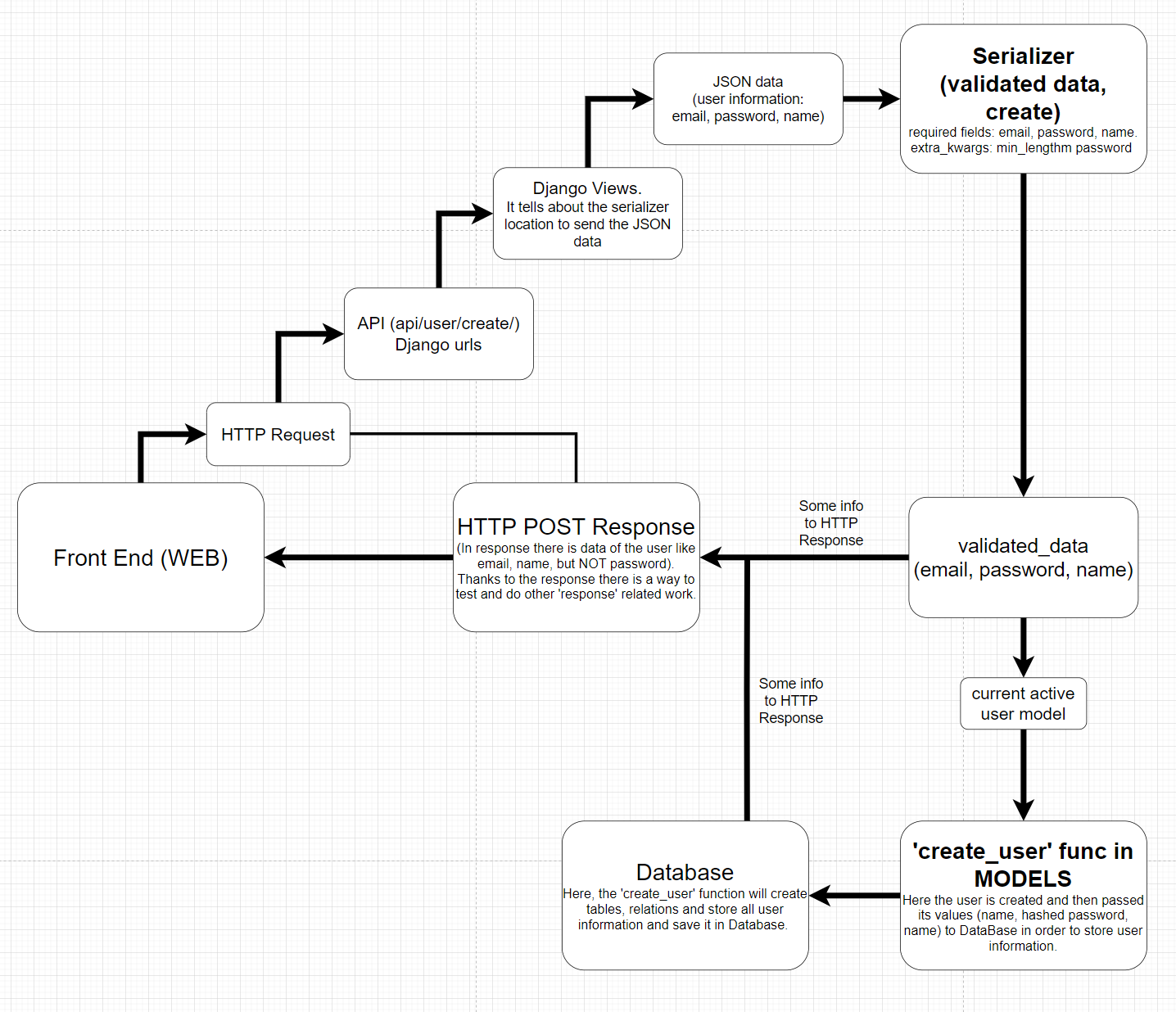
- Added models for creating custom user and custom user manager
- Added models for Tag, Ingredient, Recipe in order to form objects in the database
- Added different serializers in order to transform data from db to specific format and vice verse(from specific format to language objects(python))
- Added Views in order to control the data input and output through serializers to API
- Unit testing all the features mentioned above
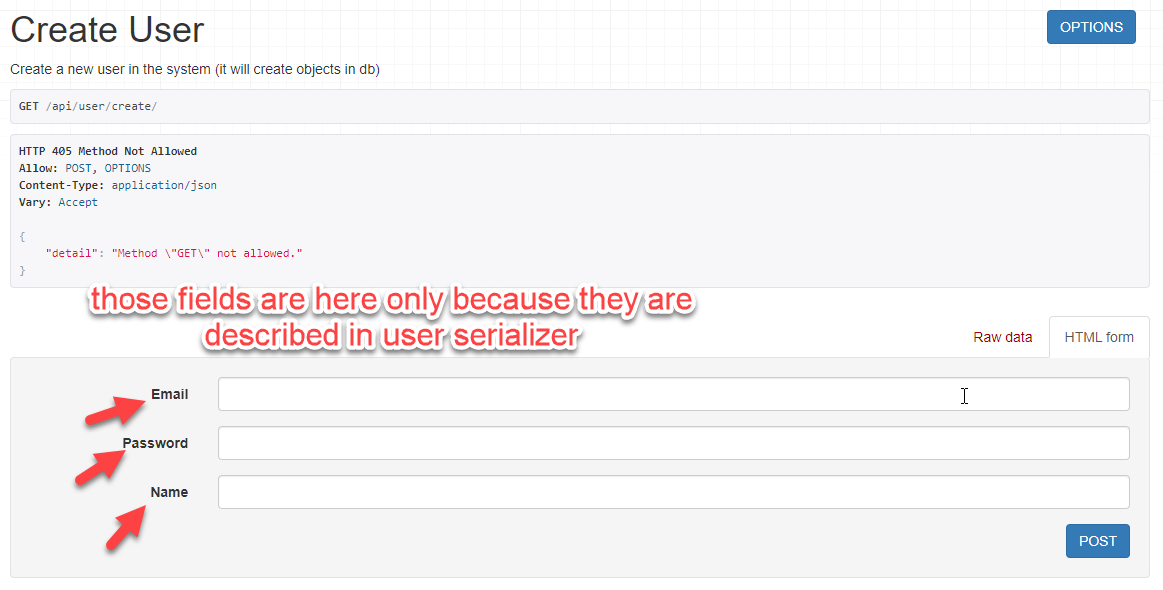
- As a Database PostgreSQL was chosen
- Configured PostgreSQL by connecting to the Docker container and Django framework
- All of the models are created in PostgreSQL
- Noted the mistake during Django and PostgreSQL integration. It occurs that Django tries to run before the PostgreSQL, that causes an error.
- Added the feature to solve the error by providing db_wait function that makes the django to wait until the database is not available.
- Unit testing all the features mentioned above
- Implemented a fully functioning REST API using DRF(Django Rest Framework)
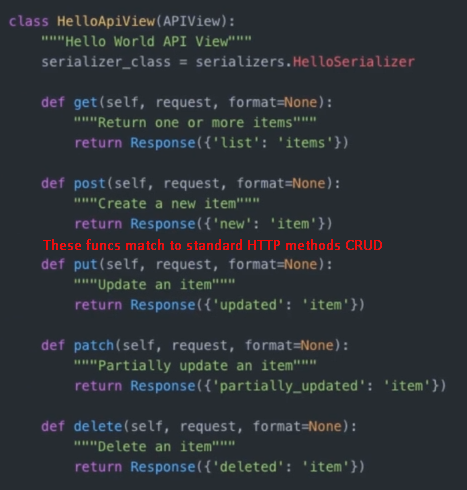
- Implemented all HTTP CRUD methods through APIView
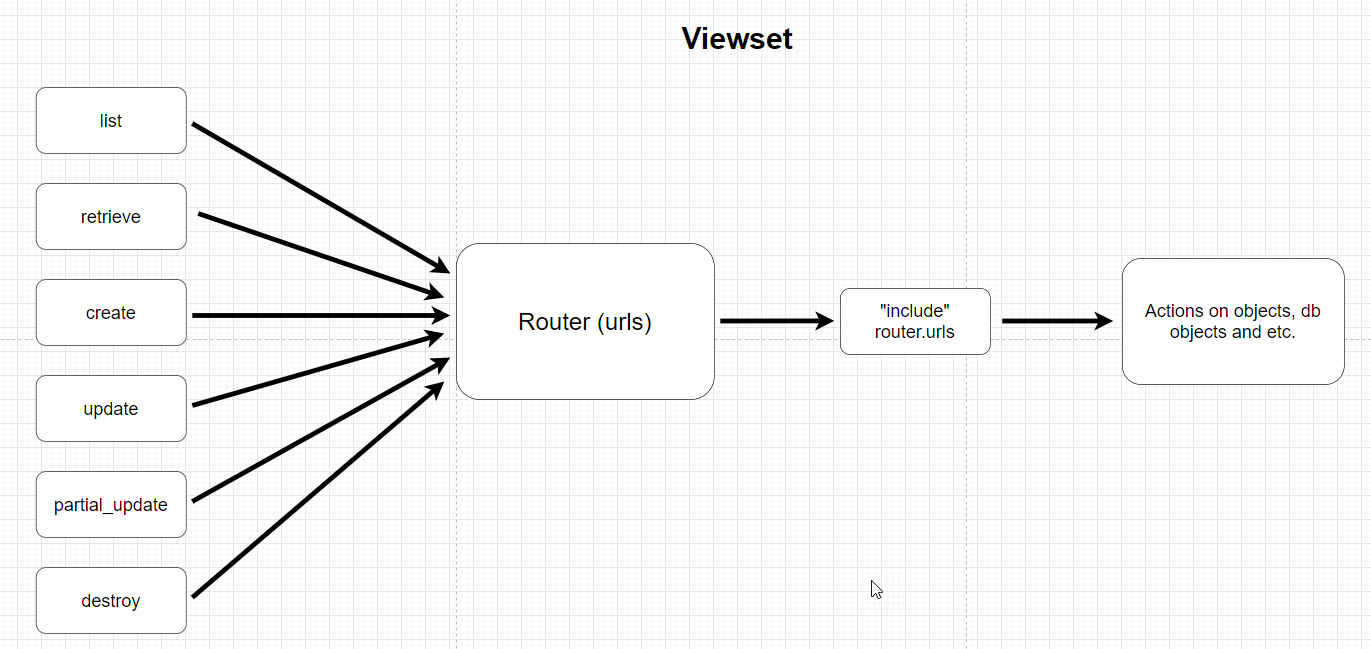
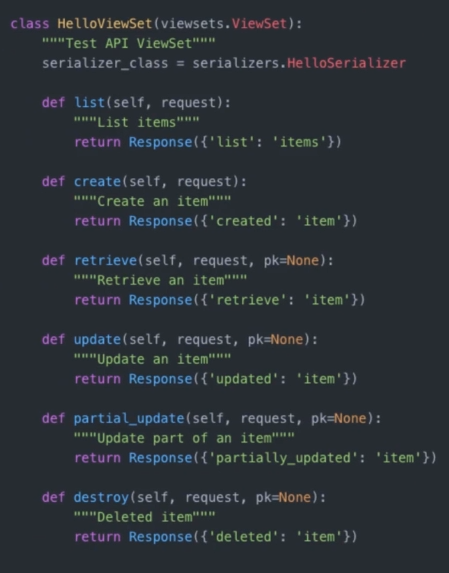
- Implemented all inner "create, retrieve, list, update, partial_update, destroy" method through ViewSet
Endpoints along with Brief Descriptions: Note that all data you see in API returned and formated in JSON format.
User:
- 127.0.0.1:8000/admin             -> Access Django Admin Panel.
- 127.0.0.1:8000/api/user/create   -> Create a user (Authentication not needed).
- 127.0.0.1:8000/api/user/token    -> Generate Token in order to access "Authentication required" services.
- 127.0.0.1:8000/api/user/me       -> Update created current active user's information (Authentication required).
                                      In order to be authenticated user needs to generate his/her unique token and
                                      authenticate with it by putting authentication token as a 'Authorization' header.
                                      Example: Authorization    Token 12b256ac456b5465n564t
Recipe:
- 127.0.0.1:8000/api/recipe                         -> To get endpoints registered to recipe (Authentication not needed).
- 127.0.0.1:8000/api/recipe/tags                    -> Returns all tags assigned to a logged in user (Authentication required).
- 127.0.0.1:8000/api/recipe/tags/?assigned_only=1   -> Filters/Returns all tags assigned to specific recipe(s) (Authentication required).

- 127.0.0.1:8000/api/recipe/ingredients                    -> Returns all ingredients assigned to a logged in user (Authentication required).
- 127.0.0.1:8000/api/recipe/ingredients/?assigned_only=1   -> Filters/Returns all ingredients assigned to specific recipe(s) (Authentication required).

- 127.0.0.1:8000/api/recipe/recipes                    -> Returns all created recipes, and also allows to create recipes through POST method (Authentication required).
- 127.0.0.1:8000/api/recipe/recipes/<recipe_id>        -> Retrieve a recipe with a given id (Authentication required). Also there are features to update(put, patch)
                                                          retrieved specific recipe, and delete(destroy, delete).
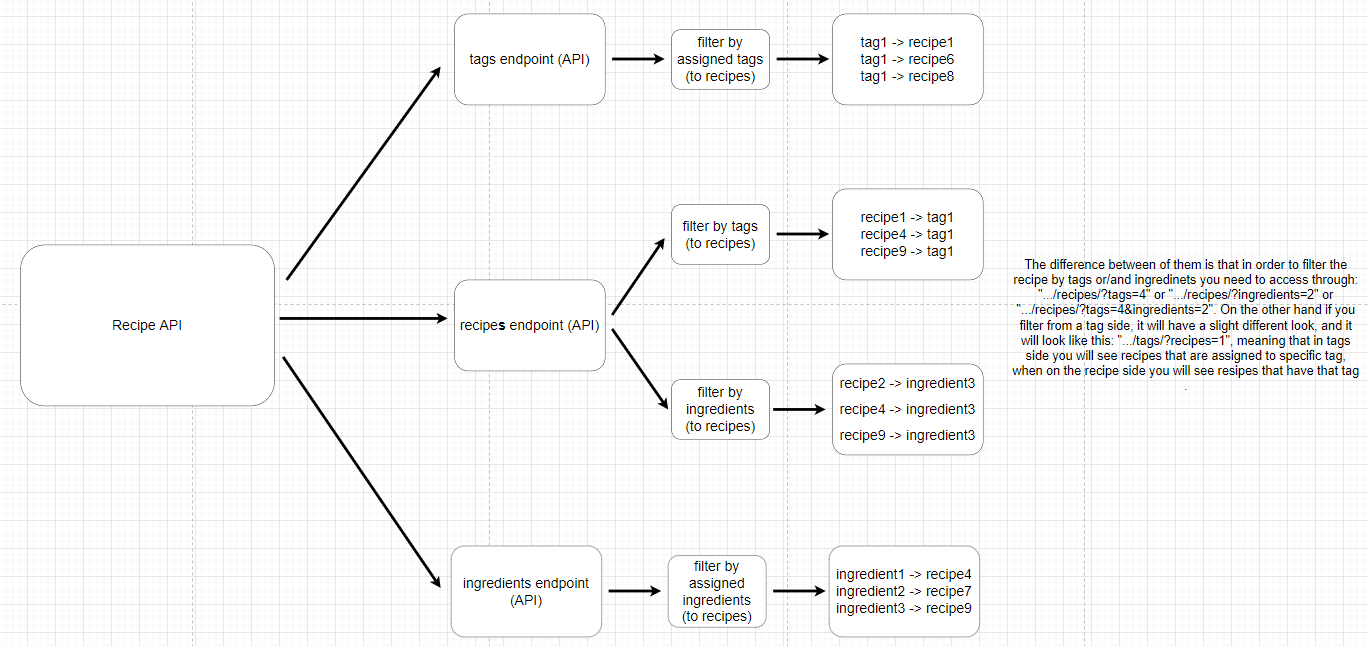
- 127.0.0.1:8000/api/recipe/recipes/?tags=<recipe_id>         -> Filter recipes by given tag id. It will return all recipes in which given
                                                                 tag was assigned (Authentication required).
- 127.0.0.1:8000/api/recipe/recipes/?ingredients=<recipe_id>  -> Filter recipes by given ingredient id. It will return all recipes in which given
                                                                 ingredient was assigned (Authentication required).
- 127.0.0.1:8000/api/recipe/recipes/?tags=<recipe_id>&ingredients=<recipe_id>  -> Filter recipes by given tag id and ingredient id. It will return all recipes in which given
                                                                                  tag and ingredient were assigned (Authentication required).
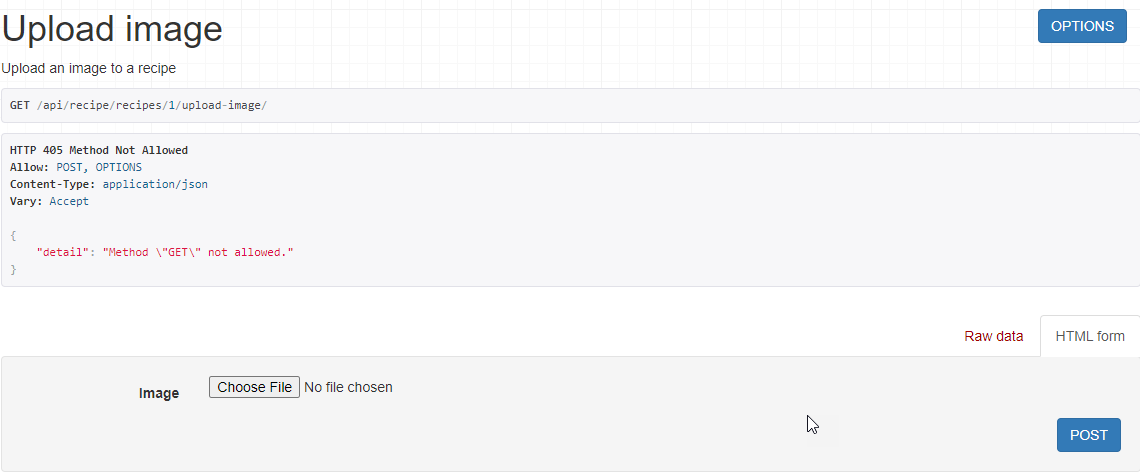
- 127.0.0.1:8000/api/recipe/recipes/<recipe_id>/upload-image  -> Upload Image to the selected recipe (through its id) (Authentication required).
- Implemented Filtering Feature
- Filter by Tags, by Ingredients, and in recipe filter by both of them
- The Pillow library has been implemented for integration with the REST API for receiving images.
- Used uuid libraryy in order to give unique id (so that i will be sure that duplicate there will not be duplicate data)
I would call Viewset dynamic comparing to APIView because Viewset dynamically identifies what action is being performed, and it will link dynamically a particular url to the specific action.
 - "list"    -> common_router  -> .../list/     (they will all be dynamically generated in url)
 - "create"  -> common_router  -> .../create/..
 - "destroy" -> common_router  -> .../delete/..
On the other hand, APIView works on the standart way of how the HTTP methods work, meaning that each action needs to be manually linked to the specific url.
- "post"   ->  .../create/    (it should be done manually),
- "update" ->  .../update/...
https://micropyramid.com/blog/django-rest-framework-send-extra-context-data-to-serializers/
https://geekflare.com/delete-github-branch/
https://www.django-rest-framework.org/api-guide/relations/#primarykeyrelatedfield
https://opensource.com/article/20/11/django-rest-framework-serializers
https://realpython.com/python-mock-library/#managing-a-mocks-side-effects