Releases: osmphp/admin
v0.2.0

Getting Started Is So Much Easier!
The main idea of v0.2 is that data classes should work without any attributes. Actually, you can even start without any properties!
It's enough to extend the Record class, generate a database table for the class using osm migrate:schema command, and you are good to go:
class Product extends Record {
}
Immediately, you'll be able to manage products visually in the admin area, integrate them with other applications using the HTTP API, or implement some internal custom logic using the query(Product::class) syntax.
Of course, you can add your own custom properties, create explicit table columns for them, compute their value using formulas, specify UI control, and many other things. Properties can be scalars, objects, arrays, or references to other records.
For more details, read the blog post.
Standard Properties
Classes inherit two properties from the Record class:
id- Unique auto-incremented object ID. It's used for creating relationships between objects, and for object selection in a grid.title- Object title. It's used for in various places of the admin area, for example, while displaying the object in dropdown option list, or in the page title of an edit form.
Formula Syntax
The query syntax introduces formulas - SQL-like expressions that you can use in SELECT, WHERE, ORDER BY (and later GROUP BY) clauses:
$products = query(Product::class)
    ->where("id IN (1, 2, 3)")
    ->where("title LIKE '%dress%'")
    ->get('id', 'title');
You may ask why inventing the new syntax if SQL is already good at what it does. And it's a great question. The main reason for introducing formulas lies in the near future.
You'll be able to specify how a property is computed from other properties of its object, and from the properties of the related objects. For example, consider a hierarchical category object tree where child categories "inherit" their values from the parent category:
/**
 * @property ?Category $parent #[Explicit]
 * @property ?int $level #[Computed("(parent.level ?? -1) + 1")]
 * @property ?string $id_path #[
 *      Computed("(parent.id_path IS NOT NULL ? parent.id_path + '/' : '') + id"),
 * ]
 */
class Category extends Record {
}
And raw SQL syntax is not a good fit for this use case, mainly because there is no good way to implicitly join related tables for expressions like parent.level, or parent.parent.level, and to integrate them into more complex expressions like (parent.level ?? -1) + 1".
Syntactic Sugar
There is also some syntax sugar in formula queries compared to SQL:
- All constants in a formula are converted to SQL bindings. For example,
id IN (1, 2, 3)formula is converted intoid IN (?, ?, ?)raw SQL. - Instead of
COALESCE(property1, property2, property3), writeproperty1 ?? property2 ?? property3. - Instead of
IF(id = 1, title, status), writeid = 1 ? title : status.
SQL Compatibility
Other formula syntax will be as close to standard SQL as possible, so you don't have to learn a new language.
New Architecture
In v0.1, there were over 10 modules, each responsible for a single concept. It's been a nice try, but in reality, these concepts were not as independent, and adding new features faced increasing resistance caused by unnecessary complexity.
In v0.2, the whole architecture is a lot more simplified:
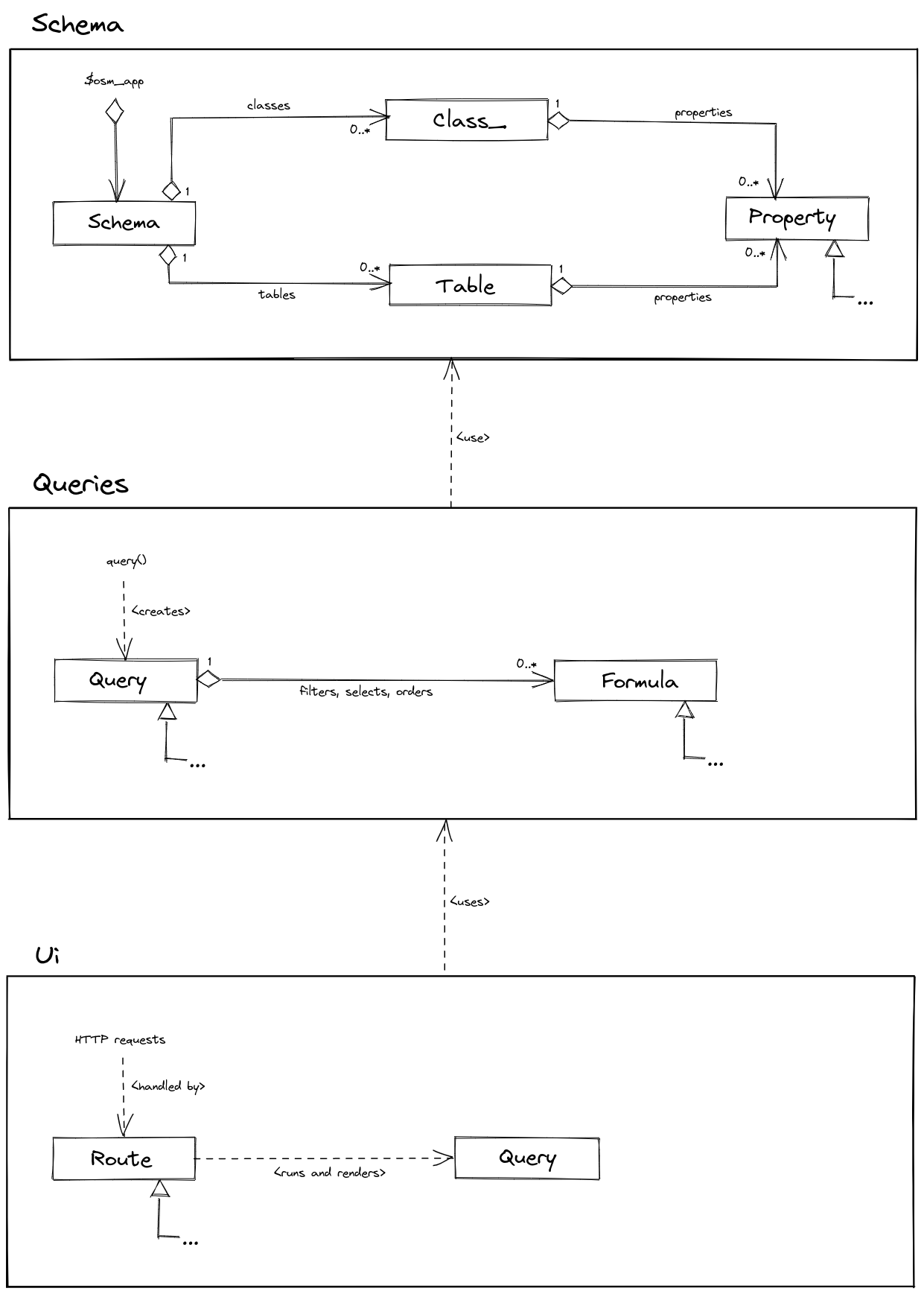
As you can see, there are only three modules left:
Schema- table/class/property definitionsQueries- well, for querying dataUi- for managing data visually, and through the API
Check more diagrams for a detailed look.
Roadmap
As I'm heading to some minimum Osm Admin user interface - one property, one data type, one UI control type - a lot of things are left unfinished.
At some point, they will! In order to keep track of them, they are listed in the product roadmap.
v0.1.5
Admin User Interface
Finally, I've got the initial version of the user interface working. Yes, I know, a lot is yet to be implemented, and yet, the transition of seeing some exception stack trace into a page that works is huge!
And I've put a lot of effort into polishing small details. For example:
- not only grid rows, but also
CreateandEditbuttons, are actually links that you can open in a new tab; - if you click outside a checkbox or a link, there is a high chance it will still work, thanks to property handling of a cell surrounding it;
- filter URLs avoid "ugly" URL encoding by only using characters that don't require encoding;
- ... and more.
For more details, read the whole article. Or even better, add the code sample to a local project and try it out in a browser!
Grid Attributes
Define available grid columns using [#Grid\*] property attributes, and make some of them visible using [Grid] class attribute:
/**
 * @property string $sku #[Grid\String_('SKU', edit_link: true), ...]
 * @property string $title #[Grid\String_('Title', edit_link: true), ...]
 * @property ?string $description #[Grid\String_('Description'), ...]
 * @property int $qty #[Grid\Int_('Quantity'), ...]
 */
#[Grid(['sku', 'title', 'qty']), ...]
class Product extends Object_
{
    ...
}
Grid Model
Internally, the grid attributes are parsed into the data schema:
global $osm_app;

$grid = $osm_app->schema
    ->classes[Product::class]
    ->interfaces['table_admin']
    ->grid;

$titleColumn = $grid->columns['title'];
Documentation
I started writing documentation for Osm Admin:
I suspect that it will evolve with time, but hey, show me someone who wrote the perfect docs in one sit!
v0.1.4
Filters
In the user interface, you will be able to narrow displayed data using grid column filters, or filters displayed in the sidebar. To enable that, apply #[Filter\*] attributes to class properties.
Applied filters appear in the URL query parameters, for example, .../edit?id=5+16+19, and on the page.
You can apply filters not only to a grid page, but also to a form page - to mass edit all matching objects, or to an action URL (edit, delete, or custom) - to perform the action on all matching objects.
In the same way, you can apply filters to the API URLs in order to retrieve or modify matching objects in a script.
This consistent approach to URL filters is described here.
Mass-Editing
I think that it's not enough to merely be able to edit your application data, but to be very effective at that.
One important part of effective data editing is editing of multiple records in a single sit, and this part just got implemented in this release.
Here is how it works.
-
Filter objects in a grid, select one or more objects for editing and press the
Editbutton. Grids are yet to be implemented, but let's say that the edit button opens the edit form using.../edit?id=18+19URL. -
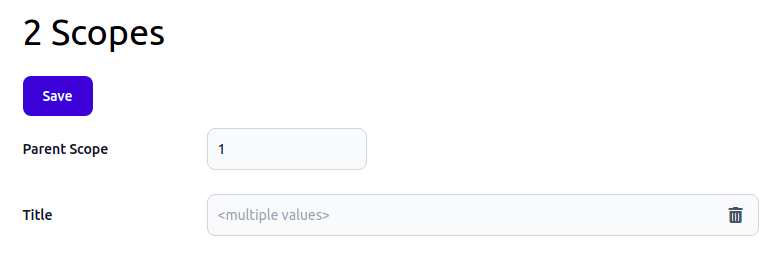
The edit form displays a field value if it's the same for all objects, or informs you that the selected objects have multiple values:
-
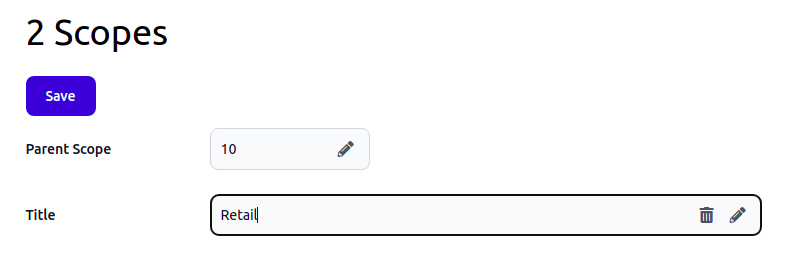
Change field values as needed. The edit form indicates which fields are modified, and allows you to reset the initial value:
-
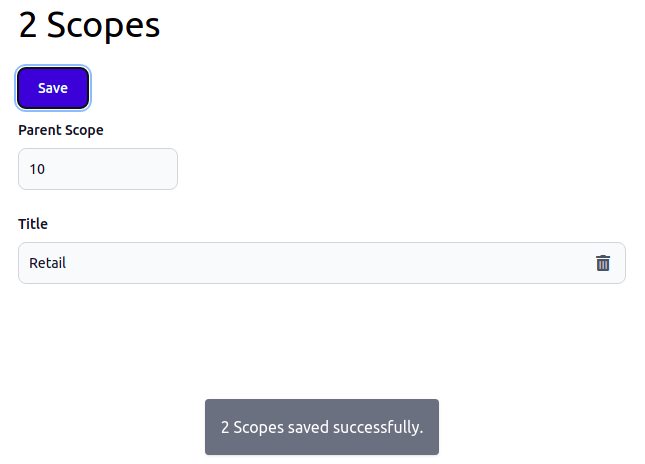
Press the
Savebutton to save the changes:
And that's it! Easy, right?
Better Queries
There are two new method in the Query class:
count()method returns the number of objects matching currently applied filters.in()method appliesWHERE <property> IN(<values>)filter.
Example:
// returns 2
$count = query(Scope::class)
   ->in('id', [18, 19])
   ->count();
v0.1.3
Approach
If you follow this project, you may have noticed a certain approach that is consistently applied to all parts of a project:
-
As an application developer, you define PHP classes and decorate them using some well-defined attributes. Actually it's enough to define just data structures your application operates with.
-
Osm Admin fetches these PHP classes into a data schema. The schema is designed in a way that is convenient to process in runtime. In fact, everything is a part of the schema: data classes, database table definitions, forms and their fields, grids and their columns.
-
There is a generic data handling, visual and programming interface implementation that just works.
-
There is a certain convention that allows you to define custom data processing logic, or visual interface logic, and your custom logic is used instead of standard one.
I use this approach on purpose. It will allow you to create your application quickly, and then tinker some little bits to make it even better.
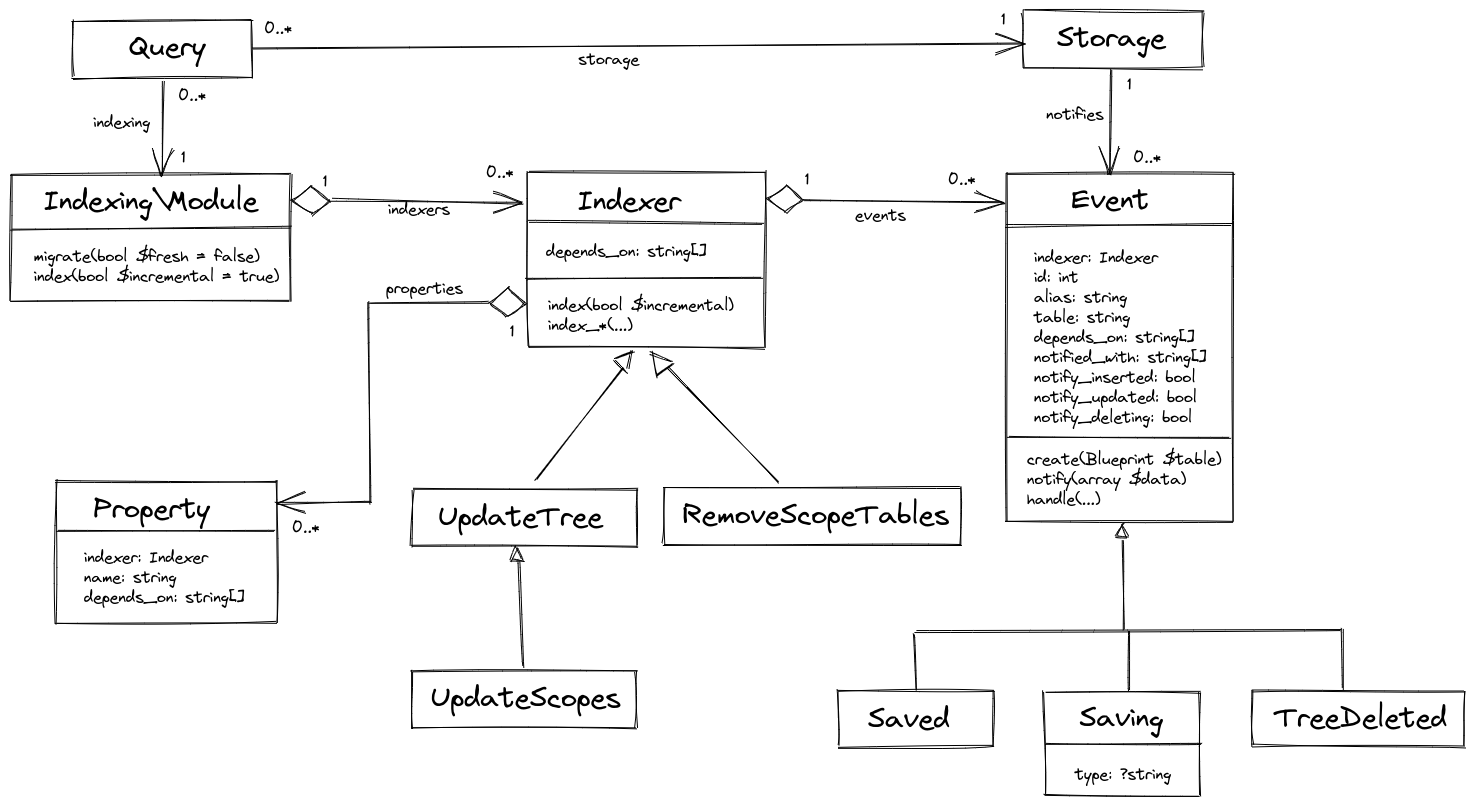
Indexing
Whenever you insert(), update() or delete() objects into/in/from a source table, the query trigger data change events.
Events create notifications in the database about the changes. Then, the indexing engine runs one or more indexers that process data change notifications by updating all the objects that have properties computed based on the changed data.
Later, indexing will be done asynchronously, and you will be able to perform other operations not waiting for indexing to complete.
I wrote a detailed article about how to configure indexing, and how it actually works. The essential parts are visible in the following class diagram:
Grid/Form Pairs
All the application data will be managed using grid/form visual pattern:
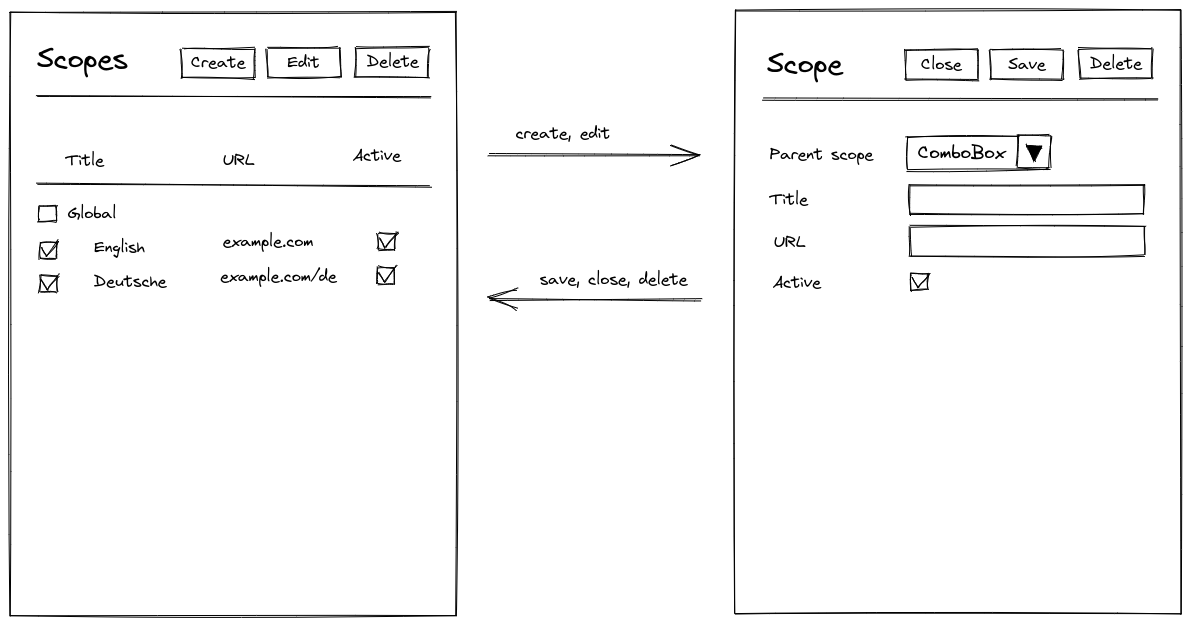
More about it here.
Interfaces
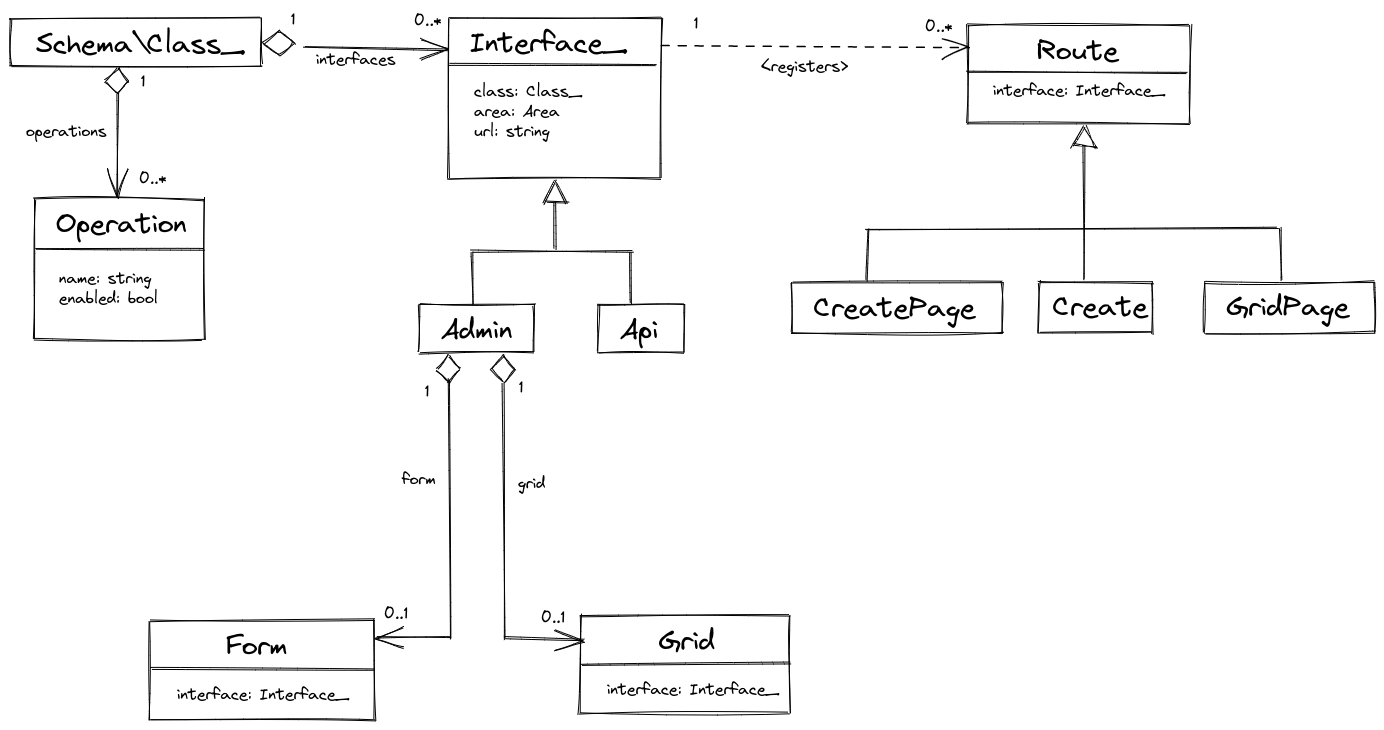
A grid/form pair will provide a visual interface for managing objects of a specific class (products, orders or customers).
Alternatively, there will be a programming interface - API - for performing the same operations from a script.
Both interfaces are designed to allow changing multiple objects with a single operation, similar to how UPDATE ... WHERE ... SQL statement works.
The following diagram catches the most important interface concepts:
For more details, read the whole piece about interfaces.
Forms
Speaking about forms, they will follow the same structure: form - chapter - section - fieldset - field:
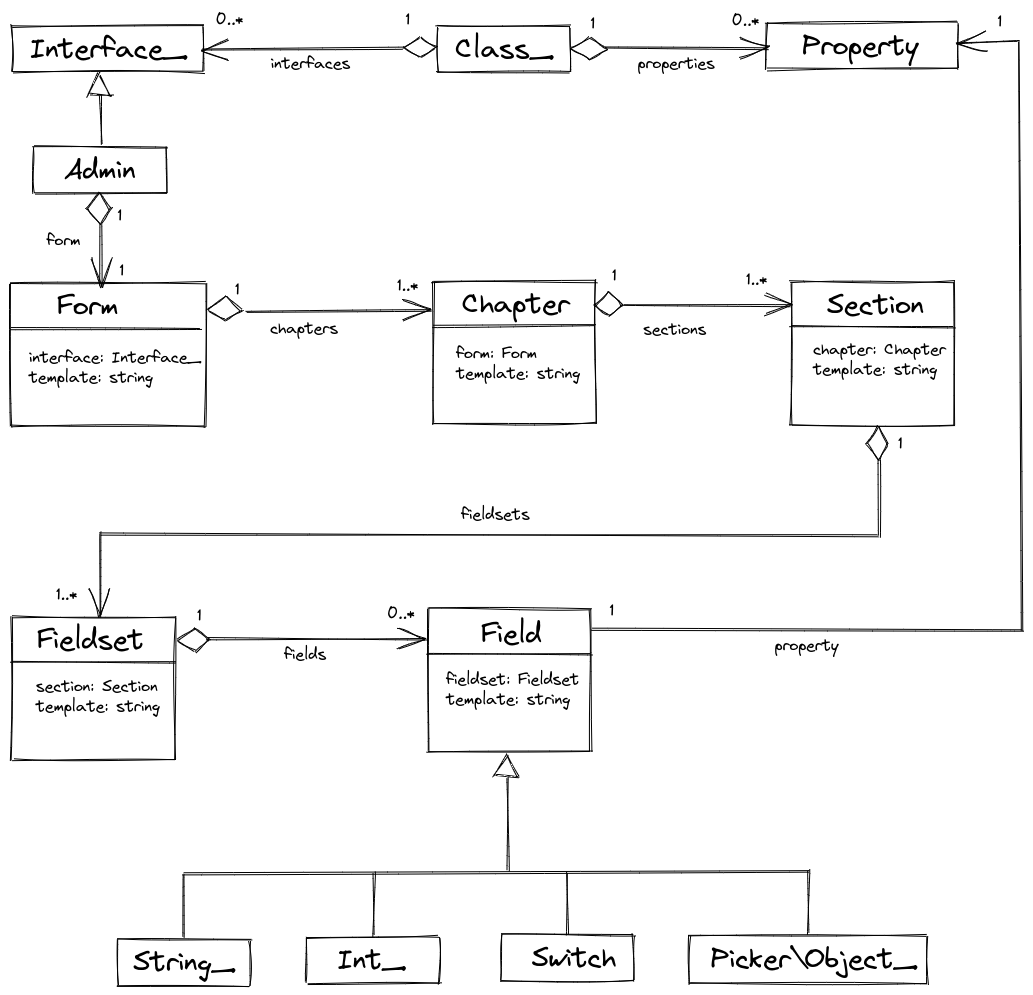
A form will operate a bit differently depending on its mode - whether the user is creating a new object, modifying the existing one, or modifying several objects at once.
The form internal design is covered in a dedicated article.
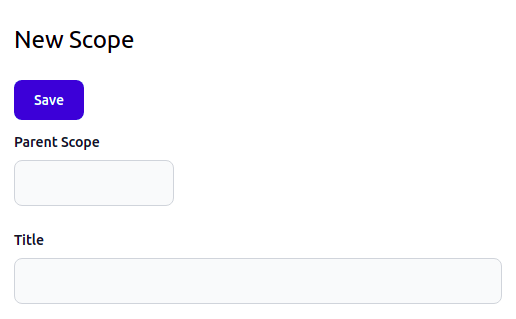
The "create mode" of a form is already implemented:
v0.1.2
Queries
In order to SELECT, INSERT, UPDATE or DELETE data objects, use query() function:
// SELECT
$products = query(Product::class)
    ->equals('in_stock', true)
    ->or(fn(Formula\Operation $q) => $q
        ->null('color')
        ->greater('price', 5.0)
    )
    ->orderBy('title', desc: true)
    ->first('id', 'title', 'category.title');

// INSERT
$id = query(Product::class)->insert([
    'sku' => 'P123',
    'title' => 'Osm Admin',
    'price' => 0.0,
    'in_stock' => true,
]);

// UPDATE
query(Product::class)
    ->greater('price', 5.0)
    ->update(['in_stock' => true]);

// DELETE
query(Product::class)
    ->equals('in_stock', false)
    ->delete();
In addition to executing an SQL statement, a query:
- validates data;
- converts data objects to/from database records;
- automatically joins related tables requested using dot syntax, for example
category.title; - notifies the indexing engine about the changes.
Queries are already partly implemented. Some query features, such as validation, are yet to be implemented. Some other features, such as equals() and other filtering methods, are likely to change in the future. Yet, I'm quite happy with the foundation that's been laid down during this iteration.
Read more:
Joins
Queries automatically join related table by calling matching join method defined in the data class. For example, category.title from the above example internally calls the join_category() method:
class Product extends Object_
{
    ...
    public function join_category(TableQuery $query, string $joinMethod,
        string $from, string $as): void
    {
        $query->db_query->$joinMethod("categories AS {$as}",
            "{$from}.category_id", '=', "{$as}.id");
    }
}
Let me explain how it works. The query while processing category.title formula infers that the category title should be selected from a related table, and it calls the join method specifying the type of join (join or leftJoin), the alias of the main selected table (this), and the alias of the joined table (category);
$product->join_category($this, 'leftJoin', 'this', 'category');
It results in the following SQL:
SELECT category.title
FROM products AS this
LEFT OUTER JOIN categories AS category
    ON this.category_id = category.id
Using the dot syntax, you may a distant related table. For example, category.parent.title would retrieve the title of the category that is parent to the product's category.
Joins are fully implemented.
Indexing
Indexing will propagate changes by running indexers - classes that extend the base Indexer class:
#[To('scopes'), From('scopes', name: 'parent')]
class ScopeIndexer extends TableIndexer
{
    protected function index_level(?int $parent__level): int {
        return $parent__level ? $parent__level + 1 : 0;
    }

    protected function index_id_path(?string $parent__id_path, int $id): string {
        return $parent__id_path ? "{$parent__id_path}/{$id}" : "{$id}";
    }

    public function index(bool $incremental = true): void {
        // SELECT data from source tables, and INSERT/UPDATE the target table
        ...
    }
}
Indexers will incrementally process changed data. For this purpose, every INSERT/UPDATE/DELETE operation will notify all dependent indexers via change notification tables.
I hope to finish indexing in the next iteration.
Read more:
v0.1.1
Despite a modest change in the version number, I've refactored a lot of things in Osm Admin. Here are the main ones.
Attributes
All PHP attribute definitions are moved into the Osm\Admin\Base\Attributes namespace:
#[Storage\*]attributes mark data classes that are stored in the database.#[Table\*]attributes mark data class properties that are stored in dedicated table columns.#[Markers\*]attributes are markers#[Grid\*]attributes specify how a data class is viewed/edited in a grid.#[Form\*]attributes specify how a data class is viewed/edited in a form.#[Icon]attribute adds a link to a data class grid page to the home page of the admin area.
Markers
Marker attributes bind attributes to behavior classes.
Let's illustrate it with an example. #[Storage\Table('products')] attribute declare that a data class is stored in the database products table:
#[Storage\Table('products')]
class Product extends Object_ {
}
The exact details of creating the products table are implemented in Osm\Admin\Tables\Table class:
#[Type('table')]
class Table extends Storage {
    ...
}
How does the application know that? It checks the type name specified in the marker attribute #[Markers\Storage] applied to the definition of the #[Storage\Table] attribute:
#[\Attribute(\Attribute::TARGET_CLASS), Storage('table')]
final class Table {
}
Then it finds a storage class that has the same type name specified in its #[Type] attribute, and it's the Osm\Admin\Tables\Table class.
Schema
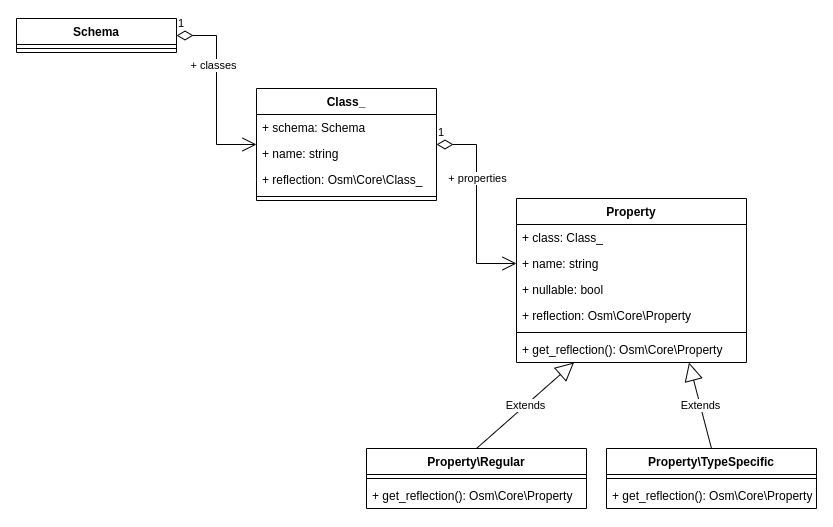
In Osm Core package, I developed dehydrate()/hydrate() functions, and I use these functions to store the data class schema in cache and in database. I've also finalized the design of the data class schema:
Database Migrations
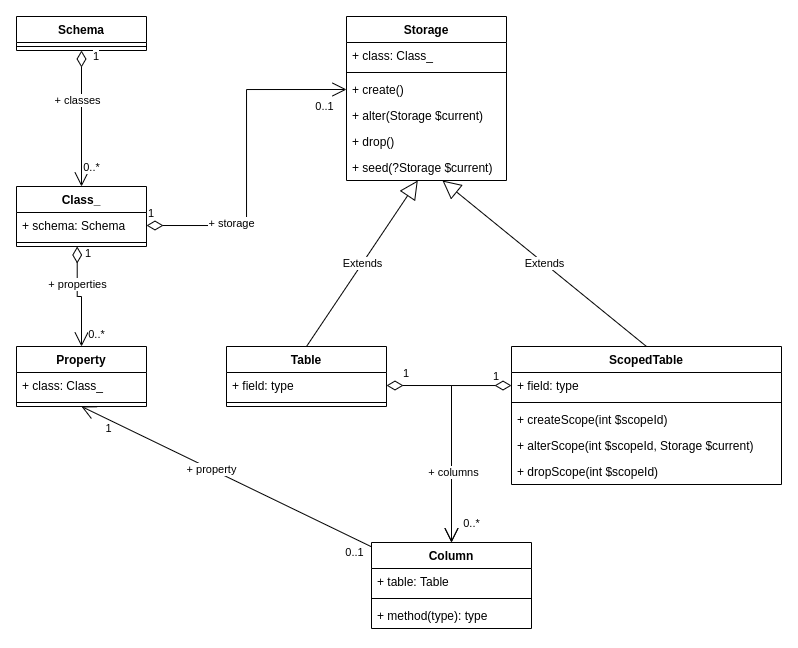
I've finished refactoring how Osm Admin stores data objects in the database. Also, in order to support multi-website, multi-vendor, multi-language applications, I've introduced the concept of scopes. The database layout is documented in this post, and the information about database tables and other storages is a part of the data schema:
Indexing
It's often needed to compute, or index, data in database tables based on data in other tables. I've sketched how it might work, and I think of implementing it in the next iteration.
v0.1.0
It's a package for defining data structures using PHP 8 classes and attributes, and getting fully functioning Admin Panel and API.
Here is how it's going to work.
First, define data classes - regular PHP classes with attributes specifying how instances of these classes are stored in database tables, and displayed in grids and forms of the admin area of your application. For example:
/**
 * @property string $sku #[
 *      Serialized,
 *      Table\String_(unique: true),
 *      Grid\String_('SKU'),
 *      Form\String_(10, 'SKU'),
 * ]
 * @property string $description #[
 *      Serialized,
 *      Grid\String_('Description'),
 *      Form\String_(20, 'Description'),
 * ]
 */
#[
    Table('products'),
    Scoped,
    Grid\Page('/products', 'Products', select: ['id', 'sku', 'description']),
    Form('/products', title_create: 'New Product', title_edit: ":title - Product"),
]
class Product extends Object_
{
    use Id, Type;
}
Then, generate database tables from the #[Table\*] attributes using a command:
osm generate:schema
Finally, open the admin area of your application, and manage the application data using grids and forms automatically created from #[Grid\*] and #[Form\] attributes, respectively.
E-commerce Sample Application
In order to test this attribute-based data management engine, I simultaneously develop a sample e-commerce application. So far, it has modules for user, product and sales order management, but surely, there is more to come.
What's Done So Far
I document daily progress on this project, challenges I face, and ideas I have, in the blog, on Twitter, on IndieHackers, and on Projectium. If you are interested in this project, please follow and participate.
Recap:
I started generating the Admin UI, but it's really too raw yet.