UI: Enable multiple audio tracks in Simple Output recording #6799
Conversation


 Fenrirthviti
added
the
UI/UX
Fenrirthviti
added
the
UI/UX

|
Note to self: test Advanced Audio Properties. |

|
From internal discussions about this: Disappearing items is something we no longer want to present in OBS, so this will need to find a permanent location to live. Disabling the checkboxes might be a solution here, but we will probably need to have a larger discussion on how best to approach this from a UI/UX standpoint for the various options. Having this PR open should push those conversations forward as a high priority (at least, for myself) for post-v28 features. |

This comment was marked as spam.
This comment was marked as spam.
Sorry, something went wrong.

|
Can we get a radio group selection for flv (and any other formats that don't support multiple audio tracks) instead of removing the checkboxes? If we are hardcoded to track 1 for single track formats, I'd still like a radio group and simply have it disabled. |
 pkviet
force-pushed
the
simplemultitrack
branch
from
pkviet
force-pushed
the
simplemultitrack
branch
from
8f95351 to
c72ac50
Compare
|
Updated the PR to implement @Fenrirthviti & @Warchamp7 suggestions. |
pkviet
force-pushed
the
simplemultitrack
branch
from
c72ac50 to
4250464
Compare
 pkviet
force-pushed
the
simplemultitrack
branch
2 times, most recently
from
pkviet
force-pushed
the
simplemultitrack
branch
2 times, most recently
from
1d29a5b to
8270532
Compare
|
PR Updated
|
 pkviet
force-pushed
the
simplemultitrack
branch
from
pkviet
force-pushed
the
simplemultitrack
branch
from
8270532 to
d91b4cd
Compare
 pkviet
force-pushed
the
simplemultitrack
branch
3 times, most recently
from
pkviet
force-pushed
the
simplemultitrack
branch
3 times, most recently
from
99811c1 to
1594e13
Compare
|
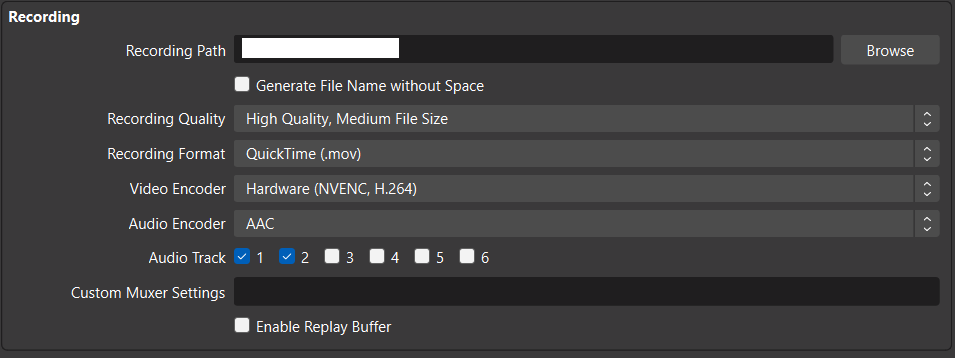
Update
|
 pkviet
force-pushed
the
simplemultitrack
branch
2 times, most recently
from
pkviet
force-pushed
the
simplemultitrack
branch
2 times, most recently
from
675c7b1 to
1786074
Compare

|
Approved on my end |

This adds support for multiple audio tracks in Simple Output for
recordings.
This is enabled for all quality presets (including "Lossless") except
"Same as Stream".
This is also enabled for the Replay Buffer.
An exception is made for flv recording format since it only allows a
single audio track.
The recorded track (and streaming track) is then Track 1 as before.

Signed-off-by: pkv <pkv@obsproject.com>
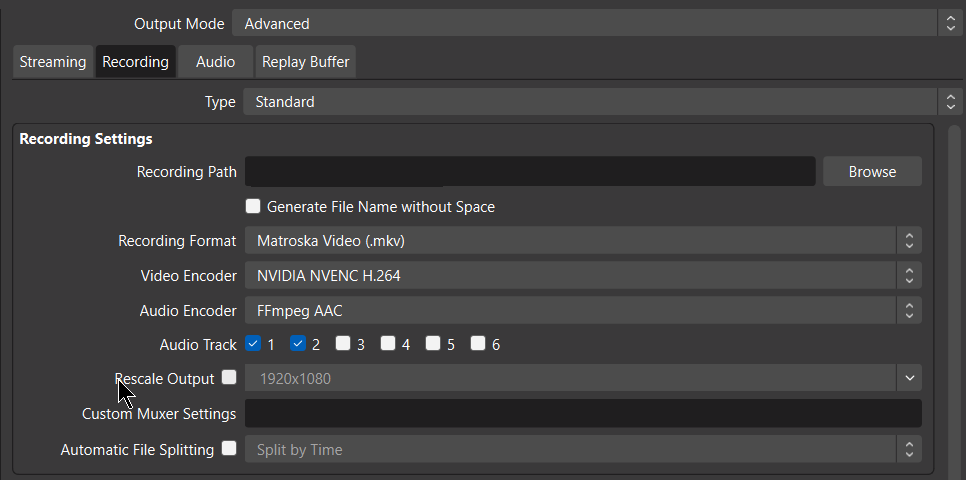
Per request of our UI design chief, the tracks from Standard Recording
(Advanced Output) are moved below the audio encoder field.
Additionally, for consistency with Simple output, the video encoder
field is moved above the audio encoder (suggestion from Rodney).

Signed-off-by: pkv <pkv@obsproject.com>
pkviet
force-pushed
the
simplemultitrack
branch
from
1786074 to
c5173d1
Compare
|
Update
|
7 participants


Description
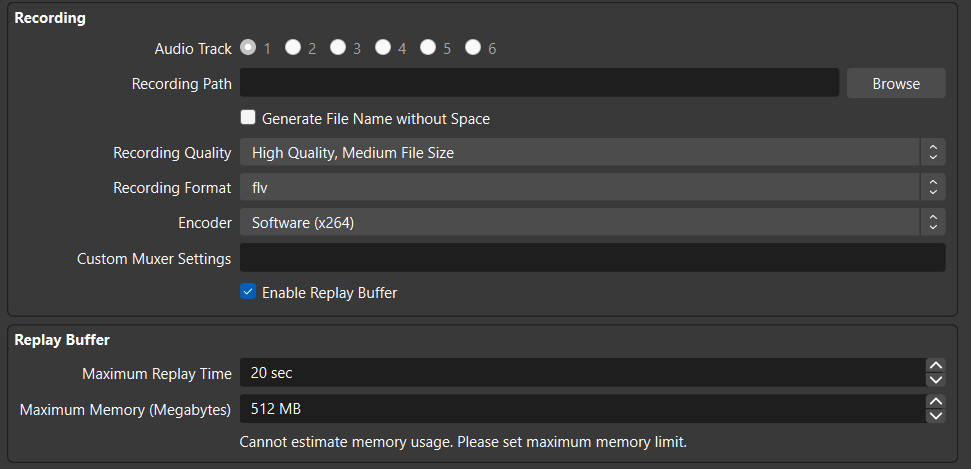
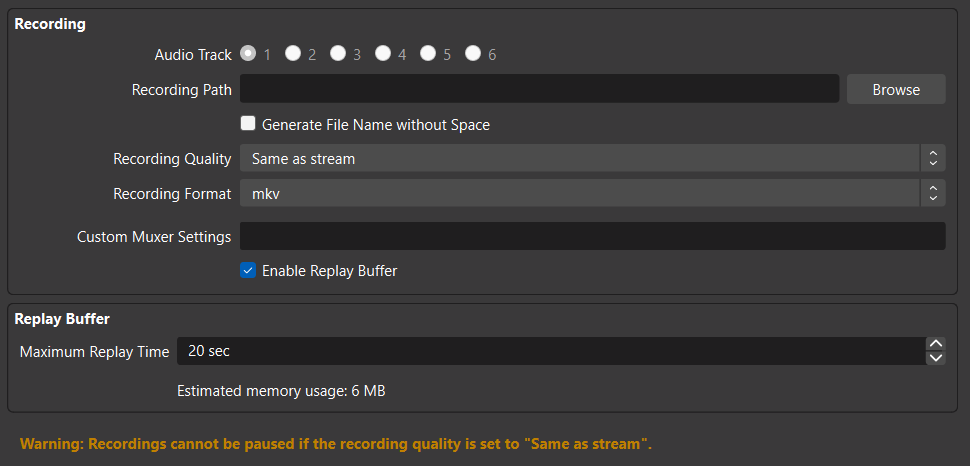
This adds support for multiple audio tracks in Simple Output for recordings. This is enabled for all quality presets (including "Lossless") except "Same as Stream".
This is also enabled for the Replay Buffer.
An exception is made for flv recording format since it only allows a single audio track.
The recorded track (and streaming track) is then Track 1 as before.
Screenshots
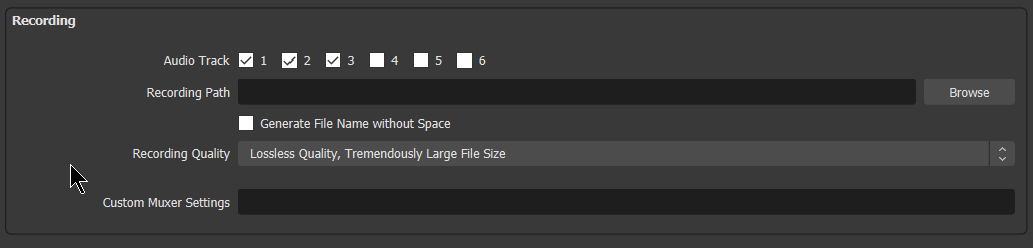
lossless preset:
encoded presets:
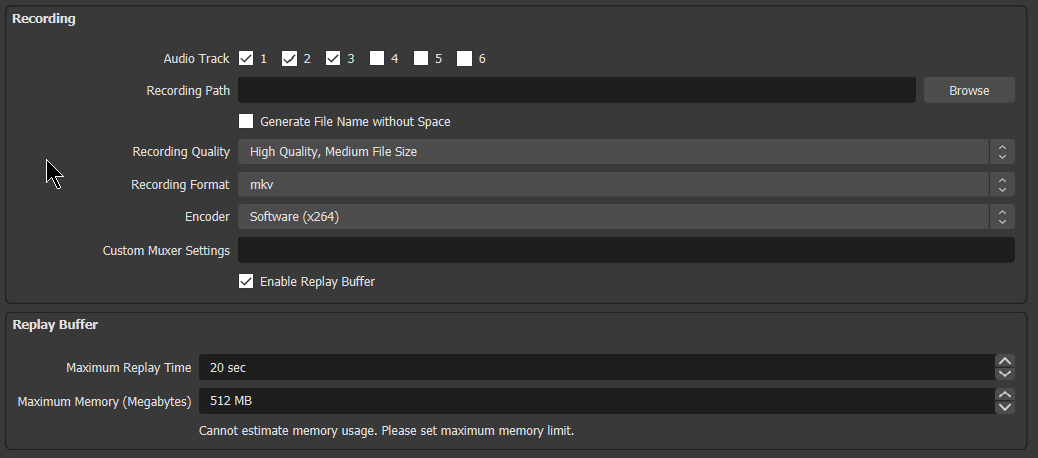
flv:
same as stream preset:
Motivation and Context
Members of obs support team report that regularly people switch from Simple to Advanced output just to be able to record multi track audio.
It would be better though for many to stick to Simple output, since it is ... simpler.
How Has This Been Tested?
Recordings made with three tracks in Simple output for:
Checked that flv & "same as stream" preset record track 1.
Types of changes
Checklist: