

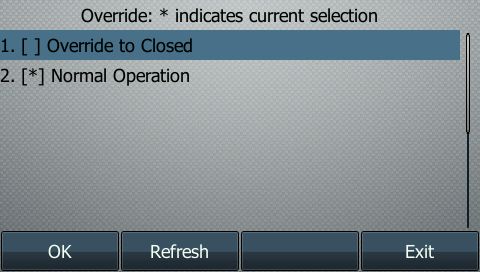
This very simple script was made to allow for enabling/disabling time frames from Yealink phones that are connected to the Netsapiens platform only. After being assigned to a DSS key on a Yealink phone it will display a menu and indicate the current status of the override. The key's LED will also turn red to indicate the system is forced closed (override/time frame enabled) and turn green to indicate the system is set to normal operation. The user can then toggle the override to enable or disable it. It is designed to be used with just one override but it can easily be modified to allow for more.
Users on our previous phone system were used to having a button where they could force the system to "closed" and we wanted to provide that same functionality on Netsapiens. It is possible to do this with star codes within Netsapiens, but this script gives visual indicators about the current status.
This type of feature was posted as a request on the Netsapiens forum (#1817) so I decided to release this for all to use. I have added a lot of comments to the code and broken it up to separate the changes you need to make from the rest of the code. Even those with very little PHP experience should be able to modify this to work for you. I did not put comments on the Yealink XML code itself. Review Yealink's documentation if you have any questions about that and feel free to contact me if you're stuck.
While this script is easy to modify, it was created for the way that we use time frames, answer rules, and overrides. There is no set way to use them so this may not work out of the box for you. Here is a simplified version of how ours are setup:
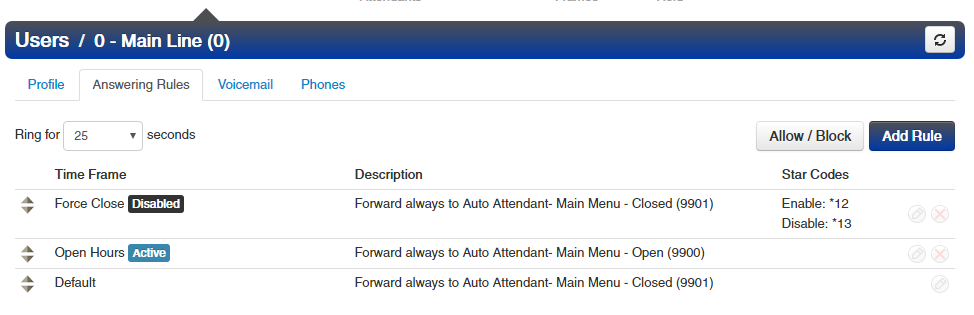
The "Force Close" answer rule (currently disabled) is the one that we will be toggling on and off. Below it is their normal "Open Hours" answer rule, followed by the "Default" answer rule. The "Default" and "Force Close" answer rules are likely going to do the same thing, but they don't have to. The script is meant to be used to toggle between "Force Closed" and normal operation where the system opens/closes automatically based on the other time frames. If your client does not have other time frames and wants to actually toggle between "Open" and "Closed" then it will still work, you just need to setup your answer rules properly.
The other very important note is this does not actually interact with the API in any way. If the client logs in to the web portal and changes their answer rules there then what the phone shows will not match. Clients who will be using this override should be encouraged to only use the button on their phone to change the status rather than using the portal and the phone. If you setup this script on more than one phone then the actual menu that displays when they press the button WILL show correct between the phones but the LED color will not change on the other phones. Also if the phone reboots then the LED will not be lit at all. You could choose to remove the LED color completely if any of this is an issue for your client.
-
Configure Time Frame Control By Star Codes. Netsapiens KB. Make sure to test this manually and confirm it's working prior to continuing.
-
Open timeframes.php and set the URL for the location where your scripts will be, without the trailing slash. You need to have separate folders for each client/domain that is using this or else the current override status will be wrong.
define("URI", "http://timeframe.example.com/ClientName");- Open selection.php and set the DSS key number where this will be deployed to, as well as the star codes that you setup in step 1 for enable/disable. In this example it will be on key 4, uses *12 to enable and *13 to disable.
define("DSS_KEY_NUM", "4");
define("ENABLE_CODE", "*12");
define("DISABLE_CODE", "*13");- Place the 3 php files on your web server in the location indicated in the URI that you set in step 2. Ensure that the user your web server runs as will have write access to status.php. If you are using the script and the current status never changes then this is your issue. Disclaimer: You are responsible for ensuring your web server is configured properly to prevent unauthorized access to these files. I have spent minimal time doing anything to really secure these scripts or prevent anything malicious from happening. The good news is that in a worst-case scenario the worst that someone could do is toggle someone's time frame remotely.
- Assign a DSS key that uses the XML browser and points to the timeframes.php file. Using the NDP and DSS key #4 the overrides would look like this:
linekey.4.type="27"
linekey.4.line="1"
linekey.4.value="http://timeframe.example.com/ClientName/timeframes.php"
linekey.4.label="Overrides"
linekey.4.extension="%NULL%"
linekey.4.xml_phonebook="%NULL%"
linekey.4.pickup_value="700"- Press the button and see if it works. :)
- PHP: Tested on PHP version 5.4.x, 5.6.x and 7.0.x. It's so basic that it should work on any modern version.
- Web server: Tested on Apache 2.2.x and 2.4.x.
- OS: Windows and Linux (Debian and Ubuntu).
- Phones: Tested on Yealink T23G, T41P, T42G, T46G, and T48G. Any model that supports their XML directories should be fine.
- Make sure your web server is configured correctly. Although take comfort in knowing there are no API keys or passwords with this script.
- For added security you can setup htaccess on the folder that the files are written to and limit access to them. Some (non-foolproof) suggestions are to lock it down to certain IP addresses and/or to Yealink User-Agents. You can also obfuscate the file/folder names if you're concerned about someone scanning for them.
I am not a developer by any means and this is code that I wrote a couple years ago, so it could definitely be better. I can't promise that this won't cause any problems for you, up to and including your web server catching on fire. Use it at your own risk. You should test it on a sandbox before you use it on your production servers.
With that said, we have been using it for a couple years without any issues. It is such a simple script and doesn't even touch the API so it should be fine.
I am releasing it under the MIT license which means you are welcome to use it for any and all purposes as long as you do not hold me liable. License details are below. You may contact me if you need it released under a different license.
MIT License
Copyright (c) 2016 Brent Nesbit
Permission is hereby granted, free of charge, to any person obtaining a copy of this software and associated documentation files (the "Software"), to deal in the Software without restriction, including without limitation the rights to use, copy, modify, merge, publish, distribute, sublicense, and/or sell copies of the Software, and to permit persons to whom the Software is furnished to do so, subject to the following conditions:
The above copyright notice and this permission notice shall be included in all copies or substantial portions of the Software.
THE SOFTWARE IS PROVIDED "AS IS", WITHOUT WARRANTY OF ANY KIND, EXPRESS OR IMPLIED, INCLUDING BUT NOT LIMITED TO THE WARRANTIES OF MERCHANTABILITY, FITNESS FOR A PARTICULAR PURPOSE AND NONINFRINGEMENT. IN NO EVENT SHALL THE AUTHORS OR COPYRIGHT HOLDERS BE LIABLE FOR ANY CLAIM, DAMAGES OR OTHER LIABILITY, WHETHER IN AN ACTION OF CONTRACT, TORT OR OTHERWISE, ARISING FROM, OUT OF OR IN CONNECTION WITH THE SOFTWARE OR THE USE OR OTHER DEALINGS IN THE SOFTWARE.