A simple Git repository access tool for Command Prompt.
Report Bug
·
Request Feature
Table of Contents
sCMDra parses your Git repositories and lists them in Command Prompt from a single command, allowing quick access to your projects from anywhere.
After selecting a repository, your Command Prompt session is redirected and Windows Explorer is opened to the corresponding directory.
IMPORTANT NOTICE:
Even if you use the automatic installer, you will need to manually add the installation directory to your user's environment Path variable. Instructions for this are included in Install sCMDra.bat.
- Clone/download the repo
git clone https://github.com/nTh0rn/sCMDra.git
- Run
Install sCMDra.batand follow the steps within.
- Create an installation directory (For example,
C:\sCMDra\). - Add the installation directory to your user's environment Path variable.
- Relocate
sCMDra.batand___cecho.exeto your installation directory. - Inside
sCMDra.bat, Find and replace all instances ofINSTALL_TEMPwith your installation directory, without quotes. - Inside
sCMDra.bat, Find and replace all instances ofREPO_TEMPwith where your repositories are located, without quotes. - Rename
sCMDra.batto the keyword you'd like to use to access sCMDra (For example, "repo.bat", "$.bat", or "projects.bat").- You will not need to type the
.batfile extension to access sCMDra from Command Prompt.
- You will not need to type the
Access sCMDra by typing in your keyword into Command Prompt from any directory (repo by default).
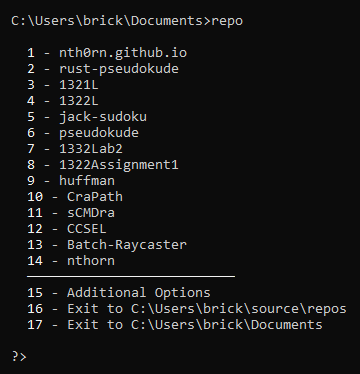
Any repository can be accessed by typing its index or title.
IMPORTANT NOTICE: Even if you use the automatic uninstaller, you will need to manually remove the installation directory from your user's environment Path variable. Instructions for this are included during the automatic uninstallation.
- Access sCMDra in Command Prompt by using your access keyword (
repoby default). - Select "Additional Options".
- Select "Uninstall sCMDra" and follow the steps provided.
- Navigate to and delete the installation folder while sCMDra is not running (
C:\sCMDra\by default). - Remove the installation folder from your user's environment Path variable.
Distributed under the MIT License. See LICENSE.txt for more information.
Nikolas Thornton - nthorn.com - contact@nthorn.com
Project Link: https://github.com/nTh0rn/sCMDra