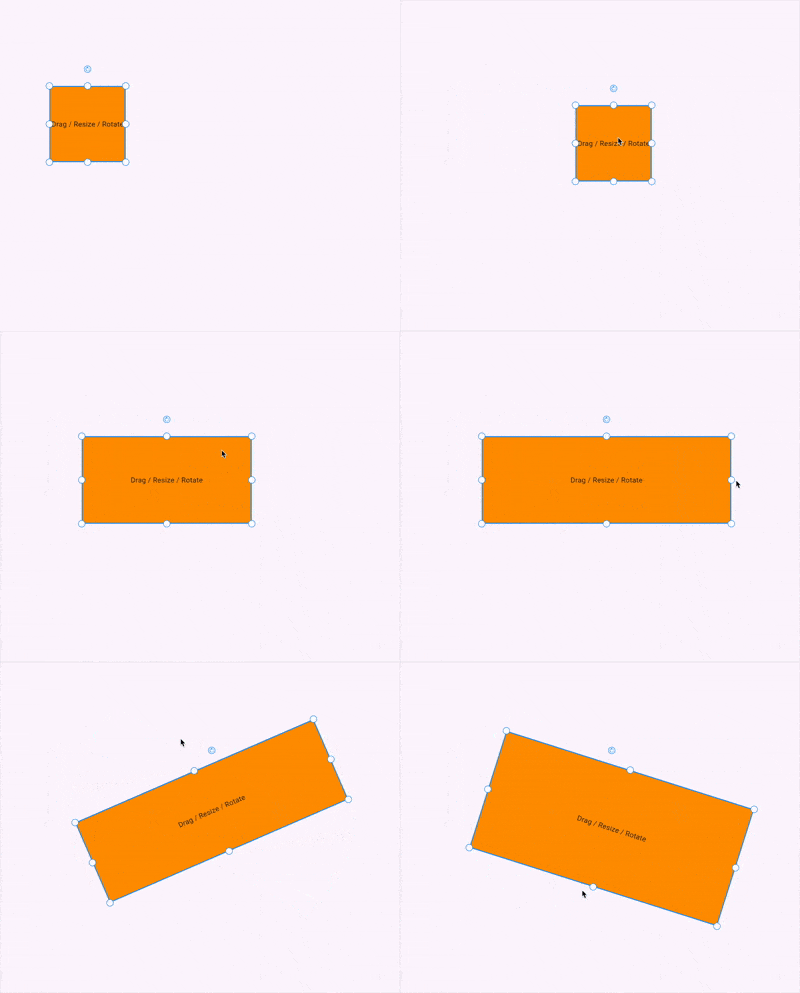
The BoundingBox is a custom Flutter widget that allows you to drag, resize, and rotate any widget with a bounding box overlay. It's useful for building design tools, image editors, diagram creators, and other interactive visual UIs.
Example DEMO
-
Move (drag) any widget freely on the screen.
-
Resize from 8 handles (top, bottom, sides, and corners).
-
Rotate via a draggable rotate handle.
-
Customizable handle appearance, stroke color, stroke width, etc.
-
Optional custom widgets for resize and rotate handles.
-
Optionally disable the interactive functionality.
BoundingBoxController({
	// Core properties
	Offset position;
	Size size;
	double rotation;
	bool enable;

	// Handles and customization
	bool? enableRotate;
	bool? enableMove;
	double actionSize;

	// Colors
	Color? handleResizeBackgroundColor;
	Color? handleResizeStrokeColor;
	Color? handleRotateBackgroundColor;
	Color? handleRotateStrokeColor;
	Color? handleMoveBackgroundColor;
	Color? handleMoveStrokeColor;
	Color? strokeColor;

	// Stroke widths
	double? strokeWidth;
	double? handleResizeStrokeWidth;
	double? handleRotateStrokeWidth;
	double? handleMoveStrokeWidth;

	// Custom widgets
	Widget? rotateIcon;
	Widget? moveIcon;
	Widget? customHandleResize;
	Widget? customHandleRotate;
	Widget? customHandleMove;

	// Decoration
	double? handlePosition;
	BoxDecoration? customDecoration;
})
-
builder: A function that takes the currentSize,Position,Rotationand returns a widget. -
controller: Is a controller class designed to manage the position, size, and rotation of a widget inside theBoundingBoxOverlay. It also allows you to customize the appearance and interaction behavior such as resizing, rotating, and moving.
import 'package:flutter/material.dart';
import 'package:bounding_box/bounding_box.dart';

void main() {
  runApp(const MyApp());
}

class MyApp extends StatefulWidget {
  const MyApp({super.key});

  @override
  State<MyApp> createState() => _MyAppState();
}

class _MyAppState extends State<MyApp> {
  @override
  Widget build(BuildContext context) {
    return MaterialApp(
      home: Scaffold(
        body: Stack(
          children: [
            BoundingBoxOverlay(
              controller: BoundingBoxController(
                position: Offset(100, 100),
                size: Size(100, 100),
                enable: true,
              ),
              builder: (size, position, rotation) {
                return Container(
                  width: size.width,
                  height: size.height,
                  decoration: BoxDecoration(
                    color: Colors.blue.withOpacity(0.5),
                    border: Border.all(width: 2),
                  ),
                  child: Center(child: Text('Box')),
                );
              },
            ),
            BoundingBoxOverlay(
              controller: BoundingBoxController(
                position: Offset(200, 200),
                size: Size(100, 100),
                enable: false,
              ),
              builder: (size, position, rotation) {
                return Container(
                  width: size.width,
                  height: size.height,
                  decoration: BoxDecoration(
                    color: Colors.blue.withOpacity(0.5),
                    border: Border.all(width: 2),
                  ),
                  child: Center(child: Text('Box')),
                );
              },
            ),
          ],
        ),
      ),
    );
  }
}Handles are placed in 8 positions:
topLeft         topCenter         topRight


centerLeft       **[Widget]**      centerRight


bottomLeft      bottomCenter        bottomRight
A rotate handle is positioned above topCenter.
You can disable all interactions using:
enable: false
This will render only the widget without any interactive overlay.
This BoundingBox widget offers a lightweight and extensible way to add draggable, resizable, and rotatable components in Flutter, perfect for design apps, whiteboard tools, diagramming editors, and more.