


A BLE keyboard controller for M5Stack AtomS3 that enables wireless page turning on Kobo e-readers.
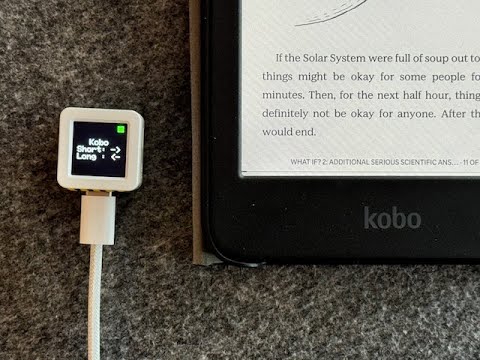
Morten Teinum (morten.teinum@gmail.com)
- Device: M5Stack AtomS3
- MCU: ESP32-S3 FN8
- Dimensions: 24.0 x 24.0 x 12.9mm
- Weight: 6.9g
- Connection: Bluetooth Low Energy (BLE)
- Short Press: Next page (Right Arrow key)
- Long Press (≥600ms): Previous page (Left Arrow key)
- Visual Status Indicator:
- Green filled square: BLE connected
- Red outline square: BLE disconnected
Download the latest firmware from Releases
pip install esptool

# Flash all three binary files
esptool.py --chip esp32s3 --port /dev/ttyUSB0 --baud 921600 write_flash -z \
  0x0 single-button-page-turner.ino.bootloader.bin \
  0x8000 single-button-page-turner.ino.partitions.bin \
0x10000 single-button-page-turner.ino.binNote: Replace /dev/ttyUSB0 with your port:
- Linux:
/dev/ttyUSB0or/dev/ttyACM0 - macOS:
/dev/cu.usbserial-*or/dev/cu.wchusbserial* - Windows:
COM3,COM4, etc.
- Download Espressif Flash Download Tool
- Select ESP32-S3
- Load the binary files:
0x0→single-button-page-turner.ino.bootloader.bin0x8000→single-button-page-turner.ino.partitions.bin0x10000→single-button-page-turner.ino.bin
- Select your COM port and click "Start"
- Install Arduino IDE or Arduino CLI
- Install ESP32 board support
- Install required libraries:
The project requires a modified version of the ESP32 BLE Keyboard library (v0.3.0) to enhance BLE security and compatibility with Kobo e-readers.
A patch file is provided in patches/BleKeyboard.patch. After installing the ESP32 BLE Keyboard library:
cd ~/Arduino/libraries/ESP32-BLE-Keyboard
patch -p1 < /path/to/single-button-page-turner/patches/BleKeyboard.patch
View complete patch content
The patch file is located at patches/BleKeyboard.patch in this repository. It contains all necessary modifications to make the ESP32 BLE Keyboard library compatible with Kobo e-readers.
-
Upload the sketch to your M5Stack AtomS3
-
Pair with your Kobo e-reader:
- Device name:
Kobo PageTurner - Look for it in Bluetooth settings on your Kobo
- Device name:
Once paired, simply press the button on the AtomS3:
- Quick tap: Turn to next page
- Press and hold: Go back to previous page
The display shows the current connection status and button functions.
You can modify these settings in the code:
BLE_DEVICE_NAME: Change the Bluetooth device nameLONG_PRESS_MS: Adjust the long press threshold (default: 600ms)
MIT License - see LICENSE file for details.