ignore the chatgpt codex slop, please, I just wanted help with building to Windows sob sob sob I need a good xmpp client

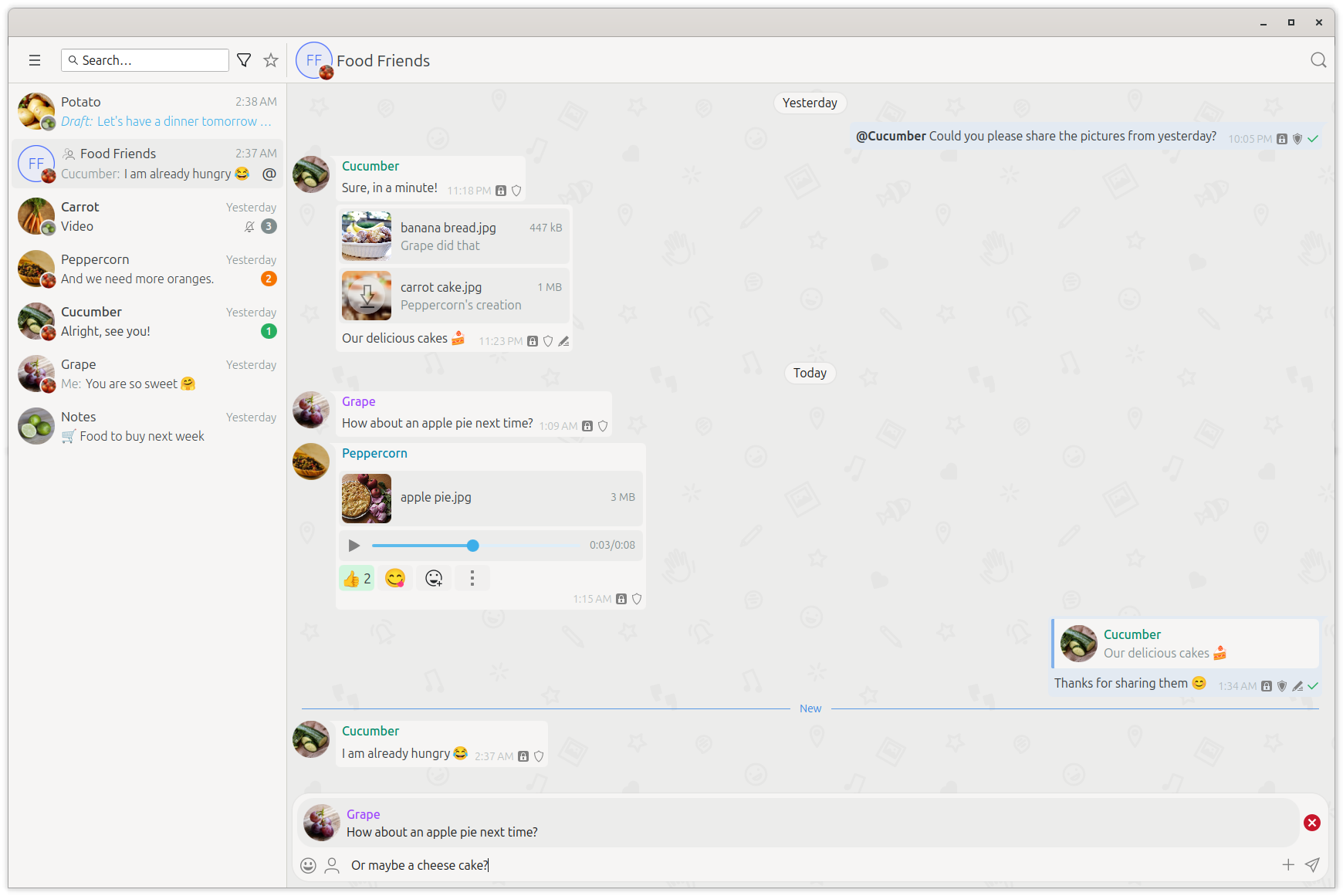

Kaidan is a simple, user-friendly and modern chat client. It uses the open communication protocol XMPP (Jabber). The user interface makes use of Kirigami and QtQuick, while the back-end of Kaidan is entirely written in C++ using Qt and the Qt-based XMPP library QXmpp. The credentials are stored using QtKeychain.
Kaidan runs on mobile and desktop systems including Linux, Windows, macOS, Android, Plasma Mobile and Ubuntu Touch. Unfortunately, we are not able to provide builds for all platforms at the moment due to little developer resources.
Kaidan does not have all basic features yet and has still some stability issues. Do not expect it to be as good as the currently dominating instant messaging clients.
If you are interested in the technical features, you can have a look at Kaidan's overview page including XEPs and RFCs.
Downloadable builds are available on Kaidan's download page. Instructions for using ready-made (nightly / stable) builds and for building Kaidan yourself can be found in our Wiki.
Kaidan is continuously built on KDE's Windows CI using the MSVC/Qt 6 toolchain. The same dependency set is used by KDE Craft and is the recommended way to build Kaidan on Windows.
For a beginner-friendly step-by-step guide, see BUILDING_WINDOWS.md.
-
Install and set up KDE Craft.
-
Build Kaidan via Craft:
craft kde/kaidan -
Open a Craft shell and run Kaidan from there to ensure all runtime DLLs are available in
PATH.
If you already have all required Qt 6/KF6 dependencies installed for MSVC, configure and build with CMake + Ninja from a Developer PowerShell:
cmake -S . -B build -G Ninja -DCMAKE_BUILD_TYPE=Release
cmake --build build
If CMake cannot find packages like ECMConfig.cmake, KF6Config.cmake,
QXmppQt6Config.cmake or Qt6KeychainConfig.cmake, add their install prefixes
to CMAKE_PREFIX_PATH (or set the corresponding *_DIR variables).
- Kaidan requires
KF6::IconThemeson Windows (WIN32) and initializes icon theme support in the app entry point. - The project is tested in KDE CI via
windows-qt6.ymland built for packaging via Craft jobs.
.gitlab-ci.ymlincludes bothwindows-qt6.yml(regular Windows CI build) and Craft-based Windows packaging jobs..kde-ci.ymldefines the KDE dependency set used across CI, including required KF6 components on Windows.CMakeLists.txtrequires KF6/Qt6 components for Windows (notablyKF6::IconThemes) and avoids passing-stdlib=libc++when building with MSVC-compatible or Windows toolchains.
Kaidan requires some dependencies and makes use of some optional dependencies if they are available.
The following dependencies are needed by Kaidan:
- Qt >= 6.7.0 - Core | Concurrent | Qml | Quick | Svg | Sql | QuickControls2 | Xml | Multimedia | Positioning | Location (+ Qt6GuiPrivate since Qt 6.10.0 on non-Windows/non-Apple desktop targets)
- KDE Frameworks >= 6.11.0 - ECM (extra-cmake-modules) | KIconThemes (for Windows) | KWindowSystem | KIO | Kirigami | Prison
- KDSingleApplication
- Kirigami Addons >= 1.8.0
- KQuickImageEditor >= 0.5.0
- ICU (International Components for Unicode) >= 61
- QXmpp (with OMEMO, GStreamer) >= 1.14.2
- QtKeychain >= 0.15
- GStreamer Good Plug-ins (gst-plugins-good) (containing qml6glsink) >= 1.20
The following dependencies can improve the user experience:
- KDE Frameworks >= 6.11.0 - KCrash | KNotifications (
-DUSE_KNOTIFICATIONS=OFFto disable) - FFmpeg Thumbnailer
If you are interested in contributing to Kaidan, please have a look at our contribution guidelines. If you want to improve Kaidan's website, feel free to visit its project site.
If you have found a security issue in Kaidan or related projects, you can find information on how to proceed in our security.txt or at the KDE Security website.