rich-gradient layers smooth foreground and background gradients on top of Rich renderables.
It includes a drop-in Text subclass, wrappers for Panel and Rule, utilities for building palettes, and
a rich-click (Click) CLI for trying gradients from the terminal.
- Works anywhere Rich expects a
ConsoleRenderable, including panels, tables, and live updates. - Generates color stops automatically or from CSS color names, hex codes, RGB tuples, or
rich.color.Colorobjects. - Supports foreground and background gradients, rainbow palettes, and deterministic color spectrums.
- Ships with ready-to-use renderables:
RuleSpectrum- And their animated counterparts.
- Includes a CLI for quick experiments and SVG export for documentation or asset generation.
- Auto-bootstraps a configuration file (
~/.rich-gradient) where you can toggle animation globally and customise the default spectrum palette.
- CLI docs now reflect the Click + rich-click commands (
print,panel,rule,markdown) with up-to-date options and examples. - Help text across CLI options uses the rich markup styling from
text_command.pyfor consistency. - Tests run without an editable install because
tests/conftest.pyprependssrc/tosys.path. - Docs CSS forces the page background to the theme color to eliminate the black/transparent flash at the top of pages.
rich-gradient targets Python 3.10+.
# Recommended: use uv
uv add rich-gradient

# or via `uv pip`
uv pip install rich-gradientOr with pip:
# via pip
pip install rich-gradientThe CLI is built with Click + rich-click. Subcommands:
print: gradient text. Options:--colors/-c,--bgcolors,--rainbow,--hues,--style,--justify,--overflow,--no-wrap,--end.rule: gradient rule. Options:--title,--title-style,--colors,--bgcolors,--rainbow,--hues,--thickness,--align,--end.panel: gradient panel. Options:--colors,--bgcolors,--rainbow,--hues,--title,--title-style,--title-align,--subtitle,--subtitle-style,--subtitle-align,--style,--border-style,--padding,--vertical-justify,--text-justify,--justify,--expand/--no-expand,--width,--height,--box,--end,--animate,--duration.markdown: gradient markdown. Options:--colors,--bgcolors,--rainbow,--hues,--style,--justify,--vertical-justify,--overflow,--no-wrap,--end,--animate,--duration.
Quick examples:
- Gradient text:
rich-gradient print "Hello [b]world[/b]!" -c magenta,cyan - Rainbow text:
rich-gradient print "Rainbow!" --rainbow - Panel with title:
rich-gradient panel "Panel content" -c red,blue --title "Gradient Panel" - Rule with title:
rich-gradient rule --title "Section" -c "#f00,#0ff" - Gradient markdown:
rich-gradient markdown "# Title" --colors "#ff0,#0ff" --justify center
- Tests:
pytestworks without an editable install becausetests/conftest.pyaddssrc/tosys.path. No extra env tweaks needed; just install deps and runpytest.
To print a simple gradient just substitute the Gradient class for the Text class in the rich-gradient library.
from rich.console import Console
from rich_gradient import Gradient

console = Console()
console.print(Gradient("Hello, World!"))
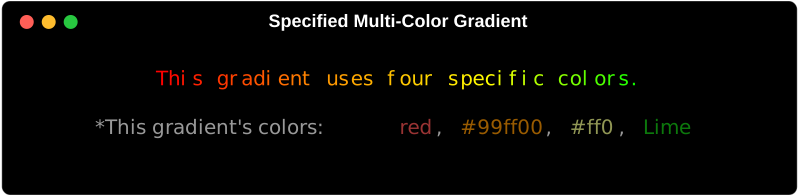
If you want a bit more control of the gradient, you can specify the colors you want to use in the gradient by passing them as a list of colors to the colors parameter.
Color can be parsed from a variety of formats including:

console.print(
    Text(
        "This a gradient with two colors.",
        colors=["red", "orange"]
    ),
    justify="center"
)
console.print(
    Text(
        "This a gradient uses four specific colors.",
        colors=["red", "#ff9900", "#ff0", "Lime"],
        justify="center"
    )
)
If four colors isn't enough, you can use the 'rainbow' parameter to generate a rainbow gradient that spans the entire spectrum of colors randomly.
console.print(
    Text(
        "This is a rainbow gradient.",
        rainbow=True,
        justify="center"
    )
)
*The rainbow gradient is generated randomly each time the code is run.
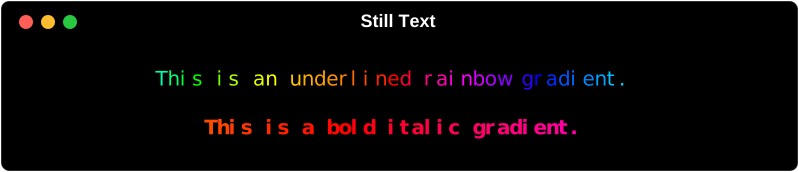
Since Gradient is a subclass of Text, you can still use all the same methods and properties as you would with Text.
console.print(
    Gradient(
        "This is an underlined rainbow gradient.",
        rainbow=True,
        style="underline"
    ),
    justify="center"
)
console.line()
console.print(
    Gradient(
        "This is a bold italic gradient.",
        style="bold italic"
    ),
    justify="center"
)
console.line()