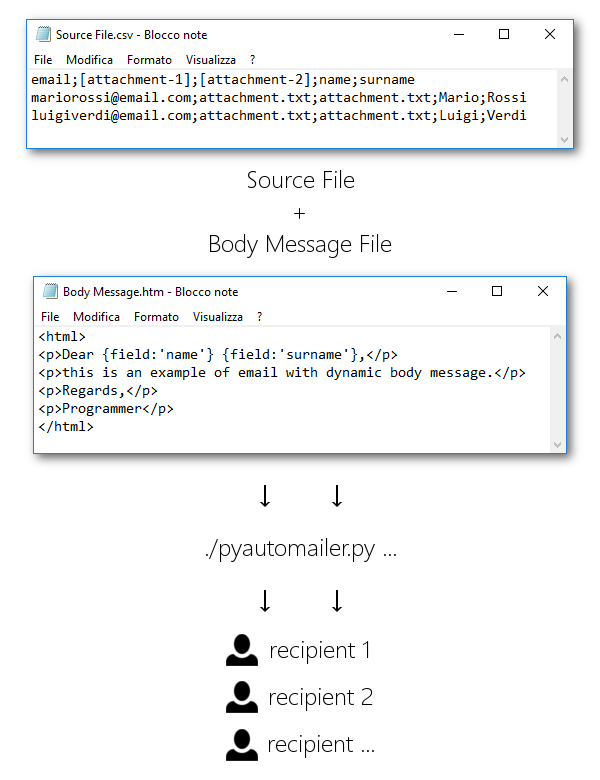
pyautomailer is a Python module (with command line tool to use it directly from terminal) that allows you to send massive custom email. It can be used with massive SMTP sending service or with standard mailbox after set sending limit to avoid SPAM and black-lists.

Contents
- E-Mail bulk sending.
- HTML dynamic Body message.
- Dynamic Subjects and Attachments.
On Windows, pyautomailer can be installed via PyPi (recommended):
$ pip install pyautomaileror manually from source code:
$ python setup.py installUfficially MacOS and Linux aren't supported but tool use standard Python library that can allow it to work. Not tested at the moment.
Pyautomailer works with Python 3.
Import module:
from pyautomailer import PyAutoMailer, PyAutoMailerModeClass initialization indicating SMTP parameters:
am = PyAutoMailer('SENDER', 'HOST', 25, 'USERNAME', 'PASSWORD')Set properties:
am.subject = 'SUBJECT STRING'
am.body_file = 'BODYMESSAGE.TXT'

# Sending mode
am.mode = PyAutoMailerMode.BULK_SEND
Send messages:
am.run_service('SOURCEFILE.CSV')Close connection:
am.close()# Enable TEST mode.
am.test = True
# Set body message with string and not using a text file.
am.body = 'BODY OF MESSAGE'Pyautomailer can send single email message using ONE-SEND mode.
# Sending mode
am.mode = PyAutoMailerMode.ONE_SEND

# Attachments
am.attachments = ['PATH_TO_ATTACHMENT_1','PATH_TO_ATTACHMENT_1',...]

# Recipient of message is passed as run_service parameter.
am.run_service('RECIPIENT')
Attachments properties is available only in ONE-SEND mode.
Using this mode, dynamic subject and dynamics body message aren't supported.
from pyautomailer import PyAutoMailer, PyAutoMailerMode

# Initialization
am = PyAutoMailer('sender@email.com', 'smtphost.com', 25, 'senderuser', 'senderpassword')

# Message proprierties
am.subject = 'This is a test email.'
am.body_file = 'C:\bodymessage.txt'

# Sending mode
am.mode = PyAutoMailerMode.BULK_SEND

# Run sending
am.run_service('C:\sourcefile.csv')

# Close connection
am.close()$ pyautomailer [-h] [-H HOST] [-P PORT] [-U USERNAME] [-PWD PASSWORD] [-SND SENDER] [-S SUBJECT] [-A ATTACHMENTS] [-BF BODY_FILE | -B BODY] [-t] {bulk-send,bs,one-send,os} ...See also pyautomailer --help and pyautomailer <command> --help.
Bulk sending mode:
$ pyautomailer -H smtphost.com -U senderuser -PWD senderpassword -SND sender@email.com -S "This is a test email." -BF "C:\bodymessage.txt" bulk-send "C:\sourcefile.csv"One email sending mode:
$ pyautomailer -H smtphost.com -U senderuser -PWD senderpassword -SND sender@email.com -S "This is a test email." -A "C:\attachment_1.jpg,C:\attachments_2.txt" -B "This is body message of email." one-send mariorossi@email.comIt contains all information about messages of a bulk send. It is a CSV file delimited by semicolon where the first field is always email address of recipient.
Header row is required to indicate dynamic fields key and the number of attachments.
Attachments fields must contain the complete file path and the header must be "[attachment-N]" where N stands for the number of attachment.
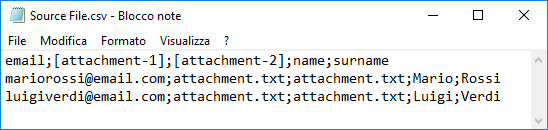
In this example there are two attachments ("[attachment-1]" and "[attachment-2]") and two dynamic fields ("name" and "surname").
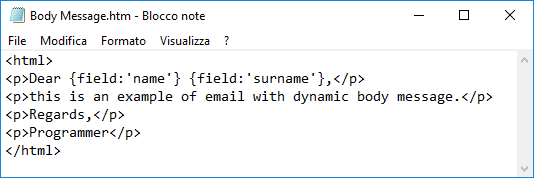
It contains the body message of email. It can be written in HTML.
Dynamic fields can be added using this form: {field:'KEY'}, where "KEY" is the field key inside header row of source file.
Please use the following support channel GitHub issues for bug reports and feature requests.
Pyautomailer uses only standard Python 3 libraries.
See CHANGELOG.
MIT: LICENSE.
Matteo Cappello created pyautomailer.