This project aims to create an IoT system for autonomous navigation of a rover intended for asteroid exploration, characterized by low gravity and irregular surfaces. It has been chosen to deal with the case where the rover, which has already successfully landed on a large asteroid such as Vesta or on the dwarf planet Ceres, consists of robotic legs with harpoons and has the mission of moving over the ground to map the surface with the help of LiDAR and gyroscope. Thus focusing exclusively on possible motion management, the goal is then to take care of part of the network of sensors and actuators that would be part of the rover’s electronic components to help it move by managing obstacles.
- App: contains the source code per Java Application, including main class Controller;
- CoAP: contains the C code of the actuators legs servo motors and harpoons and the exposed resources movement and anchoring;
- MQTT: contains the C code for motion-hub, which handles connection to Mosquitto broker, publishing sensors messages to correspondent topics and receiving the messages from the MQTT Collector developed in Java;
- sensing: contains the C code of the sensors LiDAR and gyroscope;
- rpl-border-router: contains the C code used to be deployed in the IoT network in simulation and real devices;
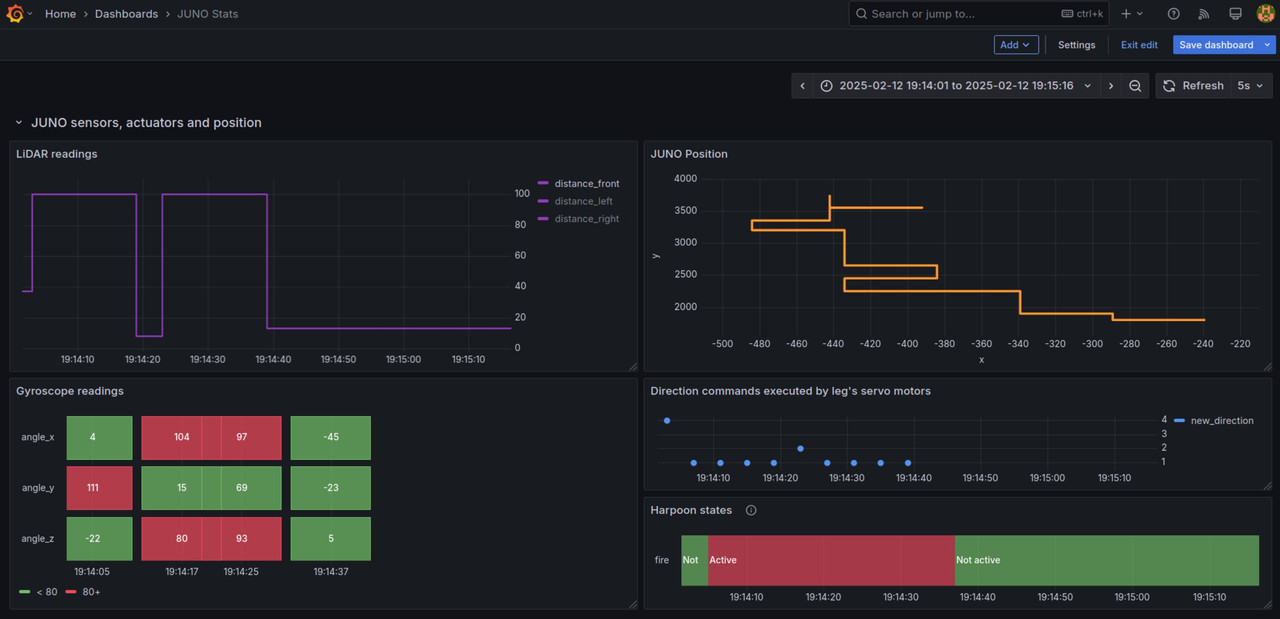
- Grafana: contains a JSON document da can be used to export the Grafana dashboard of JUNO, to visualize the data collected and see the updating in real-time.
- Contiki-NG
- Mosquitto MQTT broker
- MySQL
- Grafana
- Download the project into the contiki-ng/examples folder;
- Create the database with the rover_control.sql script in App/src/main/java/org/Persistence;
- Run the Mosquitto MQTT broker;
If the network is simulated through Cooja:
- deploy the rpl-border-router and connect the router;
- Copy motion-hub folder (contained in MQTT folder) in contiki-ng/examples and deploy motion-hub.c as a mote;
- Copy legs-servo-motors and harpoons folders (contained in CoAP folder) in contiki-ng/examples and deploy legs-servo-motors.c and harpoons.c as two different motes;
- Start the simulation and wait for the motion-hub mote to be connected with the broker;
If the network is simulated using real devices (nRF52840 dongle board):
- Flash the code of the rpl-border-router on a single dongle;
- Flash the code of motion-hub on another dongle and wait to be connected with the broker;
- Flash the code of legs-servo-motors and harpoons on 2 distinct dongles;
In the end, for both cases:
- Run the Java application and ensure that it's connected to the MQTT broker and database.
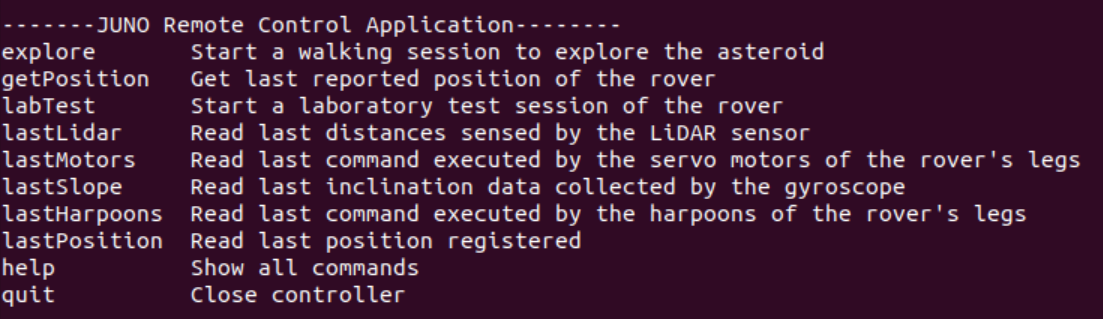
In particular:
- explore refers to a simulated walk over the asteroid. Data are stored in the database and it's possible to visualize the Grafana plots being updated in real-time;
- labTest refers to a simulated walk in the laboratory for testing purpose. Data are not stored in the database, but it's possible to see feedback on obstacles and inclination through different colours of LEDs over the motion-hub mote/device. The button of motion-hub can be pressed for less or more than 2 seconds to enable or disable, respectively, the LiDAR and gyroscope to study the situation of sensors out of order after the impact over the asteroid.
Export the Grafana dashboard, JUNO Stats, using the JSON code provided in the Grafana folder. You can see, in the case of explore mode, the data and position changing in real-time: