This repository provides three different methods to extract planes (wall and ground) from point clouds using ROS and PCL (Point Cloud Library). Each method has its own launch file and configuration file where various parameters can be set and modified according to your requirements.
- Source File:
src/plane_extraction.cpp - Overview: This method segments large point clouds to extract planes using clustering and segmentation. It is effective for processing large datasets where multiple planes need to be identified and extracted.
- Advantages: Efficient for large datasets, identifies multiple planes.
- Disadvantages: Computationally intensive, requires good parameter tuning.
- Source File:
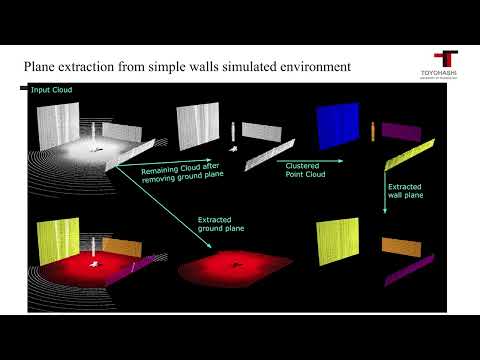
src/plane_extraction_with_out_clustering.cpp - Overview: This method first extracts the ground plane and then applies clustering to subdivide the region to extract wall planes from each sub-region.
- Advantages: Effective for structured environments, focuses on separating ground and wall planes.
- Disadvantages: Requires accurate initial ground plane extraction.
- Source File:
src/plane_extraction_using_selected_roi.cpp - Overview: This method requires manual selection of the region of interest to extract wall or ground planes from that region. It is suitable for scenarios where specific areas need to be analyzed.
- Advantages: High precision for selected regions, user control over extraction area.
- Disadvantages: Manual selection required, less efficient for large datasets.
- Extract the ground plane from the input cloud.
- Perform clustering on the extracted ground plane.
- Select the largest cluster plane from the ground plane clustering.
- Remove the extracted plane points from the input cloud.
- Perform clustering on the remaining points after removing the ground plane.
- For each cluster, while the number of remaining plane points is above the threshold:
- Extract a plane from the cluster.
- Remove the extracted plane points from the cluster.
wall_ground_plane_extractor_from_pointcloud/
├── launch/
│   ├── plane_extraction.launch
│   ├── plane_extraction_using_selected_roi.launch
│   ├── plane_extraction_with_out_clustering.launch
├── config/
│   ├── method1.yaml
│   ├── method2.yaml
│   ├── method3.yaml
├── src/
│   ├── plane_extraction.cpp
│   ├── plane_extraction_with_out_clustering.cpp
│   ├── plane_extraction_using_selected_roi.cpp
├── CMakeLists.txt
├── package.xml
└── README.md
- ROS (Robot Operating System)
- PCL (Point Cloud Library)
cd ~/catkin_ws/src
git clone <repository_url>
cd ..
catkin_make
source devel/setup.bashroslaunch wall_ground_plane_extractor_from_pointcloud plane_extraction.launchroslaunch wall_ground_plane_extractor_from_pointcloud plane_extraction_with_out_clustering.launchroslaunch wall_ground_plane_extractor_from_pointcloud plane_extraction_using_selected_roi.launchEach method has a configuration file located in the config directory. You can modify the parameters in these files based on your requirements.
You can adjust the parameters in the configuration files (method1.yaml, method2.yaml, method3.yaml) to tune the plane extraction process to your specific use case. Refer to the documentation within each configuration file for details on the available parameters and their usage.