Coding guidelines
.js code has to conform to the checked in .eslintrc files. Configure your environment accordingly, see here for Webstorm: WebStorm-IDE-Settings
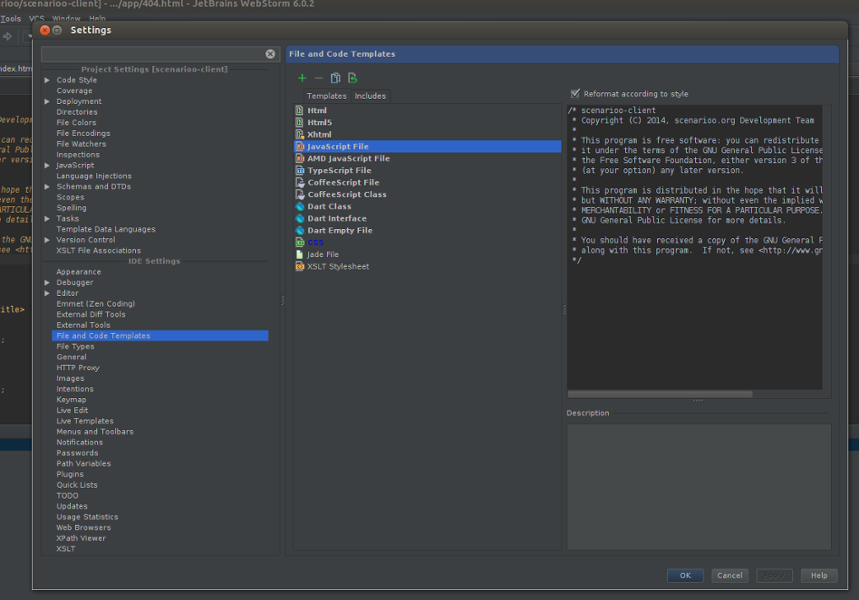
Our gulp build adds this automatically to each *.js file.
Follow the John Papa AngularJS Style Guide.
We decided that the following rules are the most important ones and they must be obeyed whenever possible.
Create folders named for the feature they represent. When a folder grows to contain more than 7 files, start to consider creating a folder for them. Your threshold may be different, so adjust as needed.
https://github.com/johnpapa/angular-styleguide/blob/master/a1/README.md#style-y152
Use consistent names for all components following a pattern that describes the component's feature then its type: feature.type.js.
https://github.com/johnpapa/angular-styleguide/blob/master/a1/README.md#style-y120
Name test specifications similar to the component they test with a suffix of spec.
https://github.com/johnpapa/angular-styleguide/blob/master/a1/README.md#style-y122
Use consistent names for all controllers named after their feature. Use UpperCamelCase for controllers, as they are constructors.
https://github.com/johnpapa/angular-styleguide/blob/master/a1/README.md#style-y123
Append the controller name with the suffix Controller.
https://github.com/johnpapa/angular-styleguide/blob/master/a1/README.md#style-y124
Use consistent names for all factories and services named after their feature. Use camel-casing for services and factories. Avoid prefixing factories and services with $. Suffix service and factories with Service.
https://github.com/johnpapa/angular-styleguide/blob/master/a1/README.md#style-y125
Use consistent names for all directives using camel-case. Use a short prefix to describe the area that the directives belong (some example are company prefix or project prefix). For Scenarioo we use the prefix sc (e.g. scMetadataTree).
https://github.com/johnpapa/angular-styleguide/blob/master/a1/README.md#style-y126
When there are multiple modules, the main module file is named app.module.js while other dependent modules are named after what they represent. For example, an admin module is named admin.module.js. The respective registered module names would be app and admin.
https://github.com/johnpapa/angular-styleguide/blob/master/a1/README.md#style-y127
Separate configuration for a module into its own file named after the module. A configuration file for the main app module is named app.config.js (or simply config.js). A configuration for a module named admin.module.js is named admin.config.js.
https://github.com/johnpapa/angular-styleguide/blob/master/a1/README.md#style-y128
Separate route configuration into its own file. Examples might be app.route.js for the main module and admin.route.js for the admin module. Even in smaller apps I prefer this separation from the rest of the configuration.
https://github.com/johnpapa/angular-styleguide/blob/master/a1/README.md#style-y129
TODO: Is this still up to date?
- general guideline: no inlined anonymous functions --> instead named functions, e.g. see UseCaseCtrl, resetSearchField etc.
-
var vm = this;- vm as an abreviation for "view model" (first line of controller code!) - then initialize all properties that are available on the view model, e.g.
vm.labelConfigurations = {}; - then assign all public functions (only the public ones!) on the view model, e.g.
vm.resetSearchField = resetSearchField; - then call the activate function, which is responsible to initialize the controller / view model:
activate() - all other initialization logic belongs inside the activate function (never directly inlined inside the controller function)
- finally define all other controller logic functions (ordered top-down by their dependencies, as most comfortable for developers)
- The prefix for our own CSS classes is
sc.- Examples:
sc-tree,sc-node-label
- Examples:
- Formatting and code style must conform to the Eclipse settings defined here: https://github.com/scenarioo/scenarioo/wiki/Eclipse-IDE-Settings
- Follow the clean code reccommendations from the "Clean Code" book
- Order in a Java class:
- Fields
- Constructors
- Factory methods
- Getters / setters for properties
- Other methods
- hashCode / equals / toString
- Use constructor dependency injection. Make sure that classes with "business logic" get their dependencies injected, so that they are easily testable.
- Do not add the
serialVersionUIDto classes.
- Formatting and code style must be conform with settings defined here: https://github.com/scenarioo/scenarioo-cs/blob/master/scenarioo-cs.sln.DotSettings
In every sourcefile (*.java, *.gradle, *.js, *.css, *.html,...) the correct licence header must be contained. In the versioned eclipse project the settings have been adjusted accordingly and new Java file while automatically contain the correct headers (depending on the module -server, -api and -docu-generation-example) for all other files (e.g. gradle files or properties) please always make sure that the correct header is included before adding to version control.
For the scenarioo-client module the code template settings (for *.js, *.css and *.html) in your favourite IDE must be configured by yourself (for WebStorms see below).