Getting started
Go to https://data-manager.qrcode.macherel.fr/ and click on the "+" button beside the token field.


The newly created token should be copied in a secure place for future use.
Create a new code by scanning existing one.


Then put a name and close the form.


NOTE : If you cannot scan you code, you can manually configure it by copying the value and selecting the proper type. If you don't see the barcode type in the list, please have a look to the supported formats (https://github.com/metafloor/bwip-js/wiki/BWIPP-Barcode-Types) and copy the corresponding "BWIPP Encoder" to the field.
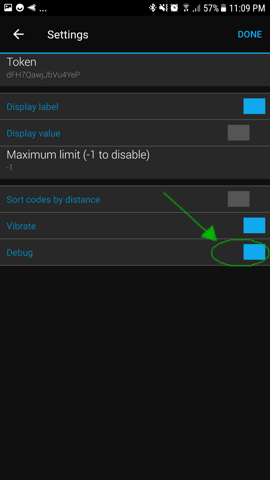
Copy your token in the app settings (using Garmin Connect on your phone)


Your chodes should be synchronized when the app is starting (it can take a few seconds).
If it fails to synchronize your codes, you can enable the "debug" mode to force synchronization and have a message if an error occurs.
Please see FAQ