This package's goal is to cache API response. This proxy acts as interceptor between client and server. Any (or filtered) HTTP request from client will go through the proxy . The process itself can be explained as figure below.
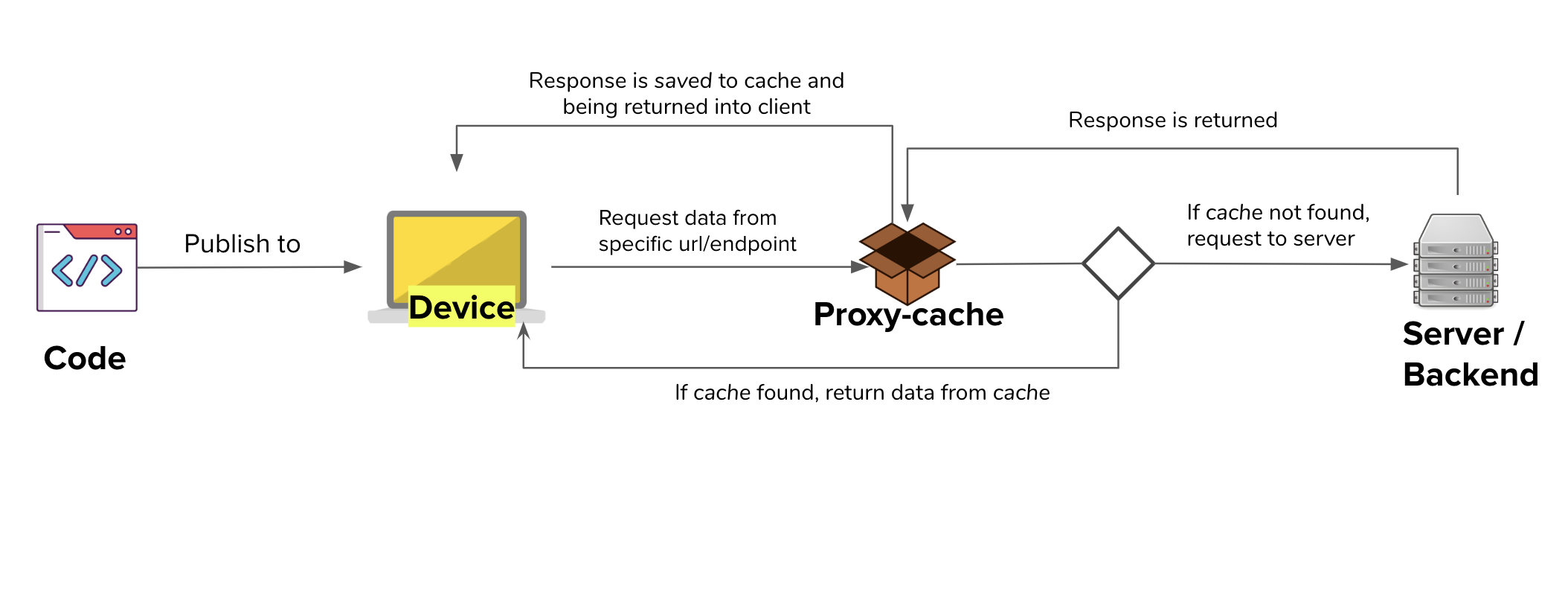
This project is node based app. You can install node js here
$ git clone --depth 1 git@github.com:linkors/proxy-cache.git
$ cd <repo_name>$ yarn installYou can run proxy-cache with
$ node proxy-cache [options]These are the list of arguments you can pass:
| Option | Description | Default |
|---|---|---|
-p, --port [value] |
Port for proxy | 8001 |
-w, --web [value] |
Web GUI port | 8002 |
-f, --filter [value] |
List of regex to be matched with url (comma separated), default all page will be cached | - |
-m, --mode [value] |
Set cache mode | all |
-c, --code [value] |
Http code to filter if use mode 'code' (comma separated) | - |
-t, --ttl [value] |
How long cache will be saved (in seconds) | 3600 |
--persist [value] |
Enable persistence cache | - |
--clean [value] |
Clean persisted cache | - |
-s, --setglobalproxy |
Will automatically set global proxy on start | - |
-i, --ignorerule |
Use this if you just want to check request response. It will ignore defined rule. | - |
example of usage:
// Will cache any response from url
// that contains `api/v2/` or `api/v1/`, eg `http://api.test/api/v2/cinema/list`
// and will return from cache whenever cache is available
$ node proxy-cache -f api/v2/.*,api/v1/.*

// Will cache any response from url
// that contains `api/v2/`
// and will return from cache when server return http code 500
$ node proxy-cache -f api/v2/.* -m code -c 500
Currently, there are two mode available:
| mode | description |
|---|---|
| all | Will return from cache if cache exists |
| code | Will return from cache if cache exists only on specific http code |
Mode code must be used with -c option
node proxy-cache -m code -c 500
This will only return cache if actual response from server is returning http code 500.
By default cache will be saved as file on memory. But, if you use --nopersist option, cache will be saved on memory. This means if you turn off proxy-cache, all cache will be removed.
For proxy ing any https requests, you need to add Anyproxy certificate as trusted source.
Use this command to generate CA certificate
$ node_modules/.bin/anyproxy-caThen you need to trust the generated certificate to your browser/device. You can see how to set up it Anyproxy Config Certification.
Warning: please keep your root CA safe since it may influence your system security. Note: you only need to do this once.
Internet connection still need to be online, because this package acts as proxy for internet network.