Imager is a proof-of-concept implementation of a genetic algorithm. The purpose of the algorithm is to redraw a source image as detailed as possible.
The genetic algorithm comes from the field of Artifical Intelligence, in which it mimics the process of natural selection. It can be used for types of problems for which the global optimal solution is unknown or for which there is no known algorithm to calculate it.
A genetic algorithm consists of 4 steps: initialisation, selection, mutation, termination. This program performs these steps in the following way:
The program starts with a starting population of size 1: An empty image.
From the population, the best child image is chosen. A fitness function is used to determine which child image generates the best result. The fitness function of the algorithm is defined as the sum of the colour distance of all pixels of the image compared to the source image. Color distance acts as an error rate; a lower fitness value implies a better resembling image.
Note: when none of the child images yields a better fitness value than the current image, then the current image will be used as a starting point of the new population. This means that the fitness value cannot get worse during runtime. However, at some point it can take a very long time to make further progress.
The program modifies the population by making a number of copies (child images) of the image that was chosen at the selection step. Each of the child images is mutated by adding a random object to the image. The user can chose the type of object: dot, line or polygon.
The algorithm doesn't terminate automatically; it will run as long as the program is active. However, a number of termination criteria can be implemented, e.g. runtime or fitness threshold.
- Open the solution and build/run the program.
- Click File -> Open... in the menu and select the favorite picture of your cat.
- Select the type of mutation element type you want to use (dot, line, polygon) by using the radio buttons.
- Select the color mode you want to use (grayscale, color) by using the radio buttons.
- Note that the element type and color mode can be changed during the process.
- Click Imager -> Run and go get a cup of coffee. :)
- Visual Studio 2012 is required to build this program.
- The program is fairly slow. The hardest task is to draw and calculate the fitness of the child images in memory during each iteration. The dimensions of the source image have a great impact on the speed of the program.
- The program doesn't take any advantage of parallel processing of the child images. This can give a great improvement to the performance of the program.
The program running in progress:
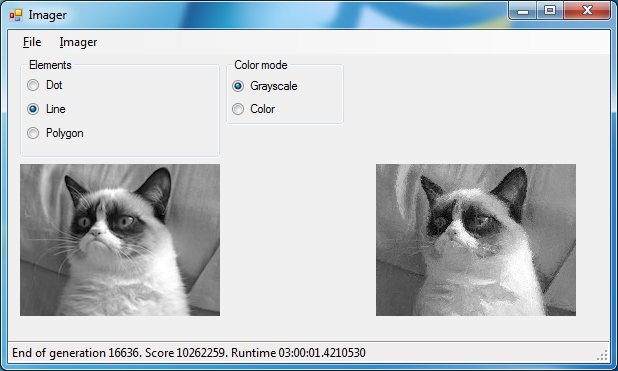
Grumpy cat does NOT approve of the result!