


AI-powered translation for app localization. Automatically translate your i18n files to 165+ languages using AI. Supports JSON and Flutter ARB formats with intelligent project structure detection.
Powered by l10n.dev
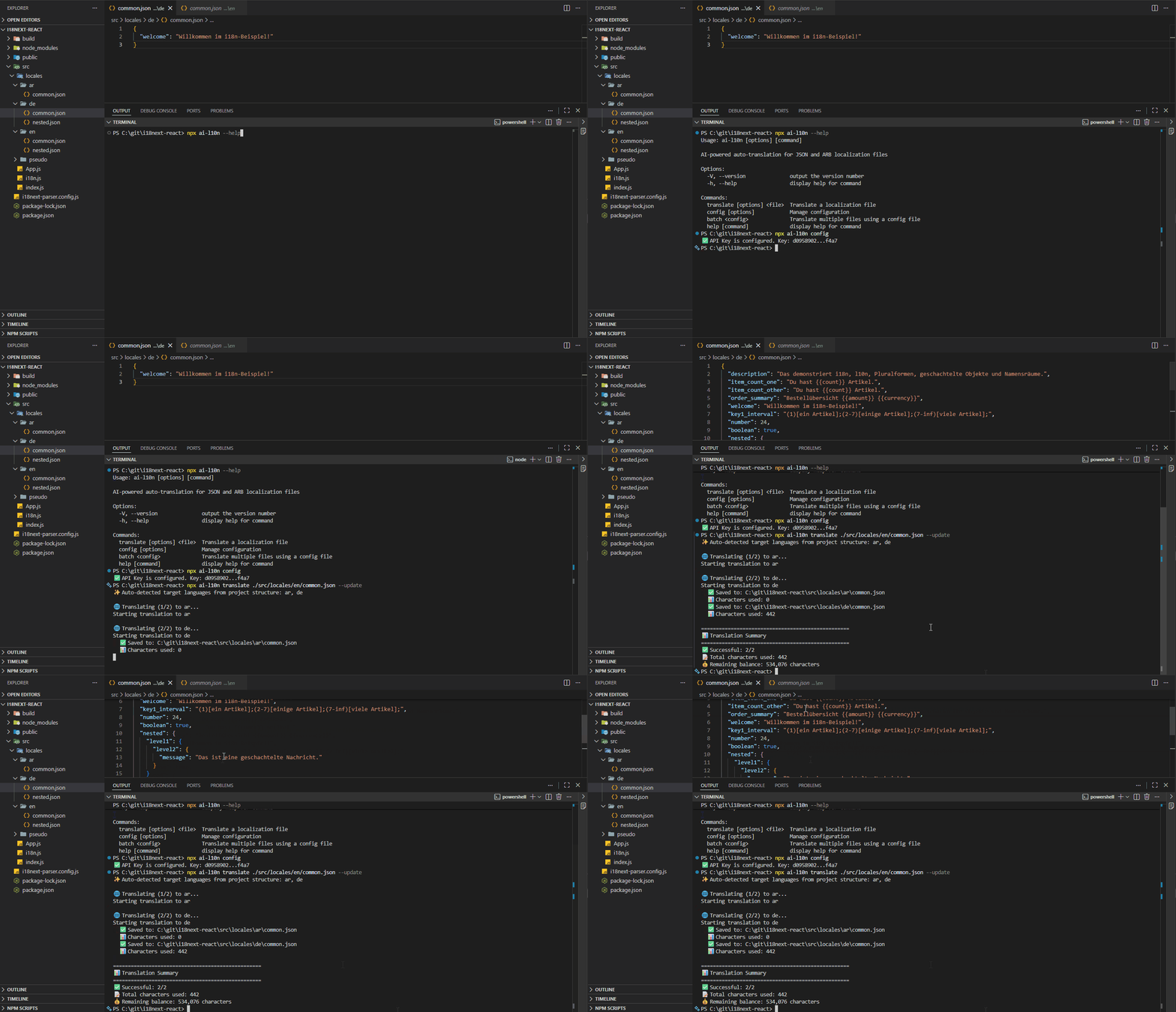
- 🤖 AI-Powered Translations - Context-aware translations using advanced AI
- 🌍 165 Languages - Translate to any of 165 supported languages with varying proficiency levels
- 📁 Smart Detection - Automatically detects target languages from your project structure
- 🔄 Incremental Updates - Translate only new strings while preserving existing translations
- 🔒 Type Safety - Preserves JSON data types—numbers stay numbers, booleans stay booleans, null values are maintained
- 🎯 Multiple Formats - Supports JSON and Flutter ARB files with full metadata handling
- ⚙️ Flexible Configuration - Use via CLI, programmatically, or in CI/CD pipelines
- 🌐 i18next Plural Forms Support - Automatically generates all required plural form strings with correct suffixes. For languages with complex pluralization rules (like Russian, Arabic, or Polish), ensures every necessary form is created
- 🛠️ Developer-Friendly - Preserves placeholders, HTML tags, and formatting while adapting dates and numbers to target locales. Intelligently avoids translating proper names, URLs, and technical terms. Learn more about I18N Translation Using AI
- 🕵️ Smart Error Detection & Chunking - Automatically detects and retries if placeholders or formatting are lost. For large files, splits content into manageable chunks while maintaining context. Prevents issues common with direct AI uploads (Claude/GPT) where exceeding ~16,000 characters causes content loss
- 🔍 Content Filtering - Automatic content filtering at moderate sensitivity. Filtered strings saved separately in i18n JSON format for review
- 📊 Usage Tracking - Monitor character usage and remaining balance
- 💰 Free Tier - Get 30,000 characters free every month
npm install ai-l10nnpm install ai-l10n-sdkGet your free API key from l10n.dev/ws/keys
You can provide your API key in three ways:
Option A: Save it globally
npx ai-l10n config --api-key YOUR_API_KEYOption B: Use environment variable
export L10N_API_KEY=your_api_key_hereOption C: Pass it directly in code or CLI
npx ai-l10n translate path/to/file.json --api-key YOUR_API_KEY# Auto-detect target languages from project structure
npx ai-l10n translate path/to/en.json
# Specify target languages
npx ai-l10n translate path/to/en.json --languages es,fr,de
# Update existing files with only new translations
npx ai-l10n translate path/to/en.json --updatenpx ai-l10n translate ./locales/en.json \
--languages es,fr,de \
--plural \ # Generate plural forms (adds suffixes, e.g., for i18next)
--shorten \ # Use shortening
--no-contractions \ # Don't use contractions (e.g., "don't" vs "do not")
--update \ # Update existing files only
--verbose # Detailed loggingCreate a config file translate-config.json:
[
  {
    "sourceFile": "./locales/en/common.json",
    "targetLanguages": ["pl", "ru", "ar"],
    "generatePluralForms": true,
    "translateOnlyNewStrings": true
  },
  {
    "sourceFile": "./locales/en/admin.json",
    "targetLanguages": ["pl", "ru", "ar", "de"]
  }
]
Run batch translation:
npx ai-l10n batch translate-config.json# View current API key status
npx ai-l10n config
# Set API key
npx ai-l10n config --api-key YOUR_API_KEY
# Clear API key
npx ai-l10n config --clearimport { AiTranslator } from 'ai-l10n';
const translator = new AiTranslator();
const result = await translator.translate({
sourceFile: './locales/en.json',
targetLanguages: ['es', 'fr', 'de'],
});📚 See the ai-l10n-sdk README for:
- Complete API documentation and TypeScript interfaces
- Advanced usage examples
- Custom logger integration
- Error handling and type definitions
Add scripts to your package.json:
{
  "scripts": {
    "translate": "ai-l10n translate ./locales/en.json",
    "translate:update": "ai-l10n translate ./locales/en.json --update",
    "translate:all": "ai-l10n batch translate-config.json"
  }
}
Then run:
npm run translate
npm run translate:update
npm run translate:allai-l10n provides a ready-to-use GitHub Action for automated translations. The action uses the batch command with a config file for flexible, multi-file translation workflows.
Quick Setup:
- Create a translation config file
ai-l10n.config.jsonin your repository root:
[
  {
    "sourceFile": "./locales/en/common.json",
    "targetLanguages": ["es", "fr", "de"],
    "translateOnlyNewStrings": true
  }
]- Add the workflow file:
name: Auto-translate i18n files

on:
  push:
    branches:
      - main
    paths:
      - 'locales/en.json'
      - 'locales/en/**'
      - 'ai-l10n.config.json'

permissions:
  contents: write

jobs:
  translate:
    runs-on: ubuntu-latest
    steps:
      - uses: actions/checkout@v4

      - uses: l10n-dev/ai-l10n@v1
        with:
          api-key: ${{ secrets.L10N_API_KEY }}
          config-file: 'ai-l10n.config.json'
          pull-request: false
Action Inputs:
| Input | Description | Default | Required |
|---|---|---|---|
version |
L10n.dev CLI version | latest |
No |
api-key |
L10n.dev Platform API Key | - | No (can use L10N_API_KEY env var) |
github-token |
GitHub token for PR creation (optional if repo setting enabled) | github.token |
No |
config-file |
Path to translation config file | ai-l10n.config.json |
No |
pull-request |
Create PR instead of direct commit | false |
No |
commit-message |
Commit message | feat: update translations via L10n.dev |
No |
pull-request-title |
Pull request title | feat: update translations via L10n.dev |
No |
commit-author-name |
Git commit author name | L10n.dev |
No |
commit-author-email |
Git commit author email | support@l10n.dev |
No |
process-own-commits |
Process commits made by this action | false |
No |
working-directory |
Working directory (for monorepos) | . |
No |
skip-setup-node |
Skip Node.js setup if already installed | false |
No |
ℹ️ Note on Pull Requests: To use
pull-request: true, you have two options:
- Enable repository setting (recommended): Go to Settings > Actions > General and enable "Allow GitHub Actions to create and approve pull requests"
- Use Personal Access Token: Provide a PAT with
reposcope viagithub-tokeninput
📚 More Examples:
- Pull Request workflow - Creates PR for review (recommended for main/master)
- Direct Commit workflow - Commits directly (for feature branches)
- Manual Trigger workflow - Run manually with custom inputs
translate:
  stage: build
  script:
    - npm install
    - npx ai-l10n translate ./locales/en.json --update
  only:
    changes:
      - locales/en.json
  variables:
L10N_API_KEY: $L10N_API_KEYpipeline {
agent any
environment {
L10N_API_KEY = credentials('l10n-api-key')
}
stages {
stage('Translate') {
steps {
sh 'npm install'
sh 'npx ai-l10n translate ./locales/en.json --update'
}
}
}
}ai-l10n automatically detects your project structure and generates translations accordingly.
locales/
  en/
    common.json
    errors.json
  es/                  # Auto-detected
    common.json
    errors.json
  zh-Hans-CN/          # Auto-detected
    common.json
locales/
  en.json              # Source
  es.json              # Auto-detected
  fr-FR.json           # Auto-detected
  zh-Hans-CN.json      # Auto-detected
lib/l10n/
  app_en.arb           # Source
  app_es.arb           # Auto-detected
  app_fr_FR.arb        # Auto-detected
  app_zh_Hans-CN.arb   # Auto-detected
| Option | Type | Default | Description |
|---|---|---|---|
sourceFile |
string |
required | Path to source file (JSON or ARB) |
targetLanguages |
string[] |
auto-detect | Target language codes (e.g., ["es", "fr", "de"]) |
apiKey |
string |
env/stored | API key for l10n.dev |
generatePluralForms |
boolean |
false |
Generate plural forms with suffixes (e.g., for i18next). Don't use for strict source-to-target mapping |
useShortening |
boolean |
false |
Use shortening in translations |
useContractions |
boolean |
true |
Use contractions in translations (using contractions makes the translation less formal) |
saveFilteredStrings |
boolean |
true |
Save filtered strings (i18n JSON format with source strings excluded due to content policy violations) to separate .filtered file |
translateOnlyNewStrings |
boolean |
false |
Update existing files with only new translations |
verbose |
boolean |
false |
Enable detailed logging |
The service uses automated content filtering systems configured at moderate sensitivity levels to balance safety with service availability. When content is filtered:
- Filtered strings are saved in i18n JSON format to a
.filteredfile (ifsaveFilteredStringsis enabled) - Content filtering operates automatically and does not constitute editorial control over your content
If strings are filtered, you'll see:
⚠️ X string(s) were excluded due to content policy violations
ℹ️ View content policy at: https://l10n.dev/terms-of-service#content-policy
📝 Filtered strings saved to: path/to/file.filtered.json
l10n.dev supports 165+ languages with varying proficiency levels:
- Strong (12 languages): English, Spanish, French, German, Chinese, Russian, Portuguese, Italian, Japanese, Korean, Arabic, Hindi
- High (53 languages): Most European and Asian languages including Dutch, Swedish, Polish, Turkish, Vietnamese, Thai, and more
- Moderate (100+ languages): Wide range of world languages
Use standard language codes (BCP-47 with optional script and region):
- Simple:
es,fr,de,ja,zh - With region:
en-US,en-GB,pt-BR,zh-CN - With script:
zh-Hans,zh-Hant - Full format:
zh-Hans-CN
For ARB files, use underscores: en_US, zh_Hans_CN
# Check if API key is configured
npx ai-l10n config

# Set new API key
npx ai-l10n config --api-key YOUR_API_KEY

# Or use environment variable
export L10N_API_KEY=your_api_key_hereIf auto-detection fails, specify languages explicitly:
npx ai-l10n translate ./locales/en.json --languages es,fr,dePurchase more characters at l10n.dev/#pricing
- VS Code Extension - Translate directly in VS Code
- 📧 Email: support@l10n.dev
- 🐛 Issues: GitHub Issues
- 📚 API Documentation: l10n.dev/api/doc
- 🌐 Website: l10n.dev
- Free Characters: 30,000 characters free every month
- Pay-as-you-go: Affordable character-based pricing with no subscription required
- Current Pricing: Visit l10n.dev/#pricing for up-to-date rates
- Secure API Keys: Stored securely in your home directory (~/.ai-l10n/config.json) or via environment variables
- No Data Storage: Source code and translations are not stored on our servers beyond processing time
- Encrypted Communication: All communication with l10n.dev API uses HTTPS encryption
- Privacy First: Built by developers for developers with privacy, reliability, and quality as top priorities
💡 Tip for Large-Files Translation:
This npm package translates files in real-time via the Translate JSON API and does not store your JSON or translations on our servers. For very large files, translation may take several minutes.
On the I18N File Translation page, you can:
- Securely create translation jobs for batch processing
- Set custom terminology for consistent translations
- Monitor progress in real-time
- Download files when complete with full control (delete anytime)
Example:
// ✅ CORRECT: New items added at the end
// source.json
["Apple", "Banana", "Orange"]

// target.json (existing)
["Manzana", "Plátano"]

// After translation (new item appended)
["Manzana", "Plátano", "Naranja"]

// ❌ INCORRECT: Items inserted in the middle
// This will cause misalignment!
["Apple", "Cherry", "Banana", "Orange"]
For object-based JSON structures (recommended for i18n), this is not a concern as translations are matched by key names.
AGPL-3.0
Powered by l10n.dev - AI-powered localization service