An advanced Chrome extension that revolutionizes research workflows using Google Chrome's built-in AI APIs.



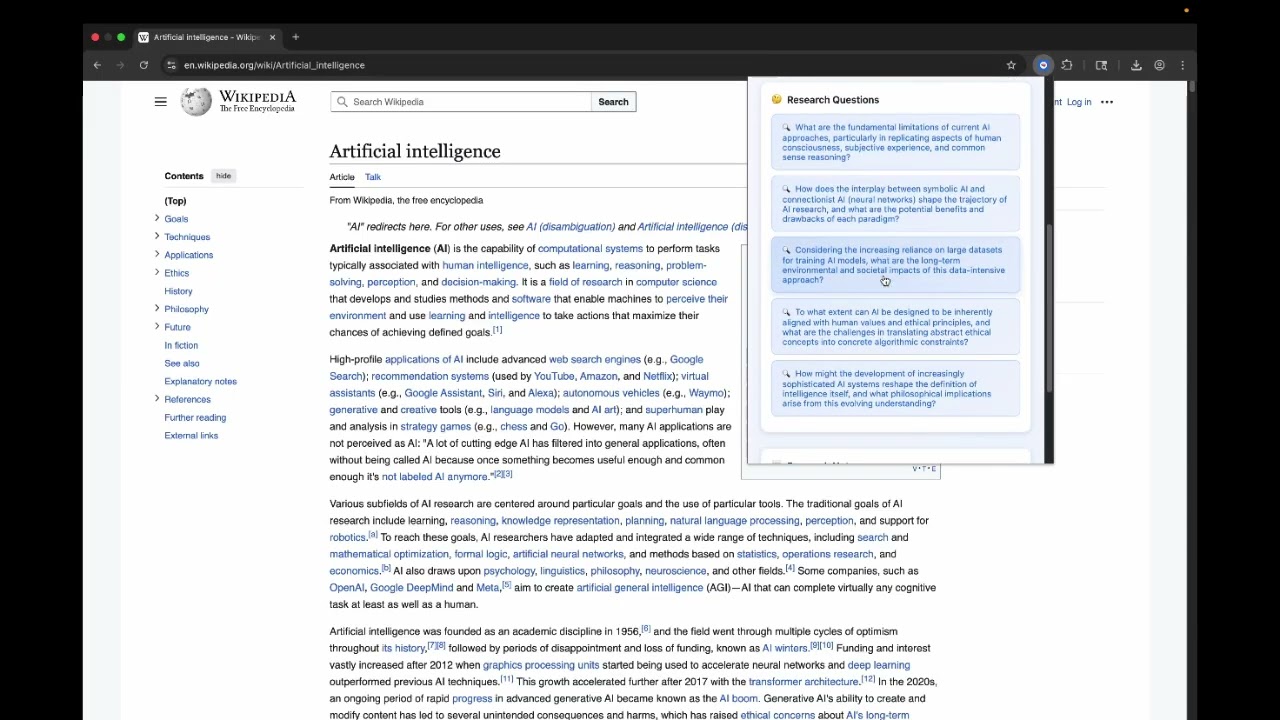
- 📄 Intelligent Summarization: Extract key insights from any webpage using Chrome's Summarizer API
- 🤔 Research Questions: Generate thoughtful follow-up questions using the Prompt API
- ✨ Content Rewriting: Rephrase summaries in different styles using the Rewriter API
- 🎯 Smart Highlighting: Visually highlight key terms from summaries on the original page
- 📤 Export Functions: Export research to Markdown format or copy to clipboard
- 📚 Research Library: Save and organize research notes with timestamps
- ⌨️ Keyboard Shortcuts: Power user shortcuts (Alt+S, Alt+Q, Alt+H)
- 🔍 Visual Feedback: Professional UI with loading animations and status indicators
- Local AI Processing: All AI operations run locally on your device
- Zero Data Collection: No user data is collected or transmitted
- Offline Capable: Works without internet once AI models are downloaded
- Cost-Free Operation: No API keys or server costs required
This extension showcases the power of Chrome's built-in AI APIs to create a seamless, privacy-focused research experience that was previously impossible on the web.
Target Category: Most Helpful - Chrome Extension ($14,000)
- Chrome Canary or Chrome Dev (required for built-in AI APIs)
- Chrome Built-in AI Early Preview Program enrollment
- Enable required flags in
chrome://flags/:#prompt-api-for-gemini-nano#summarization-api-for-gemini-nano#rewriter-api-for-gemini-nano(optional)#writer-api-for-gemini-nano(optional)
- Download or clone this repository
- Open Chrome Canary and navigate to
chrome://extensions/ - Enable "Developer mode" in the top right
- Click "Load unpacked" and select the extension folder
- The 🧠 icon should appear in your Chrome toolbar
- Navigate to any article or webpage you want to research
- Click the Smart Research Assistant icon (🧠) in your toolbar
- Summarize: Click "📄 Summarize" to get AI-generated key insights
- Explore: Click "🤔 Questions" to generate follow-up research questions
- Enhance: Click "✨ Rewrite" to get alternative phrasings
- Save: Click "💾 Save Current Research" to store your findings
- 🎯 Highlight: Click to highlight key terms from your summary on the webpage
- 📄 Export: Export individual research sessions to Markdown
- 📦 Export All: Export your entire research library
- 📋 Copy: Copy research to clipboard for use in other applications
- Alt + S: Quick summarize current page
- Alt + Q: Generate research questions
- Alt + H: Clear page highlights
┌─────────────────┐    ┌──────────────────┐    ┌─────────────────┐
│   Content       │    │   Background     │    │   Popup UI      │
│   Script        │    │   Service        │    │                 │
│                 │    │                  │    │                 │
│ • Extract page  │◄──►│ • Message relay  │◄──►│ • User controls │
│   content       │    │ • Error handling │    │ • Display       │
│ • AI processing │    │ • Tab management │    │   results       │
│ • Highlighting  │    │                  │    │ • Export tools  │
│ • Shortcuts     │    │                  │    │ • Note storage  │
└─────────────────┘    └──────────────────┘    └─────────────────┘
                              │
                              ▼
                    ┌─────────────────────┐
                    │   Chrome Built-in   │
                    │       AI APIs       │
                    │                     │
                    │ • Summarizer API    │
                    │ • Prompt API        │
                    │ • Rewriter API      │
                    │ • Storage API       │
                    └─────────────────────┘
| API | Purpose | Status |
|---|---|---|
| Summarizer API | Generate intelligent page summaries | ✅ Core Feature |
| Prompt API | Create contextual research questions | ✅ Core Feature |
| Rewriter API | Rephrase content in different styles | ✅ Enhancement |
| Writer API | Format and enhance research notes | ✅ Enhancement |
| Storage API | Local research note persistence | ✅ Core Feature |
smart-research-assistant/
├── manifest.json          # Extension configuration (v2.0.0)
├── popup.html             # Main UI interface with enhanced styling
├── popup.js               # UI logic and feature implementation
├── content.js             # AI processing and page interaction
├── background.js          # Message routing and tab management
├── icons/                 # Extension icons (16px, 48px, 128px)
│   ├── icon16.png
│   ├── icon48.png
│   └── icon128.png
├── LICENSE                # MIT License
└── README.md              # This file
- Vanilla JavaScript: No external dependencies for maximum performance
- Chrome Extension Manifest V3: Modern extension architecture
- Chrome Built-in AI APIs: Gemini Nano integration
- CSS Grid & Flexbox: Responsive, professional UI design
- Local Storage: Privacy-focused data persistence
- ❌ Passive reading without extracting key insights
- ❌ Missing important follow-up questions
- ❌ Losing track of research progress
- ❌ Relying on external AI services (privacy & cost concerns)
- ❌ Fragmented research workflows across multiple tools
- ✅ Systematic research workflow with AI-powered insights
- ✅ Intelligent question generation for deeper exploration
- ✅ Visual content highlighting shows what AI found important
- ✅ Complete privacy with local AI processing
- ✅ Seamless integration within existing browsing habits
- ✅ Professional export capabilities for academic/professional use
Why this wins "Most Helpful Chrome Extension":
- Meaningful Workflow Improvement: Transforms how millions research online
- Scalable Impact: Works for students, professionals, journalists, researchers
- Innovative Chrome AI Usage: Showcases multiple APIs working together
- Privacy Leadership: Demonstrates advantages of local AI processing
- Professional Polish: Production-ready UX and feature completeness
- Offline capable once AI models are downloaded
- Zero API costs - no external service dependencies
- Fast processing with local Gemini Nano models
- Minimal memory footprint with efficient JavaScript
- No data collection - everything stays on your device
- No external API calls - complete data sovereignty
- Local AI processing - your research never leaves your computer
- Open source transparency - full code visibility
This project was built for the Google Chrome Built-in AI Challenge 2025. While it's a hackathon submission, we welcome feedback and suggestions!
- Multi-language support using Chrome's Translator API
- Research theme categorization and tagging
- Citation generation and source verification
- Integration with popular note-taking applications
- Advanced export formats (PDF, DOCX, etc.)
MIT License - See LICENSE file for details.
- Google Chrome Team for pioneering built-in AI APIs
- Chrome Built-in AI Early Preview Program for API access
- Gemini Nano for powering local AI capabilities
- Open Source Community for inspiration and best practices
Built for Google Chrome Built-in AI Challenge 2025 🚀
Transforming research workflows with privacy-focused, locally-processed AI.