This project provides build scripts to run Claude Desktop natively on Linux systems. It repackages the official Windows application for Linux distributions, producing .deb packages (Debian/Ubuntu), .rpm packages (Fedora/RHEL), distribution-agnostic AppImages, and an AUR package for Arch Linux.
Note: This is an unofficial build script. For official support, please visit Anthropic's website. For issues with the build script or Linux implementation, please open an issue in this repository.
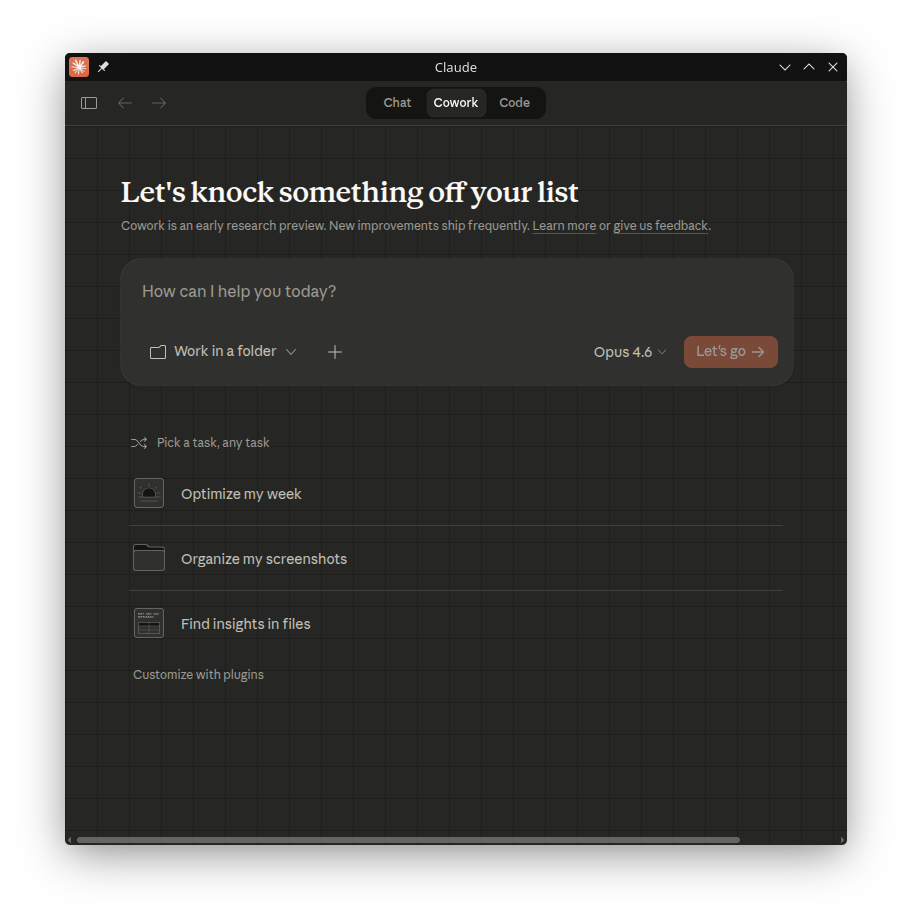
⚠️ EXPERIMENTAL: Cowork Mode Support Cowork mode is enabled by default in this build. It uses the same TypeScript VM client as Windows, communicating over a Unix domain socket to a local service daemon. To use it, start a Cowork session from the Claude Desktop UI. Important: Cowork mode on Linux currently runs Claude Code directly on the host with no VM isolation. Unlike macOS/Windows, there is no sandbox—Claude has access to your entire home directory. VM-based isolation (QEMU/KVM) is actively being developed. Use Cowork mode only if you understand the security implications.
- Native Linux Support: Run Claude Desktop without virtualization or Wine
- MCP Support: Full Model Context Protocol integration
Configuration file location:
~/.config/Claude/claude_desktop_config.json - System Integration:
- Global hotkey support (Ctrl+Alt+Space) - works on X11 and Wayland (via XWayland)
- System tray integration
- Desktop environment integration

Add the repository for automatic updates via apt:
# Add the GPG key
curl -fsSL https://aaddrick.github.io/claude-desktop-debian/KEY.gpg | sudo gpg --dearmor -o /usr/share/keyrings/claude-desktop.gpg

# Add the repository
echo "deb [signed-by=/usr/share/keyrings/claude-desktop.gpg arch=amd64,arm64] https://aaddrick.github.io/claude-desktop-debian stable main" | sudo tee /etc/apt/sources.list.d/claude-desktop.list

# Update and install
sudo apt update
sudo apt install claude-desktop
Future updates will be installed automatically with your regular system updates (sudo apt upgrade).
Add the repository for automatic updates via dnf:
# Add the repository
sudo curl -fsSL https://aaddrick.github.io/claude-desktop-debian/rpm/claude-desktop.repo -o /etc/yum.repos.d/claude-desktop.repo

# Install
sudo dnf install claude-desktop
Future updates will be installed automatically with your regular system updates (sudo dnf upgrade).
The claude-desktop-appimage package is available on the AUR and is automatically updated with each release.
# Using yay
yay -S claude-desktop-appimage

# Or using paru
paru -S claude-desktop-appimage
The AUR package installs the AppImage build of Claude Desktop.
Download the latest .deb, .rpm, or .AppImage from the Releases page.
See docs/BUILDING.md for detailed build instructions.
Model Context Protocol settings are stored in:
~/.config/Claude/claude_desktop_config.json
For additional configuration options including environment variables and Wayland support, see docs/CONFIGURATION.md.
For troubleshooting common issues, uninstallation instructions, and log locations, see docs/TROUBLESHOOTING.md.
This project was inspired by k3d3's claude-desktop-linux-flake and their Reddit post about running Claude Desktop natively on Linux.
Special thanks to:
- k3d3 for the original NixOS implementation and native bindings insights
- emsi for the title bar fix and alternative implementation approach
- leobuskin for the Playwright-based URL resolution approach
- yarikoptic for codespell support and shellcheck compliance
- IamGianluca for build dependency check improvements
- ing03201 for IBus/Fcitx5 input method support
- ajescudero for pinning @electron/asar for Node compatibility
- delorenj for Wayland compatibility support
- Regen-forest for suggesting Gear Lever as AppImageLauncher replacement
- niekvugteveen for fixing Debian packaging permissions
- speleoalex for native window decorations support
- imaginalnika for moving logs to
~/.cache/ - richardspicer for the menu bar visibility fix on Linux
- jacobfrantz1 for Claude Desktop code preview support and quick window submit fix
- janfrederik for the
--exeflag to use a local installer - MrEdwards007 for discovering the OAuth token cache fix
- lizthegrey for version update contributions
- mathys-lopinto for the AUR package and automated deployment
- pkuijpers for root cause analysis of the RPM repo GPG signing issue
- dlepold for identifying the tray icon variable name bug with a working fix
- Voork1144 for detailed analysis of the tray icon minifier bug, root-cause analysis of the Chromium layout cache bug, and the direct child
setBounds()fix approach - milog1994 for Linux UX improvements including popup detection, functional stubs, and Wayland compositor support
- jarrodcolburn for passwordless sudo support in container/CI environments
- chukfinley for experimental Cowork mode support on Linux
- IliyaBrook for fixing the platform patch for Claude Desktop >= 1.1.3541 arm64 refactor
- MichaelMKenny for diagnosing the
$-prefixed electron variable bug with root cause analysis and workaround
For NixOS users, please refer to k3d3's repository for a Nix-specific implementation.
Anthropic doesn't publish release notes for Claude Desktop. Each release here includes AI-generated notes that analyze code changes between versions. I wrote up how that process works if you're curious: Generating Real Release Notes from Minified Electron Apps.
The analysis runs against Claude's API. Costs vary a lot depending on how big the update is. Recent releases have run between $3.36 and $76.16 per release.
If this project is useful to you, consider sponsoring on GitHub to help cover those costs.
The build scripts in this repository are dual-licensed under:
- MIT License (see LICENSE-MIT)
- Apache License 2.0 (see LICENSE-APACHE)
The Claude Desktop application itself is subject to Anthropic's Consumer Terms.
Contributions are welcome! By submitting a contribution, you agree to license it under the same dual-license terms as this project.