Releases: kriscode1/DiskRover
Disk Rover v1.2

DiskRover
Description
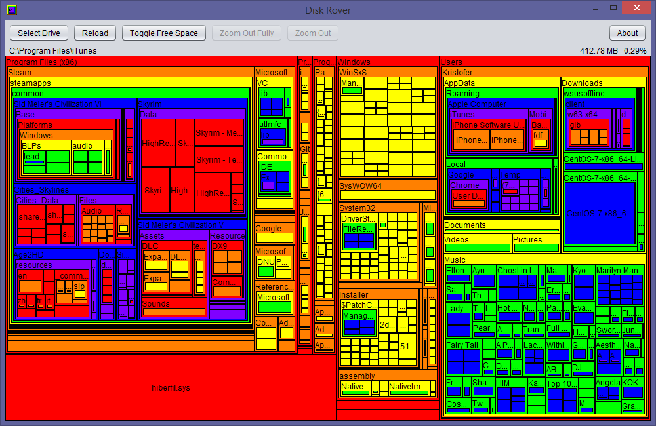
Scans a storage drive and builds an interactive map of files by file size.
Visually see which folders and files are taking up the most space in your filesystem. Written in Java for portability to multiple operating systems. Tested on Windows 7, Windows 8.1, Windows 10, CentOS, and macOS Sierra.
Screenshot:
(low-res)
Features:
- Map an entire storage drive or specify a directory
- On mouse hover, display file/folder path, size, and size% of current view
- Toggle showing drive free space
- Left click a folder to zoom in
- Runs on any operating system with Java installed
- Runs stand-alone, so it can be stored on a flash drive
New v1.2 Features:
- Right click a file/folder to:
- Copy full name/path to clipboard
- Open the containing folder in Explorer (Windows), Finder (Mac), or other default browser
- Permanently delete the file or folder and all its contents
Download and Installation
Disk Rover is a stand-alone .jar file. No installation needed.
Download link for the DiskRover.jar file is below this description.
If you cannot run jar files (because Java is not installed), download Java here first:
Bugs and Contact
Software provided as is. If you find any bugs, feel free to create an issue on Github or email me. All feedback is welcome.
Contact: kriscode1project@gmail.com
Acknowledgments
Inspired by Sean Werkema's SpaceMonger v1.4.0.
Disk Rover v1.1
Scans a storage drive and builds an interactive map of files by file size.
Visually see which folders and files are taking up the most space in your filesystem. Written in Java for portability to multiple operating systems. Tested on Windows 7, Windows 8.1, Windows 10, CentOS, and macOS Sierra.
Added in version 1.1:
Ability to scan a folder instead of an entire storage drive. When selecting a drive to scan, select "Scan a folder..." instead of a drive, and a dialog window will pop up to browse directories.
To run Disk Rover:
Download the "DiskRover.jar" file below. If you cannot run jar files (because Java is not installed), download Java here first:
Low-res screenshot:

Inspired by SpaceMonger v1.4.0 by Sean Werkema.
Disk Rover v1.0
Scans a storage drive and builds an interactive map of files by file size.
Visually see which folders and files are taking up the most space in your filesystem. Tested on Windows 7, Windows 8.1, Windows 10, CentOS, and macOS Sierra.
If you cannot run jar files (because Java is not installed), download Java here first: