Governance layer for runtime budget, policy, and trade-off control in AI systems.
Token Governor is the Governance Layer of the Digital Biosphere Architecture. This repository focuses on one layer of the broader architecture rather than a full agent stack, and it is intended to compose with external runtimes plus adjacent execution-integrity and audit-evidence layers.
It is not just a token-saving tool. Its core role is runtime governance: budget and policy control, routing and fallback management, and explicit trade-off handling across cost, quality, fallback behavior, and latency.
Part of the Agent Runtime Safety Kit, alongside ARO Audit and God Spear.


- POP
- Agent Intent Protocol
- ARO Audit
- ARO Audit LangChain Receipt
- God Spear
- God Spear MCP Gate
- Token Governor LangChain Middleware
- Verifiable Agent Demo
- Agent Runtime Safety Kit Overview
This repository is a focused layer in the Digital Biosphere Architecture ecosystem. It does not try to be the full stack. It contributes the Governance Layer for verifiable AI systems. Its focus is runtime policy, permissions, budget-aware control, and trade-off management for agent runs, including pre-execution evaluation of intent and action requests.
- This is not a generic "save tokens" promise.
- It focuses on runtime governance for budget windows, policy boundaries, and controlled execution trade-offs.
- It evaluates and constrains runtime intent and action requests, not only raw prompt cost.
- It supports routing policy, fallback control, runtime observability, and cost-quality-latency management.
- It is suitable for agent runs, not only single-turn chat prompts.
- It is designed to compose with audit and trust-gate tooling.
- incoming intent and action objects can be evaluated before execution
- policy, budget, fallback, and risk controls belong here
- this layer sits between semantic interaction and execution integrity
For a compact example flow, see docs/governance-checkpoint.md.
- Step 1: Budget window demo in this repo
- Step 2: Execution receipt demo in ARO Audit
- Step 3: Trust gate demo in God Spear
- Budget Window Demo
- Near-Term Integration Targets
- Agent Run Example
- Budget Policy Example
- Budget Report Example
Use adapters/langchain_middleware.py to wrap a LangChain-style agent with
token budget control, restricted tool lists, and policy violation detection.
Quickstart:
from adapters.langchain_middleware import wrap_agent

policy = {
    "token_budget": 120,
    "restricted_tools": ["write_file"],
    "persona_id": "governed-analyst",
}

governed_agent = wrap_agent(agent, policy)
result = governed_agent.run(
    {"prompt": "Search the policy memo and write it to disk."}
)
Runnable examples:
python examples/langchain_governed_agent.py
python examples/langchain_demo.py
The LangChain demo prints:
- baseline agent output
- governed agent output
- policy decisions
- token usage
- evidence object
Use examples/crewai_demo.py to compare a baseline CrewAI-style workflow with
the governed version.
python examples/crewai_demo.pyThe CrewAI demo prints:
- baseline agent output
- governed agent output
- policy decisions
- token usage
- evidence object
- Runtime Control Chain Overview
- LangChain Forum Post
- LangChain Forum Short Reply Templates
- Outreach Target Matrix
中文说明:
天将 TianJiang(Token Governor)是一套面向生产环境 agent runs 的预算窗口与成本治理框架,支持路由、fallback、缓存与压缩控制,以及可复现实验报告。
English Description:
TianJiang (Token Governor) provides budget-window and cost-governance controls for agent runs, with routing, fallback, caching/compression controls, and benchmark reporting.
git clone https://github.com/joy7758/token-governor.git
cd token-governor

python3 -m venv venv
source venv/bin/activate
pip install -r requirements.txt
配置环境变量(任选其一):
export OPENAI_API_KEY="your_openai_key"
# 或
export GOOGLE_API_KEY="your_google_key"python main.py --mode baseline --limit 20 --out-file metrics/data/baseline.jsonlpython main.py --mode governor --drive-mode eco \
--policy-file policy.yaml \
--tasks-file metrics/benchmarks/benchmark_v02_60_tasks.json \
--limit 20 \
--out-file metrics/data/governor.jsonlpython -m metrics.report \
--baseline metrics/data/baseline.jsonl \
--governor metrics/data/governor.jsonl \
--outdir metrics/reports/compare-real \
--interactive- 在仓库
Settings -> Secrets and variables -> Actions配置至少一个密钥:OPENAI_API_KEY或GOOGLE_API_KEY - 打开
Actions,运行工作流Benchmark And Update README Metrics - 默认会执行完整 benchmark,然后自动更新 README 图表与指标并提交
| Feature | 说明 | Description |
|---|---|---|
| 多驱动模式 | Eco / Auto / Comfort / Sport / Rocket | Drive modes for different cost-vs-quality trade-offs |
| 自动策略推荐 | 自动分析任务并推荐最优策略 | Adaptive strategy recommendation |
| 多策略组合 | 缓存、压缩、路由、RAG 等 | Semantic cache, prompt compression, model routing, RAG |
| 自动报告生成 | JSON / Markdown / 可视化图表 | Automated comparative reporting |
| CLI 参数控制 | 丰富的命令行配置选项 | Command-line interface with rich options |
| 模型画像支持 | 支持 --model-profile 驱动推荐偏置 |
Profile-guided auto strategy hints |
python main.py --mode governor --drive-mode eco --limit 20python main.py --mode governor --drive-mode auto --auto-strategy --limit 20python main.py --mode governor --drive-mode rocket --enable-agentic-plan-cache --limit 20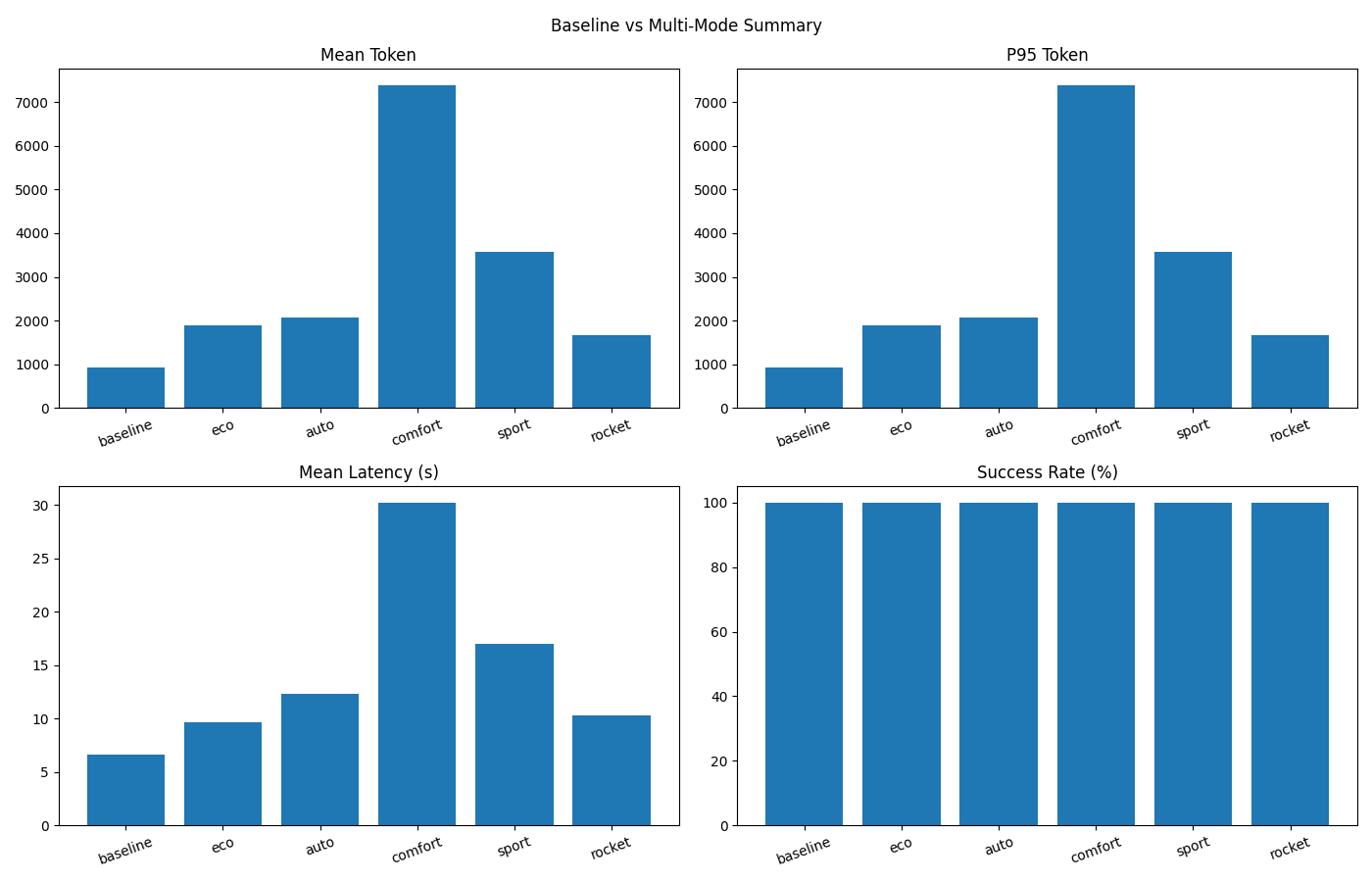
- Token 变化 / Token Change:+77.65%(Token Increase)
- 成功率 / Success Rate:Baseline 100.00% → TianJiang (rocket) 100.00%
- 延迟 / Latency:Baseline 6.63s → TianJiang (rocket) 10.26s (+54.62%)
- 总 Token / Total Tokens:Baseline 935 → TianJiang (rocket) 1,661 (+77.65%)
- 统计口径 / Method:Total Tokens = count × mean_token(input+output)
数据源 / Data source:
metrics/reports/compare-real-check/comparison.json| Generated (UTC):2026-03-03T13:55:47.575675+00:00| ΔSuccess: +0.00pp
关键词 / Keywords:天将, TianJiang, Token Governor, LLM 成本优化, Token 节省, 推理成本, 智能体, 上下文压缩, 语义缓存, 工具 Top-K, 预算守卫, 自动策略, 模型画像, 推理路由, LLM cost optimization, token savings, inference cost, AI agents, context compression, semantic cache, tool top-k, budget guard, auto strategy, model profiling, model routing
| 参数 / Parameter | 说明 / Description | 默认值 / Default |
|---|---|---|
--mode |
运行模式:baseline / governor |
baseline |
--drive-mode |
驾驶模式:auto/eco/comfort/sport/rocket |
None |
--opt-strategy |
手动策略:light/balanced/knowledge/enterprise |
balanced |
--auto-strategy |
启用自动策略推荐 | False |
--limit |
任务数量限制 | None(全部默认任务) |
--model |
模型选择(如 auto, openai:gpt-4o-mini) |
auto |
--max-tokens |
Governor 每任务累计 token 预算 | 12000 |
--max-fallback |
Governor 最大 fallback 次数 | 2 |
--out-file |
结果 JSONL 输出路径 | None |
--model-profile |
模型画像 JSON 路径 | None |
--policy-file |
Policy YAML 路径(v0.2 gate/fallback/risk 配置) | policy.yaml |
--tasks-file |
任务集文件(.json / .jsonl) |
None(使用内置任务) |
- 任务集(60 条):
metrics/benchmarks/benchmark_v02_60_tasks.json - JSONL 版本:
metrics/benchmarks/benchmark_v02_60_tasks.jsonl - 类别分布:5 类 × 12 条(单轮无工具 / 单工具敏感 / 多工具串联 / 长历史 / 对抗安全)
运行示例:
python main.py --mode governor \
  --policy-file policy.yaml \
  --tasks-file metrics/benchmarks/benchmark_v02_60_tasks.json \
  --out-file metrics/data/governor-v02.jsonl
自动判定示例:
python -m metrics.validator \
  --tasks metrics/benchmarks/benchmark_v02_60_tasks.json \
  --records metrics/data/governor-v02.jsonl \
--out metrics/reports/validator-v02.json生成可视化 Dashboard(帕累托、分类柱状、失败分布、压缩率关系):
python -m metrics.dashboard.benchmark_dashboard \
  --governor metrics/data/governor-v02.jsonl \
  --baseline metrics/data/baseline-v02.jsonl \
  --outdir metrics/reports/v02-dashboard
输出目录默认包含:
pareto_scatter.html/pngcategory_bars.html/pngfailure_pie.html/pngcompression_success.html/pngsummary_panel.pngcategory_summary.csvoverall_summary.csvdashboard_summary.json
新增工作流:.github/workflows/benchmark-v02-dashboard-auto.yml
- 触发:
push main+workflow_dispatch - 自动执行:baseline benchmark → governor benchmark → validator → dashboard → comparison report → README metrics 更新 → 自动提交
新增轻量定时工作流:.github/workflows/benchmark-v02-daily-light.yml
- 触发:daily
cron+workflow_dispatch - 默认只跑
limit=20轻量任务 - 自动执行 guardrail 检查(成功率跌幅 / token 增幅 / 延迟增幅阈值)
- guardrail 失败时自动创建(同日去重)issue,并可 @维护者,最终标记 job failed
- 自动生成
docs/trends/*.json、docs/badges/*.svg、docs/trends/kpi_summary.md - 可选通知脚本:
scripts/notify_slack.py、scripts/notify_dingtalk.py、scripts/notify_email.py - 趋势页面发布工作流:
.github/workflows/publish-trends-pages.yml
本地一键执行同等流程:
bash scripts/run-benchmark-v02-dashboard.sh中文:
- 企业级 LLM 推理成本优化
- 多模型推理策略治理
- Agent 智能体推理优化
- 自动化对比实验与报告
English:
- Enterprise LLM inference cost control
- Multi-model strategy governance
- Agent runtime optimization
- Automated benchmarking and reporting
Q1: 什么是 Drive Mode?
A: Drive Mode 用于在成本与质量之间做权衡,例如 Eco 模式偏向较低成本,而 Rocket 模式偏向输出质量。
Q2: Auto 和 Comfort 有何区别?
A: Auto 是任务特征驱动的动态推荐路径;Comfort 是固定平衡型档位。
Q3: 自动模式会覆盖手动参数吗?
A: 不会。显式传入的 CLI 参数优先级更高。
Q4: Auto 模式一定会进入 Rocket 吗?
A: 不会。Auto 会根据任务特征与预算约束动态选档,可能停在 Eco/Comfort/Sport。
Q5: Rocket 模式一定更省钱吗?
A: 不一定。Rocket 优先保证输出能力,不承诺 Token 成本最低;请以实测对比区块为准。
Q6: 如何一键复现实验并更新 README?
A: 多模式对比可执行 bash scripts/run-all-and-update.sh;v0.2 benchmark + dashboard 可执行 bash scripts/run-benchmark-v02-dashboard.sh;远端可运行 Benchmark v0.2 Dashboard Auto 或 Benchmark And Update README Metrics。
欢迎提交 Issue 和 Pull Request,细则见 CONTRIBUTING.md。
本项目使用 TianJiang Non-Commercial License v1.0:
- 非商用可免费使用
- 商用需要先购买授权或建立合作协议
详见 LICENSE。