OpenCore based installation of macOS 11.6.7 in a Dell Optiplex 7010. Used USB Flash Drive with recovery dmg.
Specs:
- Dell Optiplex 7010 USFF
- Intel Core i7-3770s
- Intel Graphics HD 4000 (iGPU)
- OpenCore 0.8.2 Release
- macOS Big Sur 11.6.7
- Running macOS installation on an external SSD using USB port
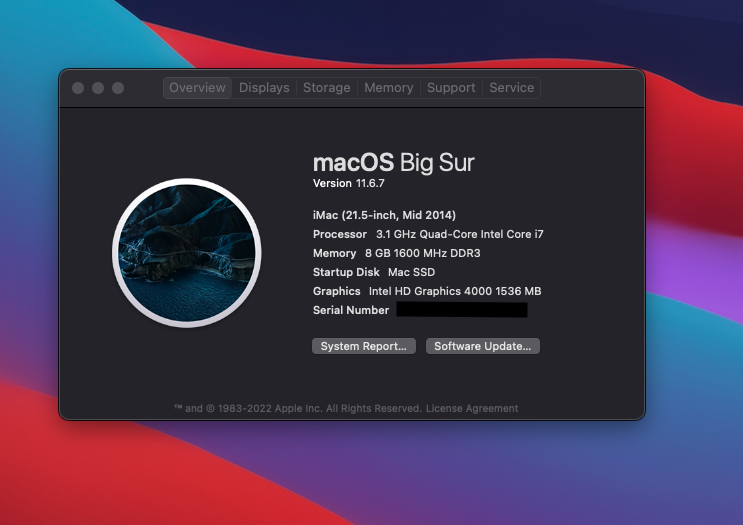
- macOS 11 Big Sur.
- Internal audio from speakers.
- Power Management.
- USB 3.0
- USB 2.0
- iServices (iCloud, iMessage, FaceTime), you need to generate your own SMBIOS config. See OpenCore Guide
- Clean and stable installation.
Download the latest release, then extract the file and open the EFI folder. If you want to learn more about it please read the OpenCore Install Guide.
Inside EFI > OC look at the config.plist file. Use ProperTree to open and edit the file.
Generate the SMBIOS with GenSMBIOS.
It is highly recommended to check the PlatformInfo section of the guide to know what you are doing. A Dell Optiplex 7010 has an Ivy Bridge processor, which means the SMBIOS required is iMac 14,4 for Big Sur or later.
In ProperTree, go to PlatformInfo > Generic and complete the required fields with the result provided by GenSMBIOS.
- The Type part gets copied to Generic -> SystemProductName.
- The Serial part gets copied to Generic -> SystemSerialNumber.
- The Board Serial part gets copied to Generic -> MLB.
- The SmUUID part gets copied to Generic -> SystemUUID.
Save the config.plist and attempt to boot.
When the computer is in sleep 2 things can happen:
- The Mac wakes up randomly with no response (Kernel Panic).
- When user wakes the Mac up, at some point it doesn't respond (Kernel Panic).
Possible causes:
- Using an external SSD plugged in a USB 3.0 port.
- Power Management not working properly with S3 state.
- Some weird quirk with USB port mapping.
Workaround:
- Disable sleep in System Properties > Energy Saver.
- Set Turn off display after Never.
- Check Prevent computer from sleeping automatically when the display is off.
- Uncheck the remaining options.
Audio works almost perfectly except for 2 things:
- When using the headphone jack audio, there is a weird static noise (Possibly related to PM or chosen layout).
- After Mac wakes up from sleep, internal audio speakers no longer work. (Related to sleep issue)
-
During the installation USB ports were not working, except for the one in use for the SSD.
-
Solved by connecting the mouse and keyboard to a USB Hub.
-
Issue gets fixed after installation.
Note: Issue should be fixed now with the USB mapping, but hasn't been fully tested.
V 2.0 Changelog
- Added GUI (Canopy).
- Disabled log file generation by OpenCore during boot inside EFI partition.
- Deleted original SMBIOS info from plist, you have to generate your own.
- Removed unnecessary kexts.
V 1.0 Changelog
- Fixed USB 3.0 Issues
- SSDT-HPET generated by SSDTTime
- SSDT-XOSI from here
- For SSDT-HPET choose default options in SSDTTime.
- Used previous USBMap.kext generated with USBMap tool.
- Huge credit to GTG from the tonymacx86 forum for the Catalina Desktop guide in which this solution was found.
V 0.2b Changelog
Followed Dortania's OpenCore Post-Install Guide. -Fixed Power Management using ssdtPRGen -Audio for this machine uses ALC269, used layout 15 converted to <15000000> on data plist.
Credits
- Dortania
- OpenCore devs
- CorpNewt
- GTG from tonymacx86