Horse racing data has been hoarded by a few companies, enabling them to effectively extort the public for access to any worthwhile historical amount. Compared to other sports where historical data is easily and freely available to use and query as you please, racing data in most countries is far harder to come by and is often only available with subscriptions to expensive software.
The aim of this tool is to provide a way of gathering large amounts of historical data at no cost.
You must have Python 3.13 or greater, and GIT installed. You can download the latest Python release here. You can download GIT here.
The above Python modules are required, they can be installed using PIP(included with Python):
pip3 install curl_cffi jarowinkler lxml orjson python-dotenv tomli tqdm
git clone https://github.com/joenano/rpscrape.git
-d, --date	Single date or date range YYYY/MM/DD-YYYY/MM/DD.
-y, --year	Year or year range (YYYY or YYYY-YYYY).
-r, --region	Region code (e.g., gb, ire).
-c, --course	Numeric course code.
-t, --type	Race type: flat or jumps.

--date-file	File containing dates (one per line, YYYY/MM/DD).

--regions	List or search regions.
--courses	List/search courses or list courses in a region.
--date and --year are mutually exclusive.
You cannot specify both --region and --course at the same time.
When scraping jumps data, the year refers to the season start. For example, the 2019 Cheltenham Festival is in the 2018-2019 season: use 2018.
All races on a specific date:
./rpscrape.py -d 2020/10/01
Only races from Great Britain:
./rpscrape.py -d 2020/10/01 -r gb
Date range:
./rpscrape.py -d 2019/12/15-2019/12/18
Flat races in Ireland (2019):
./rpscrape.py -r ire -y 2019 -t flat
Jump races at Ascot (1999–2018):
./rpscrape.py -c 2 -y 1999-2018 -t jumps
Scrape using a file with dates:
./rpscrape.py --date-file dates.txt
one date per line, format: YYYY/MM/DD.
2020/10/01
2020/11/02
2020/12/03
List all regions:
./rpscrape.py --regions
Search regions:
./rpscrape.py --regions gb
List all courses:
./rpscrape.py --courses
Search courses:
./rpscrape.py --courses Ascot
List courses in a region:
./rpscrape.py --courses gb
The user_settings.toml file contains the data fields that can be scraped. You can turn fields on and off by setting them true or false. The order of fields in that file will be maintained in the output csv. The default_settings.toml file should not be edited, its there as a backup and to introduce any new fields without changing user settings.
You can scrape racecards using racecards.py which saves a file containing a json object of racecard information.
There are only three parameter options, --day N, --days N where N is a number 1-2, and --region N where N is a region (gb, ire, etc).
Scrape today's racecards.
./racecards.py --day 1
Scrape tomorrow's racecards.
./racecards.py --day 2
Scrape today's and tomorrow's racecards.
./racecards.py --days 2
Scrape today's and tomorrow's racecards by region.
./racecards.py --days 2 --region gb
You can customize which data is included in racecards using the settings file. The scraper uses settings/user_racecard_settings.toml if it exists, otherwise falls back to settings/default_racecard_settings.toml.
To customize:
- Copy
default_racecard_settings.tomltouser_racecard_settings.toml - Edit the settings to enable/disable field groups and data collection options
The settings file lets you control:
- Data Collection: Whether to fetch stats and profiles
- Field Groups: Which groups of runner fields to include (core, basic_info, performance, jockey, trainer, etc.)
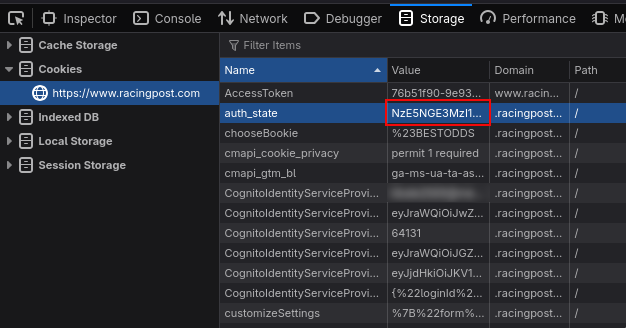
Credentials are stored in a .env file in the root directory. Make sure .env is added to .gitignore.
EMAIL=your@email.com
AUTH_STATE=your_auth_state
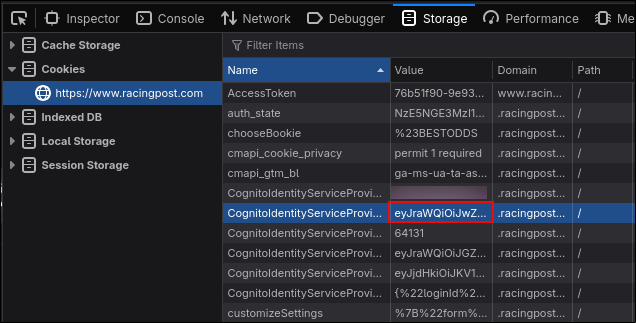
ACCESS_TOKEN=your_access_token
To find your tokens, login to the site and open the cookies section in the storage tab of your browser's developer tools.
You need the values for auth_state and cognito access token (not to be confused with the AccessToken cookie).
There will be multiple keys beginning with CognitoIdentityServiceProvider, you want the value for the one that ends with .accessToken. It should be directly under email if keys are sorted by name.