Annotations
DiBL relies on conventions and annotations in a template to replace stitches for a new diagram. A patchwork of screen-shots illustrates the mechanism, at the left bottom sits an old version of this web-page.
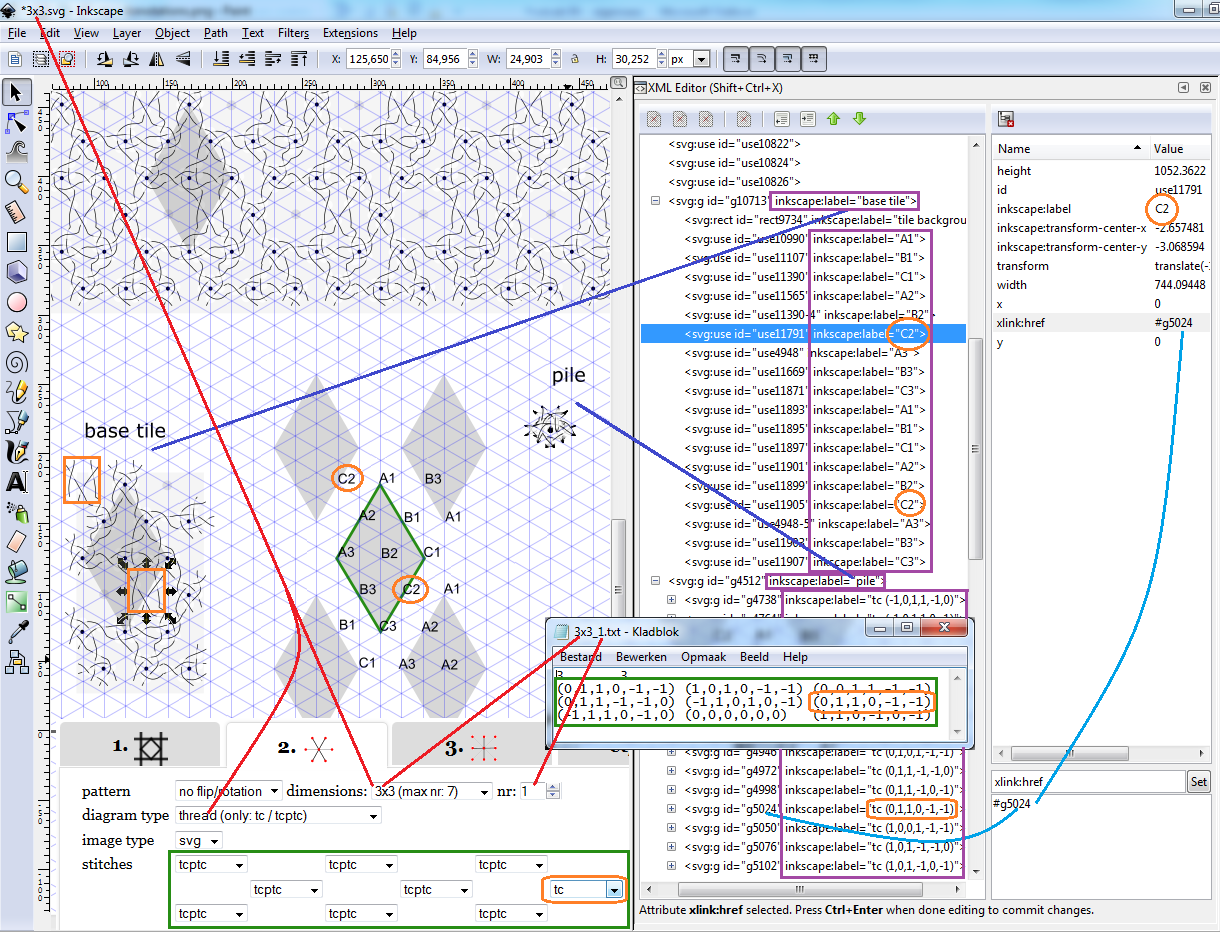
A stitch can only be replaced with one that has endpoints at the same position. So a cloth stitch (ctc) oriented as an X can't be replaced with a cloth stitch oriented as a K or with a tctc that is larger. A '[pile]' is used with different types of stitches with all variations of orientations. The base tile clones a selection of stitches from the pile and the base tile in turn is cloned into the full diagram. [pile]: https://github.com/jo-pol/DiBL/wiki/Create-New-Stitches
The red lines indicates the web form selecting a template (svg) and matrix (txt)
from the input folder of the unzipped files. This [matrix] defines a "2-in 2-out directed graph".
The web form has another matrix to select stitches, in other words: what to do at the nodes of the graph.
The matrices are surrounded by green boxes.
The orange circles and rectangles indicate a single cell of these matrices,
it was changed from ctpct in the template into ct for the generated diagram.
[matrix]: https://github.com/jo-pol/DiBL/wiki/Input-Files
The algorithm concatenates the values of corresponding cells in both matrices and
looks it up in the pile of stitches. The found id becomes the new value
of the "xlink:href" of the corresponding cells in the "base tile".
This is indicated with the light blue lines.
The algorithm needs more information than is normally available in an SVG document.
Currently these annotations are implemented as XML-attributes inkscape:label.
These labels appear in the tree view of the XML editor.
When selecting an element from the tree,
the corresponding element is selected on the canvas and the other way around.
The required annotations are surrounded with purple rectangles on the screen-shot.
Stitches to be replaced are direct members of a group annotated with "base tile". Possible replacements are direct members of a group annotated with "pile". The stitches in turn are also annotated.
Stitches in the base tile are clones in InkScape terminology or use-elements in SVG terminology. Annotations of these clones correspond to a cell in the matrix. Hence a capital letter for the columns (like the common practice for spreadsheets) and a digit for the row. Though not all templates are related to matrices, the application needs the same notation of one capital followed by one digit.
Stitches in the pile have annotations with two parts. The first part is an identifier for the type of stitch, such as tc, tcptc, ctc and tctc. Note that not all of these stitches are available in all templates. The second part matches the orientation, they match the [tuples] in a matrix. [tuples]: https://github.com/jo-pol/DiBL/wiki/Input-Files#Nodes__Tuples
DiBL tools on the web
Advanced articles on grounds
- Template Annotations
- Matrices and tuples
- Extend palette of stitches
- Create New Templates
- To be developed
General Backgrounds
- History
- Bobbin Lace concepts
- Preliminary design thoughts
- DiBL grounds Compared With Bobbinwork