A serverless cryptocurrency trading bot that predicts price movements using deep learning models and executes trades
- Support for multiple cryptocurrency exchanges via CCXT library
- Use pre-trained deep learning models for price prediction
- Provide backtesting capabilities for trading strategy evaluation
- Utilize serverless architecture with AWS Lambda
- Continuous deployment with GitHub Actions
You need a pre-trained deep learning model and scalers. For more information, see here.
You can implement your own trading strategy by modifying MyStrategy class, or adding a new class that inherits from Strategy class.
class Strategy(ABC):
    @abstractmethod
    def should_open_position(self, *args, **kwargs) -> bool:
        pass

    @abstractmethod
    def should_close_position(self, *args, **kwargs) -> bool:
passSet up the configuration in config.yaml.
default:
  EXCHANGE_ID: 'binanceusdm'
  INTERVAL: '1d'
  LEVERAGE: 1
  MIN_ORDER_AMOUNT: 0.002
  MODEL_KEY: 'model.keras'
  SCALERS_KEY: 'scalers.pkl'
  STOP_LOSS: 0.00         # 0.01 = 1%
  SYMBOL: 'BTC/USDT:USDT'
  THRESHOLD: 0.00         # 0.01 = 1%
  WINDOW_SIZE: 5

simulation:
  BUCKET_NAME: ''                     # No need to change
  DOWNLOAD_DIR: '../downloads'        # Path to model and scalers
  START_TIME: '2024-02-12T00:00:00Z'  # ISO 8601
When setting START_TIME, please note that backtesting should be performed on data not used for model fitting to avoid overfitting.
Now run the simulator.
(env) user@host:~/trading-bot$ pip install -r requirements-local.txt
(env) user@host:~/trading-bot$ export ENVIRONMENT=simulation
(env) user@host:~/trading-bot$ cd src
(env) user@host:~/trading-bot/src$ python simulator.py
--------------------------- ------
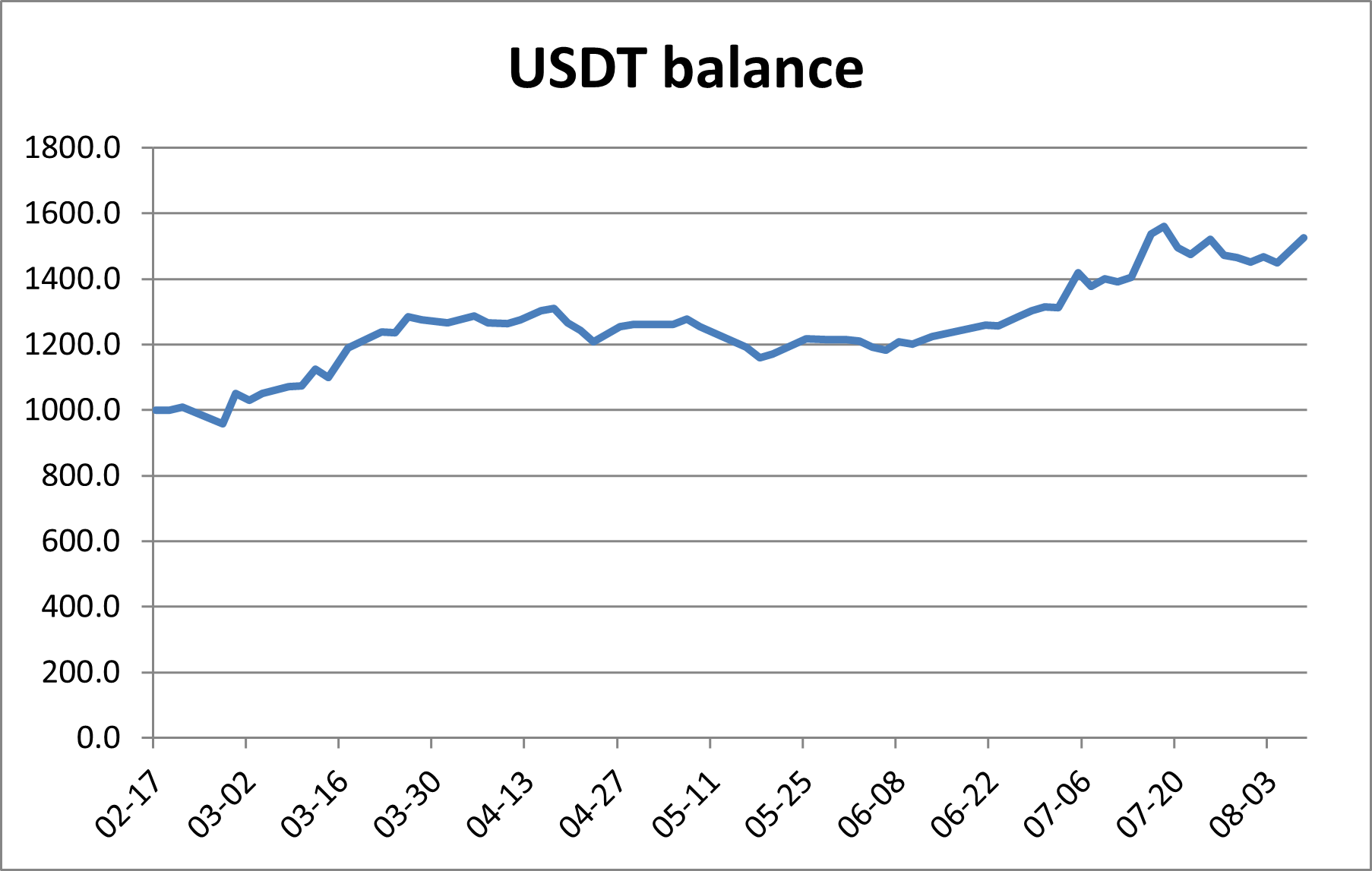
Number of trades 64
Win rate 51.6%
P&L ratio 1.72
Max profit rate (per trade) 9.5%
Max loss rate (per trade) -5.1%
Final balance 1524.2
--------------------------- ------
To deploy to AWS Lambda for serverless live trading:
- Create an S3 bucket to store the model and scalers.
- Create an ECR Repository to store Docker images.
- Build and push the Docker image.
- Can be done by manually running the workflow 'Manual deploy to Amazon ECR' in GitHub Actions.
- Create a Lambda function using the Docker image pushed to ECR.
- Please grant S3 access to the IAM role.
- Set the configuration of your Lambda function.
- Recommended general configuration
- Memory: 1~2 GB
- Timeout: 2 min
- Required environment variables
BUCKET_NAMEEXCHANGE_API_KEYEXCHANGE_API_SECRET
- Recommended general configuration
- Create an EventBridge schedule to periodically invoke the Lambda function.
To set up CD:
- Fork this repository.
- Set up repository secrets for GitHub Actions in your repository settings.
AWS_ACCESS_KEY_IDAWS_SECRET_ACCESS_KEY
- Update
cd.ymlwith your AWS region, ECR repository name, and Lambda function name. - Push changes to
mainbranch and activate the workflow.