Simple Turtle Graphics
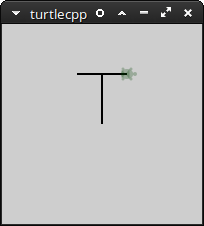
Write code like this
#include "Turtle.h"
/**
 * Sample turtle graphics program
 */
using namespace turtle;
int main() {
    lt(90);     // 90 degree left turn
    fd(50);     // 50 pixel move forward
    rt(90);     // 90 degree right turn
    bk(25);     // 25 pixel move backwards
    fd(50);     // 50 pixel move forward
    sleep_for(1s);
    ht();       // hide turtle. (Other commands: st = show turtle, pu = pen up, pd = pen down)
    sleep_for(3s);
    return 0;
}
- After setting up C++17 threads, and GTK-- for your system (see applicable section below for Windows or Debian),
- either run command line
g++ main.cpp -pthread -std=c++17 -o turtle `pkg-config gtkmm-3.0 --cflags --libs`
- or compile using CLion if you have it installed.
Instructions to set up for Windows and Debian based Linux (MX Linux, Ubuntu Linux, Linux Mint, etc.) are provided below.
- Install 64-bit MSys2 from http://repo.msys2.org/distrib/x86_64 (Choose the highest numbered msys2-x86_64*.exe file)
- In the msys2 command window, run the command:
pacman -S mingw-w64-x86_64-toolchain mingw-w64-x86_64-gtkmm3 pkg-config gcc gdb make
- Add to your path
C:\msys64\mingw64\binand then compile
- Install GTK-- development tools
sudo apt-get install libgtk-3-dev libgtkmm-3.0-dev build-essential
- And then compile