https://monster-shop-dreamteam.herokuapp.com/
Monster Shop is fictitious e-commerce website where users are able to browse items from various shops, add them to their cart, and make orders.
Monster Shop is made up of merchants and items. Merchants have many items, and items belong to merchants. Items can be ordered and reviewed by users. CRUD functionality for merchants, items, and orders is determined by user role: visitor, regular user, merchant employee, and administrator.
Monster Shop is built in Rails and uses ActiveRecord to store and query data.

- Fork this repository
- Clone down your forked repository
- From your repository's root directory, run:
bundle install - Set up the database
rake db:{drop,create,migrate,seed}


- index shows all merchants
- show page shows information for a single merchant
- can be activated/deactivated by administrator


- items can be deactivated by merchant employees and admins
- deactivated items will not show up in the items index
- items have inventory which limit how many a user can add to the cart
- users can leave reviews for items
<section class = "review-stats"> <%if @item.reviews.empty? %> <h3>This item has not yet been reviewed.</h3> <% else %> <section class = "top-three-reviews"> <h2>Top 3 Reviews</h2> <% @item.sorted_reviews(3, :desc).each do |review| %> <h3><%= "#{review.rating}-#{review.title}" %></h3> <% end %> </section> <section class = "bottom-three-reviews"> <h2>Bottom 3 Reviews</h2> <% @item.sorted_reviews(3, :asc).each do |review| %> <h3><%= "#{review.rating}-#{review.title}" %></h3> <% end %> </section> </section> - top/bottom 5 popular items are displayed in items index using the following AR query:
def self.popular(limit, order)
    left_outer_joins(:item_orders)
      .group(:id)
      .order("COALESCE(SUM(quantity), 0) #{order}, items.id")
      .limit(limit)
  end
Visitor - this type of user is anonymously browsing our site and is not logged in. Permissions for visitors:
- access to merchants and items with ability to add items to cart. Visitor must log in to checkout.
- can not access any pages outside of merchant and item shopping sites
- no profile information
Regular User - this user is registered and logged in to the application while performing their work; can place items in a cart and create an order. Permissions for regular user:
- same access as visitor
- can edit profile information, can update password information, can place orders and cancel orders
def update
  @user = current_user
  if @user.update(user_params) && @user.pw_check_not_empty(params)
    flash[:success] = 'Password updated'
    redirect_to '/profile'
  elsif @user.pw_check_empty(params)
    flash[:error] = "Password can't be blank"
    redirect_to '/profile/edit/pw'
  else
    flash[:error] = @user.errors.full_messages.to_sentence
    redirect_to '/profile/edit/pw'
  end
end
Merchant Employee - this user works for a merchant. They can fulfill orders on behalf of their merchant. They also have the same permissions as a regular user (adding items to a cart and checking out). Permissions for merchant employees:
- Merchants can fulfill orders
- pending orders are shown on the merchant dashboard:
<% @merchant.pending_orders.each do |order| %> <tr id="item-<%= order.id %>"> <td><p>Order#<%= link_to order.id, "#{path}#{order.id}" %> </p></td> <td><p><%= order.created_at.to_formatted_s(:long) %></p></td> <td><p><%= order.item_orders.by_merchant(@merchant.id).item_count %></p></td> <td><p><%= number_to_currency(order.item_orders.by_merchant(@merchant.id).total) %></p></td> </tr> <% end %> <%= "No orders have been placed." if @merchant.pending_orders.nil? %> - Add, edit, delete, and update items
- Update merchant store information
- Place orders
Admin User - a registered user who has "superuser" access to all areas of the application; user is logged in to perform their work
- Access to all merchants and ability to disable or enable
- Access user information
- Cannot place orders
- See all orders, ship and cancel orders
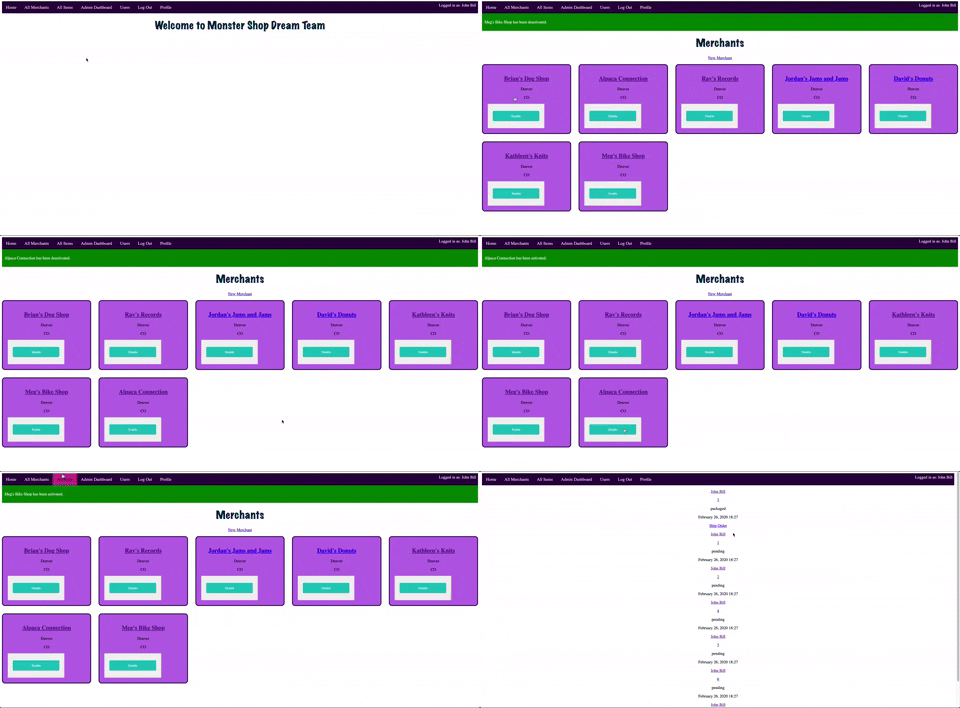
Orders can be made by regular users and merchant users when items are added to the cart. Visitors can add items to the cart but must log in to make an order.
Orders have four possible statuses:
- pending: default status
- packaged: all merchants have fulfilled all items on the order
- shipped: admin has approved shipping of order
- canceled: user cancels a pending or packaged order
Orders are made up of item orders
- an item order is a single item and its quantity in an order
- class methods for item orders:
def self.by_merchant(id)
    self
      .all
      .joins(:item)
      .where("items.merchant_id = #{id}")
  end
  def self.total
    sum("item_orders.quantity * item_orders.price")
  end
  def self.item_count
    sum(:quantity)
  end