Releases: huangruoqi/computer_vision_learning
Releases · huangruoqi/computer_vision_learning
Video Labeler v0.2.4

Instruction
- download and extract
labeler_v0.2.4.zipon windows - copy videos to
videos\folder (only support 10 videos for now) - open
GUI.exe
Usage
- save labels to
data\folder by clicking the floppy disk icon (available when paused) - press number key on keyboard to temporarily set current label (ex: press 1 to choose the first label, press 2 to choose the second label)
- label will be set back to previous clicked label when you release the number key
- press space key to play/pause the video
- press the icon button shown below to rotate 90 degree
- dimension are resized to same width and height for now, will change that in future releases.
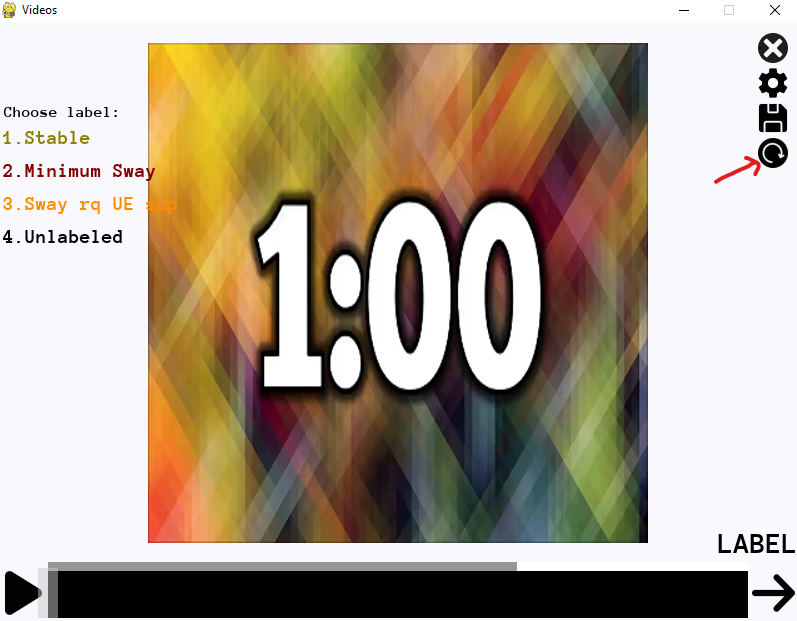
- dimension are resized to same width and height for now, will change that in future releases.
Video Labeler v0.2.3
This is just a patch to version v0.2.2
Instructions
simply remove the previous GUI.exe, download the new GUI.exe below, and move to the labeler folder.
Usage
- press the icon button shown below to rotate 90 degree.
- dimension are resized to same width and height for now, will change that in future releases.
- dimension are resized to same width and height for now, will change that in future releases.
Video Labeler v0.2.2
This is just a patch to version v0.2.1
Instructions
simply remove the previous GUI.exe, download the new GUI.exe below, and move to the labeler folder.
Usage
- press number key on keyboard to temporarily set current label (ex: press 1 to choose the first label, press 2 to choose the second label)
- label will be set back to previous clicked label when you release the number key
- don't press multiple number key at the same time
it's a feature, not a bug
Video Labeler v0.2.1
Usage
- download and extract
labeler_v0.2.1.1.zipon windows - copy videos to
videos\folder - open
GUI.exe - change labels or score range in the settings and save
- label frame by frame with either categorical or numerical value (negative supported)
- save labels to
data\folder by clicking the floppy disk icon (available when paused)
Update
- fix ValueError for non-digit input
- fix label button flickering and ui glitch
- add prompt for score and labels
- lower the initial load by 2/3 to speed up opening label scene
Video Labeler v0.2.0
Usage
- download and extract
labeler_v0.2.0.3.zipon windows - copy videos to
videos\folder - open
GUI.exe - change labels or score range in the settings and save
- label frame by frame with either categorical or numerical value (negative supported)
- save labels to
data\folder by clicking the floppy disk icon (available when paused)
Update
- add settings
- change labels in GUI instead of in json file (whitespace check)
- change score range (invalid range check)
- plan to add fps control and others to settings page.
- add toggle for numerical or categorical label
- change between 2 mode, data will be saved after switching
- numerical value label
- input validation added supported up to 5 characters.
- invalid input is displayed as
Unlabeledand saved asNaNwhich is just empty cell in csv file.
- memory
- video frames saved in the buffer are resized to (400, 300) to reduce ram usage.
- fix memory leak due to un-joined threads.
- up to 3000 frames will be loaded in frame buffer for fast access using ~1.3GB of ram
- fps is set to 30 and capped at 30 for now
Video Labeler v0.1.0
Built windows executable with pyinstaller.
Usage
- download and extract
labeler.zipon windows - copy videos to
videos\folder - open
GUI.exe