


Attribution and analytics SDK for Circle CCTP bridge integrators.
Gives every bridge a unique ID, tracks the full burn→attestation→mint lifecycle, and exposes transaction history and analytics that works with any CCTP-compatible bridge.
- SDK Repository: github.com/heyeren2/bridge-id-sdk
- Backend Template: github.com/heyeren2/bridge-id-backend-template
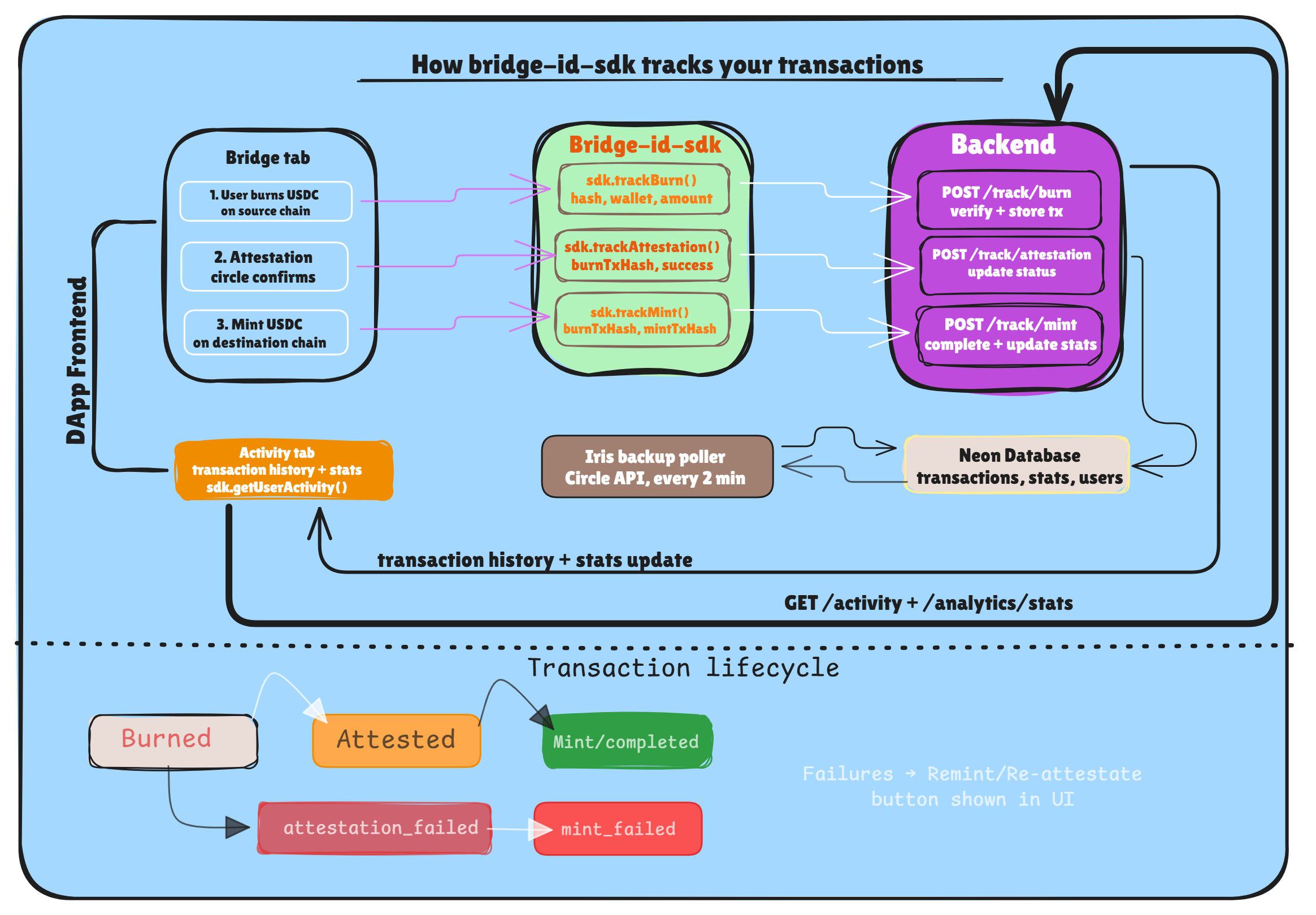
Your analytics backend stores these steps, allowing you to show a clean Activity history with statuses across multiple chains. A backup poller in the backend also checks the Iris API every 2 minutes for any missed updates.
npm install bridge-id-sdkRun this once when setting up. This unique ID links all your bridge transactions to your analytics backend. Pass your Project Name and Fee Recipient address to generate a unique, deterministic ID.
From your project folder (where bridge-id-sdk is installed):
npx bridgeidsdk --name "MyBridge" --address "0xYOUR_FEE_RECIPIENT_ADDRESS"Output:
✅ Your Bridge ID:

   mybridge_a3f9c2

Add this to your .env:

   VITE_BRIDGE_ID=mybridge_a3f9c2
⚠️ Never change this ID. All historical transactions are permanently linked to it.
import { BridgeAnalytics } from "bridge-id-sdk"

const sdk = new BridgeAnalytics({
  bridgeId: import.meta.env.VITE_BRIDGE_ID,
  apiUrl: "https://your-analytics-backend.xyz",

  // Optional — pass your own RPC URLs for status checking
  rpcUrls: {
    sepolia: import.meta.env.VITE_SEPOLIA_RPC,
    base:    import.meta.env.VITE_BASE_RPC,
    arc:     import.meta.env.VITE_ARC_RPC,
  }
})Call these as the bridge transaction progresses. In your frontend, use these inside your "status update" callbacks.
Call this as soon as the source chain transaction is confirmed.
await sdk.trackBurn({
  burnTxHash: "0x...",
  wallet: userAddress,
  amount: "100.00",
  sourceChain: "sepolia",
  destinationChain: "base",
})Call this when the Circle attestation is fetched.
await sdk.trackAttestation({
  burnTxHash: "0x...",
  success: true, // or false if it failed
})Call this once the destination chain transaction is confirmed.
await sdk.trackMint({
  burnTxHash: "0x...",
  mintTxHash: "0x...", // required if success is true
  success: true,
})Use this to show real-time bridge progress to your users. The SDK checks both your backend and on-chain for accuracy.
const status = await sdk.getStatus("0xBURN_TX_HASH")

// status.status is one of:
//   "burned"             — burn confirmed, waiting for attestation
//   "attested"           — Circle signed it, ready to mint
//   "attestation_failed" — Circle could not attest the burn
//   "mint_failed"        — transaction failed on destination (manual mode)
//   "completed"          — bridge cycle finished successfully
//   "not_found"          — transaction not tracked or recognized

if (status.status === "attested") {
  // Pass these to CCTP's receiveMessage() on the destination chain
  console.log("Ready to mint:", status.messageBytes, status.attestation)
}A flattened list of transactions for a specific user, perfect for an "Activity" tab.
const activity = await sdk.getUserActivity(walletAddress)Filter/search specifically for your bridge transactions.
const txs = await sdk.getTransactions({
  wallet: userAddress, // or "all"
  limit: 20,
})All SDK methods throw a BridgeError on failure.
import { BridgeError } from "bridge-id-sdk"

try {
  await sdk.trackBurn({ ... })
} catch (err) {
  if (err instanceof BridgeError) {
    console.error(`Error Code: ${err.code}`, err.message)
  }
}| Code | When it happens |
|---|---|
INVALID_INPUT |
Bad tx hash, wallet address, amount, or missing field |
NETWORK_ERROR |
RPC call or backend request failed |
NOT_FOUND |
Transaction not found in backend or on-chain |
CONFIG_ERROR |
Missing bridgeId or apiUrl on SDK init |
This SDK requires a running analytics backend to store and serve transaction data. We provide a ready-to-deploy template with Express, Drizzle ORM, and Neon (PostgreSQL).
Quick start:
git clone https://github.com/heyeren2/bridge-id-backend-template.git
cd bridge-id-backend-template
npm install
The backend handles:
- Burn verification → confirms transactions on-chain before storing
- Lifecycle tracking → stores burn, attestation, and mint status updates
- Analytics → volume, transaction count, and user stats per bridge ID
- Activity feed → paginated transaction history per wallet
Full setup guide (Neon, Render, environment variables): 👉 Backend README
- Does not execute any bridge transactions on-chain.
- Does not custody funds or wrap CCTP.
- Does not handle the "Remint" UI logic (your frontend provides the button).
- Does not store sensitive private keys.
The SDK helps you track and show bridge transactions using Circle CCTP. By adding it to your bridge, you get:
- Uniform Attribution: Identify which bridges and partners are driving the most volume.
- User Experience: Provide users with a reliable "Activity" history that persists across sessions and devices.
- Reliability: The built-in Iris API poller ensures that even if a user closes their tab mid-bridge, the transaction is eventually tracked as "Completed".
- Simplified Development: Expose transaction history and analytics that work out-of-the-box with any CCTP-compatible bridge.
MIT