Mempool Guru (https://mempool.guru)
Mempool Guru is a system that collects mempool data and displays real-time analysis.
The data collection system consists of a centralized DB and a number of mempool monitor nodes (MMN).
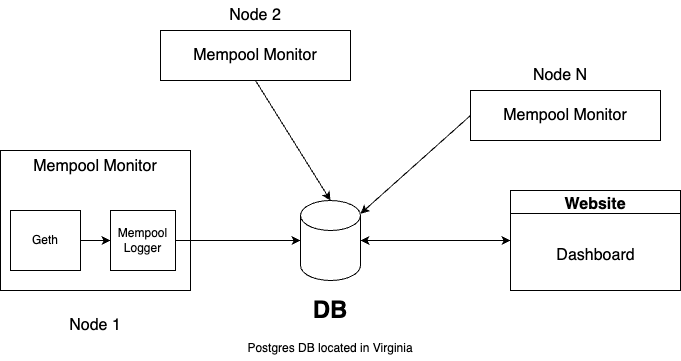
The centralized DB runs on a dedicated server in Virginia, USA. The DB can be accessed by MMNs provisioned with proper credentials.
Currently we have 6 MMNs deployed cross the globe. Each MMN runs a geth client along side a python script that fetches the mempool content from geth and stores it in DB.
We built a dashboard at http://mempool.guru.
First, you need a full node set up using eth-docker.
git clone https://github.com/eth-educators/eth-docker
cd eth-docker

# patch geth configuration to our needs
curl https://gist.githubusercontent.com/bl4ck5un/ce5205f50a93e122fe1fc6c4517064a4/raw/70cdb31b312c69ac480ab55e73cc32599755053d/geth.diff | git apply -v

# Option 1: download config
curl https://gist.githubusercontent.com/bl4ck5un/26a32f4634ecfbd9919338e9cdd36f16/raw/277c025dc35039adb412c5d439d78905f6c77f4b/eth-docker.env -o .env

# Option 2: configure the full node: **please choose geth as the execution client**.
./ethd config

# start the node!
./ethd up
It will take some time to sync. You can check progress with docker logs -f eth-docker-execution-1.
🚨 Important: read this carefully.
Then, you just need to spin up the docker service defined in docker-compose.yml following these steps:
- Clone this repo & go to the root directory
- Use
cp .env-template .envto create an environment file named.env. This file will be used by docker to populate environment variables indocker-compose.yml. - Configure your node by editing
.env:- 🚨 change
MONITOR_IDto a unique ID for your node, preferably something readable. - 🚨 Replace
POSTGRES_DB_URLwith a DB credential provided by the admin. It should look likePOSTGRES_DB_URL=postgresql://user:passwd@IP:port/db_name. Please keep the credential secret. - Other environment variables must remain as is.
- 🚨 change
- Start the service by
docker-compose up -d.
This will start three docker containers
tlistener: record pending transaction arrival timeblistener: record block arrival timetxdump: record full transaction details
You can check logs of these containers using, e.g., docker logs -f tlistener. Similarly, you can check the logs of txdump and blistener.
docker exec -it eth-docker-execution-1 geth attach
- tx listener:
docker logs -f tlistener - block listener:
docker logs -f blistener - geth:
docker logs -f eth-docker-execution-1
./ethd prune-geth
git stash # since we changed geth.yml, we need to stash the changes before pulling
git pull
git stash pop
./ethd update
./ethd up
git pull
docker compose pull
docker compose up -d
Many.
- improving monitor
- add automated scripots
- add more stuff to the dashboard