Design
Remap isn't technically only map/reduce, because you can load any kind of module that performs work into remap, but since the map-reduce technology is quite well known by now and people are familiar with projects like Hadoop, it helps to demonstrate how remap approaches the map-reduce architecture. This is what map-reduce is:
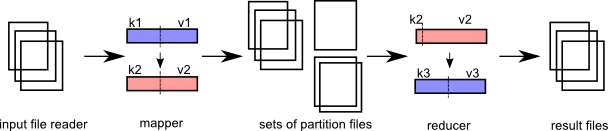
There are 2 distinct stages: map and reduce.
Any number of 'map' processes can run in parallel as long as they perform work on a unique input file.
A mapper creates one or more 'partitions' of the data (a partition set). Each partition is destined for a specific 'reducer' later in the workflow. It is also possible to create multiple sets of partitions, which means that multiple 'sets' of reducers will run later to process that output data.
Any number of 'reduce' processes can run in parallel, as long as they perform work on a different partition. (There will never be more reduce processes than there are partitions available.)
After 'map' and before 'reduce', there must be a clever sort process. Every file that map exports can be guaranteed to be sorted. The mapper output goes into a partition, which keeps output in memory until it gets too big. Before flushing the partition to disk, the output file is sorted. Multiple files per partition can be generated.
A reducer in remap will open multiple files at once, but if the fileset is too large (>1000), 'remap' will presort a collection of files prior to starting the reducer. This basically does the same thing, but it is an intermediary step. It opens multiple files and outputs a couple of intermediate files of a specific predetermined size, which hopefully will have reduced the number of files. This will happen if the input files are significantly smaller than the new output files.
##File System
MR requires a file system where nodes can read and write files. CephFS is suggested as such a file system, because the use of cephfs can be transparent to the end user. This simplifies the setup, because it makes no difference if it's installed or not.
This does require a bit of thinking where files appear and go. There are two different trees that can be imagined that dictate how files are written by the application; some files are local logfiles and should be kept on the local disk and not be distributed. Other files are config files or app files and should be kept on the entire network. Other files are data files that should be distributed as well.
##Processing requests
The implementation is heavily decentralized. From the outside environment, an app initiator may send a "processing request" into the network, specifying the number of cores that need to be part of the processing run. This number is based on the size of the network and the processing priority. Low priority tasks simply get less cores, high priority tasks get more cores. So lower priority processes run in a more serial fashion vs. more parallellism for high priority tasks.
A core is a temporary process on a machine that hosts a mapper or reducer process. The core is connected to a node daemon, which in turn connects to a messaging pub/sub architecture. This "relaying" mechanism helps to improve performance a bit and it makes more sense functionally.
A core runs on a node. The number of cores that can be run per node is the number of cores in the CPU - 1. 1 core is always kept free for the node daemon itself and other OS work.
If there are no cores to initiate the app, the initiator prints an error.
The output directory where processed files are to be located may not already exist.
If the app initiator dies, currently running cores will simply continue.
If the app initiator is terminated (Ctrl-C), the initiator sends out a request to stop cores that may be processing for that jobid.
##The mapper
One mapper is started for each file to be processed. The core daemon has received the following information:
- the in file to be processed
- the directories to produce output files
- the number of reducers per collection.
The core instantiates the file reader, passing the name of the input file. The input file reader is then ready to produce k,v pairs. Progress is measured by "file size" and the file input reader needs to keep track of that in a sensible way. At a minimum, progress is reported every percentage of processing for a mapping process. The core must at least provide a status report every 5 seconds. If the core does not issue a status report after 12 seconds, it is terminated by the node process.
The core also instantiates formatter plugin objects for the output partitioning sets and a formatter plugin for the final file that the reducer produces.
The output of the mapper can be in any file format imaginable. The implementation for working with those file types is at the discretion of the mapper process, but obviously the reducer must be able to work with that filetype as well ( to read it ).
Key,value pairs destined for output by a partitioner are kept in memory as long as possible. When the memory size exceeds a specific configured value, the partitioner dumps the contents to disk and starts a new output file.
##The reducer
The reducer has up to as many input files as there are mappers. At this point it is guaranteed that one reducer will process the input files and that there are no keys in the data that should belong to a different reducer.
Prior to starting the reducer, the core sorts the input files.
In this case, the same core process starts a workflow to deal with a reducer instead. It uses the same process to create an input file reader object, passing in the filename to open. It is single-threaded, so the core opens one input file at a time.
The reducer produces output files in the final output directory and it overwrites existing files for the partition set it is responsible for.
##Core daemon responsibilities
The core is responsible for maintaining the validity of the output files. A mapper process either succeeds when everything is confirmed processed in its entirety or it fails in its entirety.
The core daemon should produce 1 minute heartbeats to the app initiator to indicate it is still processing. This heartbeat message contains a percentage of completeness.
It is not necessary to include any output files, because the output file names can always be derived by other means.
##Directory trees
jobid = a uuid to identify a specific job run. coreid = locally unique identifier for a core, unique per node.
/remote = mount for distributed file system (ceph). Or... just a created directory on a local system, or a softlink on a local system
/local = mount for local file system. Always a directory on a local system, or a softlink to some other location
/remote/job/<jobid> = main directory where a job is initiated
/remote/job/<jobid>/app = App files are copied here, so that it is known which version of the app was used for the job
/remote/app/xxx/yyy/zzz = directory to files for a particular application
/remote/data/xxx/yyy/zzz = data directory with custom hierarchy, user specific, input or output
/remote/job/<jobid>/part/xxx = Intermediate files destined for reducer xxx
/remote/job/<jobid>/part/yyy = Intermediate files destined for reducer yyy, etc...
/remote/cluster/blacklist = A file with blacklisted nodes.
/local/tmp/<coreid>/whatever = Temporary local files for mappers or reducers, if needed
##Files of interest
/remote/app/xxx/yyy/zzz/appconfig.json = Configuration file for the app.

/remote/job/<jobid>/app.log = Global log file that indicates general progress for the run. Written to by the app initiator only.
/remote/job/<jobid>/jobconfig.json = File indicating how the network resolved nodes/cores to process the application. Explains the config of the job.
/remote/job/<jobid>/progress/mapper-0000.json = Progress file for mapper 0000, written in 10% quartiles.
/remote/job/<jobid>/progress/mapper-0001.json = Progress file for mapper 0001, written in 10% quartiles.
/remote/job/<jobid>/progress/reducer-0000.json = Progress file for reducer 0000, written in 10% quartiles.
/remote/job/<jobid>/consolidated-progress.json = Consolidated progress file.
/remote/job/<jobid>/result = Result file for the job: INCOMPLETE, FAIL, OK
##Starting a job
The initiator can start a job. The initiator has an HTTP REST interface:
##Mapper/reducer file templates
mapper input file:
can be anything (folder indicated by user). /file1.txt (etc)
mapper output file:
purpose = a string identifying the purpose for the reducer. reducer-id = the id of a specific reducer mapper-id = this mapper id part-id = files created at boundaries of 64MB filesize.
/remote/job/<jobid>/<purpose>/<reducer-id>/mapper-<mapperid>-part-<partid>
/remote/job/<jobid>/default/reducer-0000/mapper-0000-part-00000
/remote/job/<jobid>/default/reducer-0001/mapper-0000-part-00000
/remote/job/<jobid>/default/reducer-0001/mapper-0000-part-00001
/remote/job/<jobid>/default/reducer-0002/mapper-0000-part-00000
/remote/job/<jobid>/default/reducer-0000/mapper-0000-part-00001
/remote/job/<jobid>/byage/reducer-0001/mapper-0000-part-00000
/remote/job/<jobid>/byage/reducer-0002/mapper-0000-part-00000
reducer input file(s):
/remote/job/<jobid>/<reducer-id>/*
/remote/job/<jobid>/default/reducer-0001/mapper-0000-part-00000
/remote/job/<jobid>/default/reducer-0001/mapper-0000-part-00001
/remote/job/<jobid>/default/reducer-0001/mapper-0001-part-00000
/remote/job/<jobid>/default/reducer-0001/mapper-0003-part-00003
reducer output file(s):
/remote/data/<hierarchy>/wordcounts/default/reducer-0000-part-00000
/remote/data/<hierarchy>/wordcounts/default/reducer-0000-part-00001
/remote/data/<hierarchy>/wordcounts/default/reducer-0001-part-00000
/remote/data/<hierarchy>/wordcounts/byage/reducer-0001-part-00000
##Reliability
Networks are not 100% reliable, node hardware can fail, node's tcp traffic can overflow, tasks are getting reprioritized, all issues that create conditions in which states or processing runs can get stuck.
Remap doesn't count on tasks to actually finish, it doesn't even count on tasks getting started. The only thing that remap counts on is feedback when something has actually happened. So the only guarantee that an app must provide is to correctly report correct function. It may communicate about a failure.
"What can an app do if there's a failure?"
From the outside world, if a process says something failed, it's very unlikely that some other external entity can fix that condition (unless it's a human). In this case, the system runs highly automated.
So in remap, nodes and cores are expected to fail at some point. Failure detection never happens by a failed node or core issuing an 'oops' message. Failure detection only ever happens by a monitor (here, initiator) that is waiting for a success message that never arrives. Nodes and cores may signal that a failure occurred though, which can shorten the amount of time of total processing.
The monitor can then retry the same task elsewhere. The monitor must keep track which parts (input files?) failed, so that it doesn't retry forever.
Cores are the final units that do actual work. Cores can fail. So from the perspective of remap, the lifetime of a core is very simple. This can be exemplified by the following possible flows:
- core created -> gets an id -> requests work -> ... (silence)... -> core kills itself
- core created -> requests id -> ... (silence) ... -> core kills itself
- core created -> gets an id -> gets work -> gets stuck, doesn't send status updates -> node kills core
- core created -> gets an id -> gets work -> processes work and sends status -> finishes work -> kills itself
- core created -> gets an id -> gets work -> processes work -> gets killed because it's reassigned other work with a higher priority (free up resource @ node).
In all cases, the monitor knows where work was dispatched. If it doesn't receive a status update for that unit of work, it will redispatch the work elsewhere. If that is rejected (because work changed), eventually the pool of workers that the monitor has available shrinks, which in effect reduces the parallellism of the job.
##Keeping track of work
The monitor/initiator keeps track of the work. This is how it works:
- The initiator figures out how many files there are in the input directory. Each input file is mapped to a mapper.
- This returns a list of mapper jobs to execute. Each job item is a filename and a number of attempts.
- The initiator figures out how many nodes and cores are available by broadcasting on the network. This gets updated through the message bus.
- 5 seconds later, the initiator distributes the mapper jobs over the available nodes and cores. The "parallellism" index can be used to reduce the number of nodes committed.
- The jobs that can actually be run are created in an 'execution plan'.
- The execution plan has timestamps for when the job started, when it got updated (status message) and what the expected finish time is.
- Every 15 seconds, the initiator checks the progress of jobs that were committed. If any job is not updated sufficiently, it gets removed from the currently executing job list and is assumed dead. The mapperjob item is updated with a +1 attempt.
- When a job completes, the work item is removed from the mapperjobs list and the job item is removed from the currently in progress job list. Since a core now probably became available, the system replans a new work item for that core.
- When a mapper job item was attempted 5 times, it is no longer allocated to a core and moves to an "failed" list. The rest of the work continues.
- At the end, the system lists the statistics.