Please refer to the repo terraform-azurerm-caf-enterprise-scale for examples and input parameters for the Terraform variables file.
In this sample, we have several pipelines deploying the following:
- The base ESLZ environment:
- Management Groups
- Landing Zones
- Policies
- Policy Sets
- Policy Assignments
- Role Assignments
- A base network inside of the connectivity subscription:
- Virtual Machine
- Virtual Network
- Network Security Groups
- A simple AKS deployment inside of a landing zone:
- Azure Kubernetes Service
- Virtual Network (with peering to connectivity VNet)
- Network Security Group
- An Azure Tenant with Global Admin privileges.
- At least 3 subscription to complete the full demo.
- Terraform Cloud to store central pipeline state. Optionally: Store Terraform state in Azure Storage
- Github Actions or equivalent tool for automated deployments.
- Code Editor like VSCode
For the intial deployment of ESLZ, you will need to create a service principal and grant it access to the root management group scope. We strongly recommend developing a process to allow temporary access for your deployments and not leave accounts with standing access at the root level.
1.1 Sign in to the Azure portal or the Azure Active Directory admin center as a Global Administrator. If you are using Azure AD Privileged Identity Management, activate your Global Administrator role assignment.
1.2 Open Azure Active Directory.
1.3 Under Manage, select Properties.
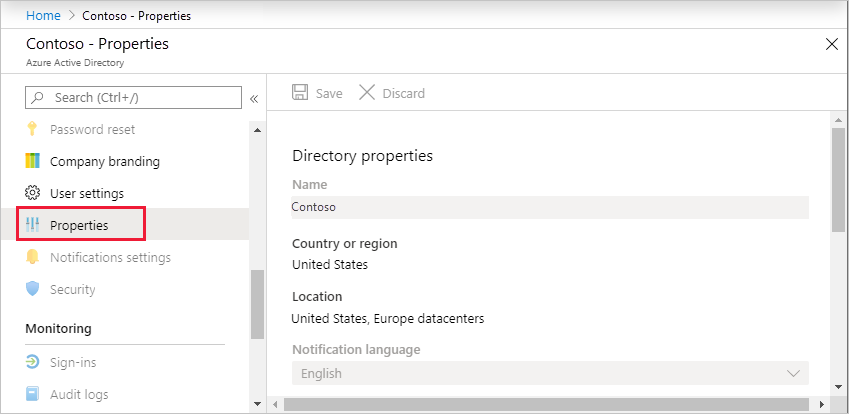
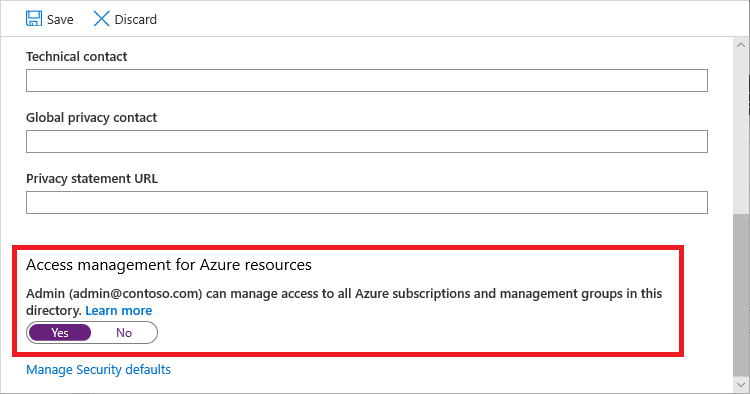
1.4 Under Access management for Azure resources, set the toggle to Yes.
2. Grant Access to your Service Principal at root scope "/" to deploy Enterprise-Scale reference implementation
Please ensure you are logged in as a user with UAA role enabled in AAD tenant and logged in user is not a guest user.
PowerShell
- Create Service Principal Account
    #sign in to Azure from Powershell, this will redirect you to a webbrowser for authentication, if required
    Connect-AzAccount

    #create a new service principal with root level owner access.
    New-AzADServicePrincipal -DisplayName ESLZAccount -Scope "/" -Role Owner
- Grant Access to MG "/" path
    #sign in to Azure from Powershell, this will redirect you to a webbrowser for authentication, if required
    Connect-AzAccount

    #get object Id of the current user (that is used above)
    $spn = Get-AzADServicePrincipal -DisplayName ESLZAccount

    #assign Owner role to Tenant root scope ("/") as a User Access Administrator
    New-AzRoleAssignment -Scope '/' -RoleDefinitionName 'Owner' -ObjectId $spn.Id
Please note, it may take up to 15-30 minutes for permission to propagate at tenant root scope. It is highly recommended that you log out and log back in.
The Owner privileged root tenant scope is required in the deployment of the Reference implementation. However post deployment, and as your use of Enterprise Scale matures, you are able to limit the scope of the Service Principal Role Assignment to a subsection of the Management Group hierarchy.
Eg. "/providers/Microsoft.Management/managementGroups/YourMgGroup".
- List Current Role Assignments for MG "/" path
    #sign in to Azure from Powershell, this will redirect you to a webbrowser for authentication, if required
    Connect-AzAccount

    #get list of owner assignements on the root scope
    Get-AzRoleAssignment | where {$_.RoleDefinitionName -eq "Owner" -and $_.Scope -eq "/"}
- Remove Current Role Assignments for MG "/" path
    #sign in to Azure from Powershell, this will redirect you to a webbrowser for authentication, if required
    Connect-AzAccount

    #Remove Role Assignment using SPN Name
    Remove-AzRoleAssignment -ServicePrincipalName ESLZAccount -RoleDefinitionName "Owner" -Scope "/"
    #Remove Role Assignment using Object Id
    Remove-AzRoleAssignment -ObjectId "xxxxxxxx-xxxx-xxxx-xxxx-xxxxxxxxxxxx" -RoleDefinitionName "Owner" -Scope "/"
You will need to fork this repo into your own github repo and create 3 environments to store secrets for each deployment in your repo (Settings > Environment):
-
Dev-Platform
- Secrets:
- AZURE_CLIENT_ID - This is the client ID of the service principal you created above.
- AZURE_CLIENT_SECRET - This is a client secret you need to create in AAD > Application Registrations for the service principal you created above.
- AZURE_SUBSCRIPTION_ID - This should be your planned management subscription as Log Analytics and an Automation Account will be deployed here. Please make sure the service principal has access to create resources in this subscription.
- AZURE_TENANT_ID - Tenant ID of your Azure environment.
- TF_API_TOKEN - If you are using Terraform to store state, you will need to genereate an API Token for your team.
- Secrets:
-
Dev-Network
- Secrets:
- AZURE_CLIENT_ID - This is the client ID of the service principal you created above.
- AZURE_CLIENT_SECRET - This is a client secret you need to create in AAD > Application Registrations for the service principal you created above.
- AZURE_SUBSCRIPTION_ID - This should be your planned connectivity subscription where you plan to deploy centralized networking components. Please make sure the service principal has access to create resources in this subscription.
- AZURE_TENANT_ID - Tenant ID of your Azure environment.
- TF_API_TOKEN - If you are using Terraform to store state, you will need to genereate an API Token for your team.
- VM_ADMIN_PASSWORD - Any complex password for provisoning of your VM.
- Secrets:
-
Dev-LandingZone-A1
- Secrets:
- AZURE_CLIENT_ID - This is the client ID of the service principal you created above.
- AZURE_CLIENT_SECRET - This is a client secret you need to create in AAD > Application Registrations for the service principal you created above.
- AZURE_SUBSCRIPTION_ID - This should be a landing zone subscription where you plan to deploy an application or solution. Please make sure the service principal has access to create resources in this subscription.
- AZURE_TENANT_ID - Tenant ID of your Azure environment.
- TF_API_TOKEN - If you are using Terraform to store state, you will need to genereate an API Token for your team.
- Secrets:
Please proceed with pipeline deployments:
- Note: You can only associate your subscriptions to a single ESLZ Management Group. You can move these between the default and custom ESLZ by rerunning the pipeline and modifying your input parameters.
-
-
This pipeline will deploy 2 Management Group Structures:
- Default ESLZ Environment
- Variables
- Management group prefix (defaults to "es")
- Map Subscriptions to Management Groups (optional)
    {
        root           = [],
        decommissioned = [],
        sandboxes      = [],
        landing-zones  = ["xxxxxxxx-xxxx-xxxx-xxxx-xxxxxxxxxxxx",  "xxxxxxxx-xxxx-xxxx-xxxx-xxxxxxxxxxxx"],
        platform       = [],
        connectivity   = ["xxxxxxxx-xxxx-xxxx-xxxx-xxxxxxxxxxxx"],
        management     = ["xxxxxxxx-xxxx-xxxx-xxxx-xxxxxxxxxxxx"],
        identity       = ["xxxxxxxx-xxxx-xxxx-xxxx-xxxxxxxxxxxx"]
    }
- Variables
- Completely Custom Management Group Structure
- Variables
- Set Custom Landing Zones
    {
        "main" = { # This is the Management Group ID and will be used as the Parent_Management_Group_Id below.
        display_name               = "ContosoRoot",
        parent_management_group_id = "xxxxxxxx-xxxx-xxxx-xxxx-xxxxxxxxxxxx", # Must be your Azure Tenant ID.
        subscription_ids           = [],
        archetype_config = {
            archetype_id   = "main",
            parameters     = {},
            access_control = {}
            }
        },
        "usa" = {
        display_name               = "USA",
        parent_management_group_id = "main",
        subscription_ids           = [],
        archetype_config = {
            archetype_id   = "usa",
            parameters     = {},
            access_control = {}
            }
        },
        "uk" = {
        display_name               = "UK",
        parent_management_group_id = "main",
        subscription_ids           = [],
        archetype_config = {
            archetype_id   = "uk",
            parameters     = {},
            access_control = {}
            }
        },
        "decommissioned" = {
        display_name               = "Decommissioned",
        parent_management_group_id = "usa",
        subscription_ids           = [],
        archetype_config = {
            archetype_id   = "default_empty",
            parameters     = {},
            access_control = {}
            }
        },
        "sandbox" = {
        display_name               = "Sandbox",
        parent_management_group_id = "usa",
        subscription_ids           = [],
        archetype_config = {
            archetype_id   = "sandbox",
            parameters     = {},
            access_control = {}
            }
        },
        "core" = {
        display_name               = "Shared Services",
        parent_management_group_id = "usa",
        subscription_ids           = [],
        archetype_config = {
            archetype_id   = "default_empty",
            parameters     = {},
            access_control = {}
            }
        },
        "management" = {
        display_name               = "Management",
        parent_management_group_id = "core",
        subscription_ids           = ["xxxxxxxx-xxxx-xxxx-xxxx-xxxxxxxxxxxx"],
        archetype_config = {
            archetype_id   = "logging",
            parameters     = {},
            access_control = {}
            }
        },
        "iam" = {
        display_name               = "Identity",
        parent_management_group_id = "core",
        subscription_ids           = [],
        archetype_config = {
            archetype_id   = "default_empty",
            parameters     = {},
            access_control = {}
            }
        },
        "networking" = {
        display_name               = "Connectivity",
        parent_management_group_id = "core",
        subscription_ids           = ["xxxxxxxx-xxxx-xxxx-xxxx-xxxxxxxxxxxx"],
        archetype_config = {
            archetype_id   = "networking",
            parameters     = {},
            access_control = {}
            }
        },
        "prod" = {
        display_name               = "Production",
        parent_management_group_id = "usa",
        subscription_ids           = ["xxxxxxxx-xxxx-xxxx-xxxx-xxxxxxxxxxxx"],
        archetype_config = {
            archetype_id   = "prod",
            parameters     = {},
            access_control = {}
            }
        },
        "nonprod" = {
        display_name               = "Development",
        parent_management_group_id = "usa",
        subscription_ids           = [],
        archetype_config = {
            archetype_id   = "nonprod",
            parameters     = {},
            access_control = {}
            }
        }
    }
- Set Custom Landing Zones
- Variables
Inspecting a Landing Zone Object:
"usa" = { display_name = "USA", parent_management_group_id = "main", subscription_ids = [], archetype_config = { archetype_id = "usa", parameters = {}, access_control = {} } }- usa - The Management Group Id. Must be lower case with no spaces.
- display_name - Display name of the Management Group.
- parent_management_group_id - the objects parent Id. In this case, it would be "main" as usa is nested underneath main.
- subscription_ids - This is a string array of all subscriptions that should be associated with this Management Group. This can be overridden using another variable.
- archetype_config
- archetype_id - this is a reference to the /lib/archetype_definitions file that contains the "usa" definition.
- parameters - maps parameters to policy assignments
- access_control - map users to specific roles within the management group.
More information can be found here: Archetype Definitions
- Default ESLZ Environment
-
-
- Required Variables:
- Connectivity Subscription ID - This is the subscription ID where you plan to deploy the centralized networking components (Hub-n-Spoke or Virtual WAN)
- Optional Variables
- Deployment Region (Defaults to "eastus") - Location to deploy resources.
- Virtual Machine Admin Username (Defaults to "sysadmin") - This is a jump box used to get onto the network.
- Required Variables:
-
- Required Variables:
- Landing Zone Subscription ID - This is the subscription where you plan to deploy a custom AKS application.
- Required Variables: