Testing LLM reasoning abilities with lineage relationship quizzes.
The project is a successor of the farel-bench benchmark.
Note: GPT 5.2 (reasoning effort medium and high) seems to perform significantly worse in my benchmark compared to its predecessor.
- 2025-12-18 - Added results for some legacy models (gemini-2.5-flash, gemini-2.5-pro), for high reasoning effort (gpt-5.1, gpt-5.2) and other recently released models (nemotron-3-nano-30b-a3b, doubao-seed-1-8, gemini-3-flash-preview, mimo-v2-flash, ministral-14b-2512). Stacked results plot shows only top 30 scores now.
- 2025-12-03 - Updated results for ring-1t model. Added results for seed-oss-36b-instruct (courtesy of @mokieli).
- 2025-12-01 - Added results for ring-1t, deepseek-r1-0528, glm-4.5-air, glm-4.5, intellect-3, ernie-5.0-thinking-preview, deepseek-v3.2 and deepseek-v3.2-speciale. Updated results for glm-4.6 (works better with lower temperature). Results for ring-1t are not final (problems with model provider).
- 2025-11-25 - Added results for gpt-5.1, claude-opus-4.5, grok-4.1-fast and o4-mini.
- 2025-11-23 - Added results for qwen3-32b, o3-mini and o3 models.
- 2025-11-22 - Updated results to include recently released models, but only with 40 quizzes per problem size to reduce costs. Extended range of problem lengths to increase difficulty. Added file-based caching of model requests and responses.
- 2025-03-07 - Added results for qwq-32b (used Parasail provider with 0.01 temp, observed some infinite loop generations, but mostly for lineage-64 where the model performs bad anyway).
- 2025-03-04 - Updated results for perplexity/r1-1776. (apparently there was a problem with the model serving stack, that's why r1-1776 initially performed worse than expected)
- 2025-02-26 - Added results for claude-3.7-sonnet (also with :thinking) and r1-1776
- 2025-02-20 - Updated results for deepseek/deepseek-r1-distill-llama-70b. (used Groq provider with 0.5 temperature)
- 2025-02-18 - Added results for kimi-k1.5-preview and llama-3.1-tulu-3-405b.
- 2025-02-06 - Added results for o1, o3-mini, qwen-max, gemini-exp-1206, deepseek-r1-distill-qwen-14b and deepseek-r1-distill-qwen-32b.
- 2025-01-24 - Added results for deepseek-r1-distill-llama-70b.
- 2025-01-20 - Added results for deepseek-r1.
- 2025-01-15 - Added results for deepseek-v3, gemini-2.0-flash-exp, gemini-2.0-flash-thinking-exp-1219 and minimax-01.
The plot below shows only the 30 top-performing models. See the table for all results.


The table below presents the benchmark results. If not explicitly stated default medium reasoning effort was used during benchmark.
| Nr | model_name | lineage | lineage-8 | lineage-64 | lineage-128 | lineage-192 |
|---|---|---|---|---|---|---|
| 1 | deepseek/deepseek-v3.2-speciale | 0.994 | 1.000 | 1.000 | 1.000 | 0.975 |
| 2 | openai/gpt-5.1 (high) | 0.969 | 1.000 | 0.975 | 0.975 | 0.925 |
| 2 | google/gemini-3-pro-preview | 0.969 | 1.000 | 1.000 | 0.925 | 0.950 |
| 4 | deepseek/deepseek-v3.2 | 0.956 | 1.000 | 1.000 | 0.975 | 0.850 |
| 5 | anthropic/claude-sonnet-4.5 | 0.944 | 0.975 | 0.975 | 0.900 | 0.925 |
| 6 | google/gemini-2.5-pro | 0.925 | 1.000 | 0.900 | 0.900 | 0.900 |
| 7 | openai/gpt-5.1 (medium) | 0.888 | 1.000 | 0.950 | 0.875 | 0.725 |
| 8 | google/gemini-3-flash-preview | 0.881 | 1.000 | 0.975 | 0.875 | 0.675 |
| 9 | qwen/qwen3-max | 0.869 | 1.000 | 0.800 | 0.900 | 0.775 |
| 10 | x-ai/grok-4 (medium) | 0.869 | 1.000 | 0.950 | 0.900 | 0.625 |
| 10 | x-ai/grok-4-fast (medium) | 0.869 | 1.000 | 0.925 | 0.900 | 0.650 |
| 10 | anthropic/claude-opus-4.5 (medium) | 0.869 | 1.000 | 0.950 | 0.900 | 0.625 |
| 13 | qwen/qwen3-235b-a22b-thinking-2507 | 0.856 | 0.900 | 0.875 | 0.850 | 0.800 |
| 14 | inclusionai/ring-1t | 0.819 | 0.875 | 0.975 | 0.800 | 0.625 |
| 15 | deepseek/deepseek-v3.1-terminus | 0.812 | 0.975 | 0.900 | 0.700 | 0.675 |
| 16 | openai/o3 (medium) | 0.800 | 1.000 | 0.925 | 0.800 | 0.475 |
| 17 | deepseek/deepseek-v3.2-exp | 0.794 | 0.975 | 0.900 | 0.700 | 0.600 |
| 18 | anthropic/claude-haiku-4.5 | 0.794 | 0.975 | 0.925 | 0.575 | 0.700 |
| 19 | openai/gpt-5 (medium) | 0.788 | 1.000 | 0.975 | 0.850 | 0.325 |
| 20 | deepseek/deepseek-r1-0528 | 0.787 | 1.000 | 0.975 | 0.650 | 0.525 |
| 21 | bytedance/seed-oss-36b-instruct | 0.769 | 1.000 | 0.850 | 0.750 | 0.475 |
| 22 | deepcogito/cogito-v2.1-671b | 0.756 | 0.975 | 0.800 | 0.650 | 0.600 |
| 23 | x-ai/grok-4.1-fast (medium) | 0.750 | 1.000 | 0.900 | 0.800 | 0.300 |
| 24 | baidu/ernie-5.0-thinking-preview | 0.719 | 1.000 | 0.850 | 0.650 | 0.375 |
| 25 | z-ai/glm-4.5 | 0.700 | 1.000 | 0.775 | 0.625 | 0.400 |
| 26 | z-ai/glm-4.6 | 0.644 | 0.925 | 0.725 | 0.525 | 0.400 |
| 27 | xiaomi/mimo-v2-flash | 0.600 | 1.000 | 0.900 | 0.425 | 0.075 |
| 28 | z-ai/glm-4.5-air | 0.594 | 1.000 | 0.750 | 0.450 | 0.175 |
| 28 | prime-intellect/intellect-3 | 0.594 | 1.000 | 0.950 | 0.325 | 0.100 |
| 30 | qwen/qwen3-next-80b-a3b-thinking | 0.575 | 0.950 | 0.700 | 0.425 | 0.225 |
| 31 | google/gemini-2.5-flash | 0.569 | 0.975 | 0.575 | 0.525 | 0.200 |
| 32 | minimax/minimax-m2 | 0.562 | 0.975 | 0.700 | 0.350 | 0.225 |
| 33 | openai/gpt-oss-120b | 0.544 | 1.000 | 0.825 | 0.325 | 0.025 |
| 34 | amazon/nova-2-lite-v1 | 0.525 | 1.000 | 0.700 | 0.325 | 0.075 |
| 34 | openai/o4-mini (medium) | 0.525 | 1.000 | 0.775 | 0.300 | 0.025 |
| 34 | moonshotai/kimi-k2-thinking | 0.525 | 1.000 | 0.850 | 0.200 | 0.050 |
| 37 | volcengine/doubao-seed-1.8 | 0.512 | 1.000 | 0.925 | 0.125 | 0.000 |
| 37 | openai/gpt-5-mini (medium) | 0.512 | 1.000 | 0.950 | 0.075 | 0.025 |
| 39 | qwen/qwen3-30b-a3b-thinking-2507 | 0.494 | 1.000 | 0.575 | 0.275 | 0.125 |
| 39 | openai/gpt-5.2 (high) | 0.494 | 1.000 | 0.700 | 0.175 | 0.100 |
| 41 | openai/gpt-5.2 (medium) | 0.450 | 1.000 | 0.675 | 0.075 | 0.050 |
| 42 | allenai/olmo-3-32b-think | 0.444 | 0.925 | 0.600 | 0.175 | 0.075 |
| 43 | mistralai/ministral-14b-2512 | 0.400 | 0.875 | 0.425 | 0.175 | 0.125 |
| 44 | qwen/qwen3-32b | 0.362 | 0.950 | 0.475 | 0.025 | 0.000 |
| 45 | openai/gpt-5-nano (medium) | 0.294 | 1.000 | 0.150 | 0.025 | 0.000 |
| 46 | openai/o3-mini (medium) | 0.287 | 0.950 | 0.200 | 0.000 | 0.000 |
| 47 | nvidia/nemotron-3-nano-30b-a3b | 0.231 | 0.875 | 0.025 | 0.025 | 0.000 |
Each row contains the average benchmark score across all problem sizes, and separate scores for each problem size.
The purpose of this project is to test LLM reasoning abilities with lineage relationship quizzes.
The general idea is to make LLM reason about a graph of lineage relationships where nodes are people and edges are ancestor/descendant relations between people. LLM is asked to determine the lineage relationship between two people A and B based on the graph. By varying the number of graph nodes (problem size) we can control the quiz difficulty.
There are five possible answers in each quiz:
- A is B's ancestor
- A is B's descendant
- A and B share a common ancestor
- A and B share a common descendant
- None of the above is correct.
The last answer is never correct. It serves only as an invalid fallback answer.
Below you can see some example lineage relationship graphs and corresponding quizzes.
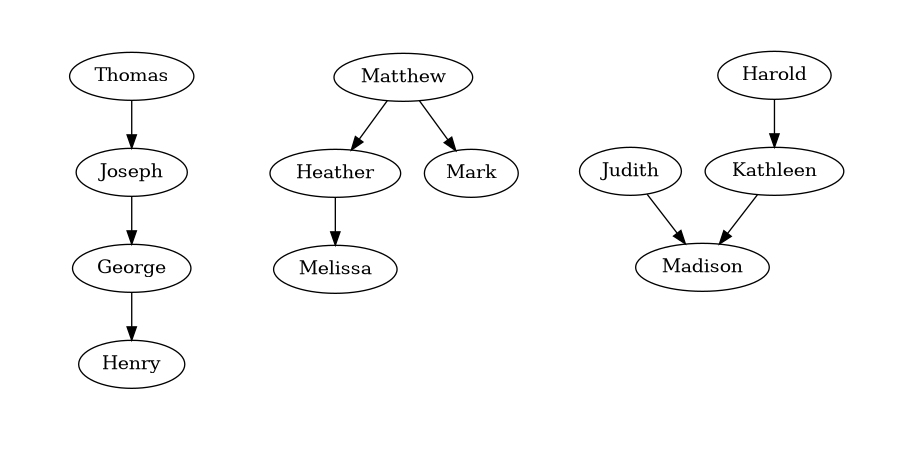
Given the following lineage relationships:
* Joseph is George's ancestor.
* Henry is George's descendant.
* Thomas is Joseph's ancestor.
Determine the lineage relationship between Thomas and Henry.
Select the correct answer:
1. Thomas is Henry's ancestor.
2. Thomas is Henry's descendant.
3. Thomas and Henry share a common ancestor.
4. Thomas and Henry share a common descendant.
5. None of the above is correct.
Enclose the selected answer number in the <ANSWER> tag, for example: <ANSWER>1</ANSWER>.
Given the following lineage relationships:
* Matthew is Heather's ancestor.
* Heather is Melissa's ancestor.
* Matthew is Mark's ancestor.
Determine the lineage relationship between Mark and Melissa.
Select the correct answer:
1. Mark and Melissa share a common ancestor.
2. Mark is Melissa's ancestor.
3. Mark and Melissa share a common descendant.
4. Mark is Melissa's descendant.
5. None of the above is correct.
Enclose the selected answer number in the <ANSWER> tag, for example: <ANSWER>1</ANSWER>.
Given the following lineage relationships:
* Madison is Kathleen's descendant.
* Judith is Madison's ancestor.
* Harold is Kathleen's ancestor.
Determine the lineage relationship between Harold and Judith.
Select the correct answer:
1. Harold and Judith share a common descendant.
2. Harold and Judith share a common ancestor.
3. Harold is Judith's ancestor.
4. Harold is Judith's descendant.
5. None of the above is correct.
Enclose the selected answer number in the <ANSWER> tag, for example: <ANSWER>1</ANSWER>.
The usual workflow is to:
- Run lineage_bench.py to generate lineage relationship quizzes.
- Run run_openrouter.py to test LLM models.
- Run compute_metrics.py to calculate benchmark results.
- Run plot_stacked.py to generate a results plot.
Output is usually written to the standard output. Input is usually read from the standard input.
Example usage:
$ ./lineage_bench.py -s -l 8 -n 10 -r 42|./run_openrouter.py -m "google/gemini-pro-1.5" -t 8 -r -o results/gemini-pro-1.5 -v|tee results/gemini-pro-1.5_8.csv
$ cat results/*.csv|./compute_metrics.py --csv --relaxed|./plot_stacked.py -o results.png
I usually run the benchmark like this:
for length in 8 16 32 64
do
  ./lineage_bench.py -s -l $length -n 50 -r 42|./run_openrouter.py -m <model> -p <provider> -o <cache_dir> -r -v|tee results/<model>_$length.csv
done
This results in 200 generated quizzes per problem size, 800 quizzes overall in a single benchmark run.
usage: lineage_bench.py [-h] -l LENGTH [-p PROMPT] [-s] [-n NUMBER] [-r SEED]

options:
  -h, --help            show this help message and exit
  -l LENGTH, --length LENGTH
                        Number of people connected with lineage relationships in the quiz.
  -p PROMPT, --prompt PROMPT
                        Prompt template of the quiz. The default prompt template is: 'Given the following lineage
                        relationships:\n{quiz_relations}\n{quiz_question}\nSelect the correct answer:\n{quiz_answers}\nEnclose the selected
                        answer number in the <ANSWER> tag, for example: <ANSWER>1</ANSWER>.'
  -s, --shuffle         Shuffle the order of lineage relations in the quiz.
  -n NUMBER, --number NUMBER
                        Number of quizzes generated for each valid answer option.
  -r SEED, --seed SEED  Random seed value
Before running run_openrouter.py set OPENROUTER_API_KEY environment variable to your OpenRouter API Key.
usage: run_openrouter.py [-h] [-u URL] -m MODEL -o OUTPUT [-p PROVIDER] [-r] [-e EFFORT] [-t THREADS] [-v] [-s [SYSTEM_PROMPT]] [-T TEMP]
                         [-P TOP_P] [-K TOP_K] [-n MAX_TOKENS] [-i RETRIES]

options:
  -h, --help            show this help message and exit
  -u URL, --url URL     OpenAI-compatible API URL
  -m MODEL, --model MODEL
                        OpenRouter model name.
  -o OUTPUT, --output OUTPUT
                        Directory for storing model responses.
  -p PROVIDER, --provider PROVIDER
                        OpenRouter provider name.
  -r, --reasoning       Enable reasoning.
  -e EFFORT, --effort EFFORT
                        Reasoning effort (recent OpenAI and xAI models support this).
  -t THREADS, --threads THREADS
                        Number of threads to use.
  -v, --verbose         Enable verbose output.
  -s [SYSTEM_PROMPT], --system-prompt [SYSTEM_PROMPT]
                        Use given system prompt. By default, the system prompt is not used. When this option is passed without a value, the
                        default system prompt value is used: 'You are a master of logical thinking. You carefully analyze the premises step by
                        step, take detailed notes and draw intermediate conclusions based on which you can find the final answer to any
                        question.'
  -T TEMP, --temp TEMP  Temperature value to use.
  -P TOP_P, --top-p TOP_P
                        top_p sampling parameter.
  -K TOP_K, --top-k TOP_K
                        top_k sampling parameter.
  -n MAX_TOKENS, --max-tokens MAX_TOKENS
                        Max number of tokens to generate.
  -i RETRIES, --retries RETRIES
                        Max number of API request retries.
usage: compute_metrics.py [-h] [-c] [-r] [-d]

options:
  -h, --help      show this help message and exit
  -c, --csv       Generate CSV output.
  -r, --relaxed   Relaxed answer format requirements
  -d, --detailed  Generate detailed output
usage: plot_line.py [-h] [-o OUTPUT] [-n TOP_N]

options:
  -h, --help           show this help message and exit
  -o, --output OUTPUT  Write rendered plot to this file.
  -n, --top-n TOP_N    Show only n best results.
usage: plot_stacked.py [-h] [-o OUTPUT] [-n TOP_N]

options:
  -h, --help           show this help message and exit
  -o, --output OUTPUT  Write rendered plot to this file.
  -n, --top-n TOP_N    Show only n best results.