Easily install, configure, control cms(Contest Management System v1.3rc0) on remote Ubuntu 16.04 machines.
Install python requirements from requirements.
Configure settings.py and passwords.py in config folder.
Run script with -i flag and specify indexes of ip addreses written in settings.py numbered from zero.
Example: python3 ./easy_cms 0 1 2 3 -i
Run script with -u flag and specify indexes of ip addreses written in settings.py numbered from zero.
Example: python3 ./easy_cms 0 1 2 3 -u
Run script with --start_admin flag.
Example: python3 ./easy_cms --start_admin
Run script with -ti %task_link% flag and specify link to task.
Example: python3 ./easy_cms --task_import https://polygon.codeforces.com/p85dIBF/mmirzayanov/a-plus-b
Run script with -tu %task_link% flag and specify link to task.
Example: python3 ./easy_cms --task_update https://polygon.codeforces.com/p85dIBF/mmirzayanov/a-plus-b
Note: It updates task with the same name as it named in Polygon.
Run script with -s %contest_id% flag and specify indexes of ip addreses written in settings.py numbered from zero.
Example: python3 ./easy_cms 0 1 2 3 -s 1
Run script with --stop flag and specify indexes of ip addreses written in settings.py numbered from zero.
Example: python3 ./easy_cms 0 1 2 3 --stop
Bot allows you to communicate with participants: send announcements and answer questions. Create telegram bot. Configure token and secret it in settings.py.
Send /secret %your_secret%. Enjoy!
To announce send /a %subject%\n %text%.
To answer question press button or reply to message.
Run script with --bot %contest_id% flag.
Example: python3 ./easy_cms --bot 1
You can combine commands.
Example: python3 ./easy_cms 0 1 2 3 -i --start_admin
Commands executed in this order:
Installation
Updating configs
Starting AdminWebServer
Stopping cms
Importing tasks
Updating tasks
Starting contest
Starting bot
- Launch Ubuntu 16.04 EC2 Instances (one of the best choices is t2.medium with ~20GB SSD).
- Open 80 port for main instance and allow all traffic to local (usually 172.31.0.0/16, change it in settings.py if it's different).
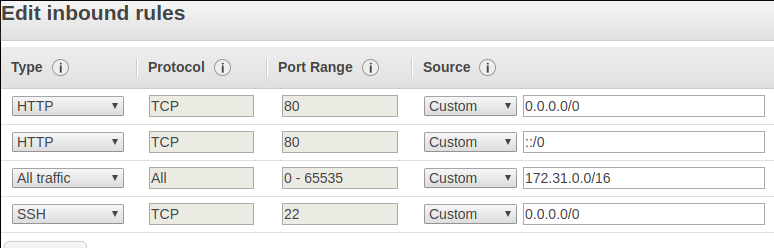
- Add ip addresses list to settings.py and specify number of workers (remember that first ip in list will be used as main web server). Change passwords in passwords.py. Change path to your pemfile in settings.py.
- Run python3 ./easy_cms 0 1 2 -i --start_admin to install CMS and run AdminWebServer.
- Configure contest.
- Log in to AWS.
- Add contest.
- Configure start time and languages.
- Add tasks.
- Run python3 ./easy_cms --task_import https://polygon.codeforces.com/p85dIBF/mmirzayanov/a-plus-b to import task from polygon.
- Do not forget to configure scoring type for every task.
- Add users.
- Run python3 ./easy_cms 0 1 2 -s 1 to start contest for users.
- Run python3 ./easy_cms --bot 1 to start bot.