A simple local Retrieval-Augmented Generation (RAG) chatbot that can answer to questions by acquiring information from personal pdf documents.
(please, if you find this content useful please consider leaving a star ⭐)
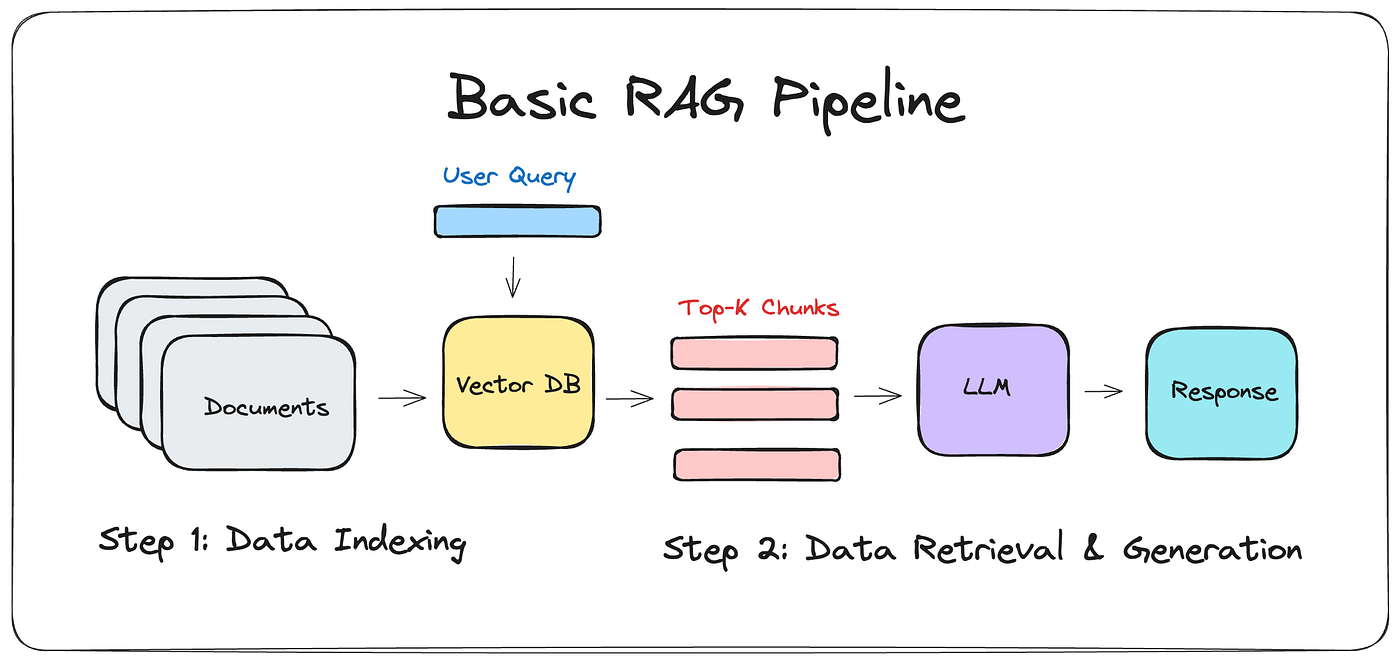
- Data Indexing
- Documents: This is the starting point where multiple documents are stored.
- Vector DB: The documents are processed and indexed into a Vector Database.
- User Query
- A user query is input into the system, which interacts with the Vector Database.
- Data Retrieval & Generation
- Top-K Chunks: The Vector Database retrieves the top-K relevant chunks based on the user query.
- LLM (Large Language Model): These chunks are then fed into a Large Language Model.
- Response: The LLM generates a response based on the relevant chunks.
For this project, i exploited the following components to build the RAG architecture:
- Chroma: A vector database used to store and retrieve document embeddings efficiently.
- Flask: Framework for rendering web page and handling user interactions.
- Ollama: Manages the local language model for generating responses.
- LangChain: A framework for integrating language models and retrieval systems.
- Choose Your Setup:
- You have three different options for setting up the LLMs:
- Local setup using Ollama.
- Using the OpenAI API for GPT models.
- Using the Anthropic API for Claude models.
- You have three different options for setting up the LLMs:
- Download and install Ollama on your PC:
- Visit Ollama's official website to download and install Ollama. Ensure you have sufficient hardware resources to run the local language model.
- Pull a LMM of your choice:
ollama pull <model_name> # e.g. ollama pull llama3:8b
- Set up OpenAI API: you can sign up and get your API key from OpenAI's website.
- Set up Anthropic API: you can sign up and get your API key from Anthropic's website.
-
Clone the repository and navigate to the project directory:
git clone https://github.com/enricollen/rag-conversational-agent.git cd rag-conversational-agent -
Create a virtual environment:
python -m venv venv
source venv/bin/activate  # On Windows, use `venv\Scripts\activate`
-
Install the required libraries:
pip install -r requirements.txt
-
Insert you own PDFs in /data folder
-
Run once the populate_database script to index the pdf files into the vector db:
python populate_database.py
-
Run the application:
python app.py
-
Navigate to
http://localhost:5000/ -
If needed, click on ⚙️ icon to access the admin panel and adjust app parameters
-
Perform a query
The application runs over HTTP by default, which is suitable for local development. If the web interface is exposed publicly, HTTPS is recommended to avoid transmitting documents, queries, or API requests in plaintext.
For small-scale or experimental deployments, a free reverse proxy such as Ngrok can be used to provide HTTPS without modifying the application code. For more stable or long-term deployments, a standard web server (for example, Nginx with TLS) is recommended.
Here are some ideas for future improvements:
- Add OpenAI LLM GPT models compatibility (3.5 turbo, 4, 4-o)
- Add Anthropic Claude LLM models compatibility (Claude 3.5 Sonnet, Claude 3 Sonnet, Claude 3 Opus, Claude 3 Haiku)
- Add unit testing to validate the responses given by the LLM
- Add an admin user interface in web UI to choose interactively the parameters like LLMs, embedding models etc.
- Add Langchain Tools compatibility, allowing users to define custom Python functions that can be utilized by the LLMs.
- Add web scraping in case none of the personal documents contain relevant info w.r.t. the query
Watch the demo video below to see the RAG Chatbot in action:

The demo was run on my PC with the following specifications:
- Processor: Intel(R) Core(TM) i7-14700K 3.40 GHz
- RAM: 32.0 GB
- GPU: NVIDIA GeForce RTX 3090 FE 24 GB