


OGC TEAMEngine docker-compose automated deployment, including most common test suites up and running in minutes! For HTTPS reverse proxy see Elasticlabs HTTPS Nginx Proxy.
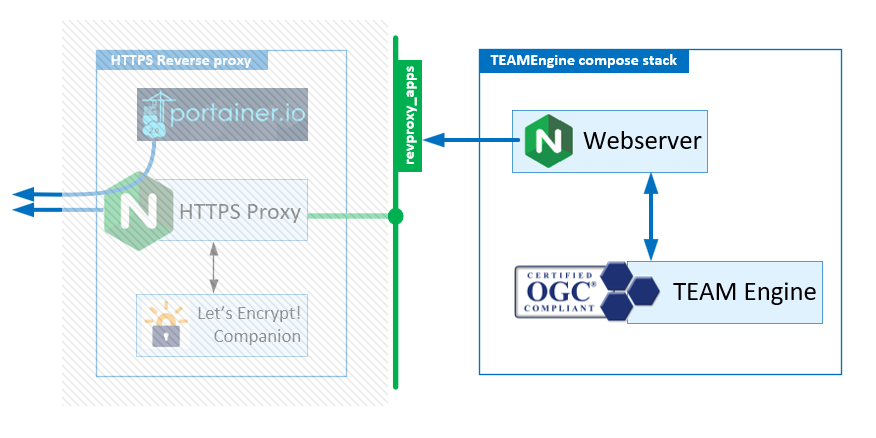
Table Of Contents:
This stack is meant to be deployed behind an automated NGINX based HTTPS proxy. The recommanded automated HTTPS proxy for this stack is the Elasticlabs HTTPS Nginx Proxy. This composition repository assumes you have this environment :
- Working HTTPS Nginx proxy using Let'sencrypt certificates
- A local docker LAN network called
revproxy_appsfor hosting your bubble apps (Nginx entrypoint for each bubble).
Once you have a HTTPS reverse proxy, navigate to the next section.
- Choose & register a DNS name (e.g.
teamengine.your-awesome-domain.ltd). Make sure it properly resolves from your server usingnslookupcommands. - Carefully create / choose an appropriate directory to group your applications GIT reposities (e.g.
~/AppContainers/) - GIT clone this repository
git clone https://github.com/elasticlabs/teamengine-compose.git
Configuration
- Rename
.env-changemefile into.envto ensuredocker-composegets its environement correctly. - Modify the following variables in
.env-changemefile :TE_VHOST=: replaceteamengine.your-domain.ltdwith your choosen subdomain for teamengine.LETSENCRYPT_EMAIL=: replaceemail@mail-provider.ltdwith the email address to get notifications on Certificates issues for your domain.
Deployment
- Get help :
sudo make help - Bring up the whole stack :
sudo make build && sudo make up - Head to
http://teamengine.your-awesome-domain.ltd/appand enjoy TEAMENgine test suites!
Useful management commands
- Go inside a container :
sudo docker-compose exec -it <service-id> bashorsh - See logs of a container:
sudo docker-compose logs <service-id> - Monitor containers :
sudo docker statsor... use portainer!