A basic Python scraper for NetrunnerDB cards. Works with NetrunnerDB's v2 API and tested in Python 3.9.5.
python scraper.py
By default it searches for all cards in the Startup format at the time of writing (System Gateway, System Update 21, Ashes, Midnight Sun Booster Pack). You can change which cards are filtered by changing this section of code:
# Data to include/exclude
startup_pack_codes = ["sg", "su21", "df", "ur", "msbp"]
non_startup_codes = ["30076", "30077"]

# Filter by the above parameters, then format into a single string
startup_cards = filter(lambda c : c["pack_code"] in startup_pack_codes and c["code"] not in non_startup_codes, cards)
formatted = "\n".join(map(format, startup_cards))
You can filter by any fields cards have (note that not every card has every possible field, so you may need to perform additional checks for things like advancement cost or trash cost). See the API itself for the fields cards can have.
You can add, remove, and reorder the output fields by changing this line:
# The fields to include from each card
fields = ["title", "text", "cost", "strength", "trash_cost"]
The script checks if each card has each specified field, so you don't need to perform additional checks.
You can change the name of the output file by changing the file parameter at the top of the script.
Once you have the formatted CSV file, you can import it into Excel by opening a new Excel file and going to the Data tab:
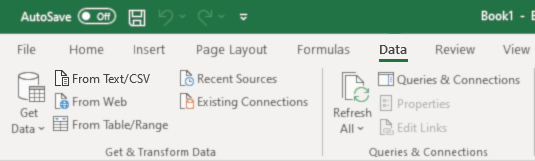
Click of From Text/CSV and choose your outputted card data. You'll need to set the delimiter to match that of the file:
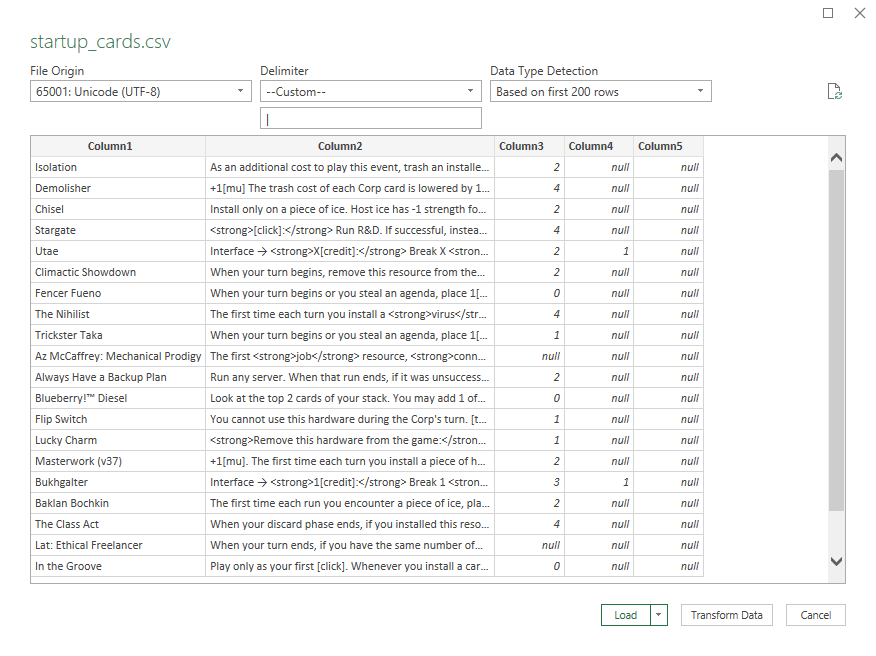
By default, each field in the output is separated by a pipe (|). CSVs are normally comma separated, but since cards can contain commas in their text a pipe is used instead. If you want to change this for any reason (e.g. a future card has a pipe in its text) you can change the delimiter parameter at the top of the script.