Demo :
Watch the demo video to see Research Assistant in action:
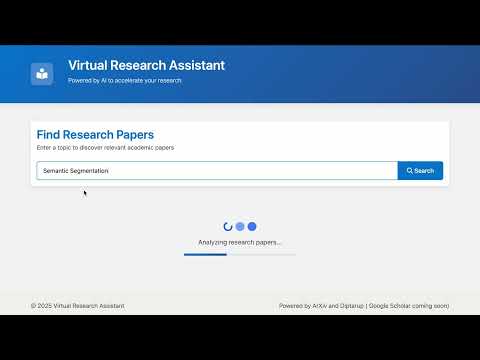
The Virtual Research Assistant is an AI-powered web application designed to streamline the research process for academics, students, and anyone interested in exploring scientific literature. It allows users to search for academic papers on the arXiv repository based on keywords or topics. For each relevant paper found, the application utilizes the Groq Large Language Model (LLM) API to generate a concise summary and an analysis of the paper's potential advantages and disadvantages. This provides users with a quick understanding of the paper's core concepts and contributions without needing to read the entire document initially. The application features a modern, responsive user interface built with Bootstrap 5 and enhanced with subtle animations using the AOS library for a better user experience.
- Keyword-Based Paper Search: Enter any research topic or keyword to search the arXiv database for relevant papers.
- AI-Generated Summaries: Automatically generates concise summaries (3-4 sentences) for each retrieved paper using the Groq LLM API (llama3-8b-8192 model).
- Advantages & Disadvantages Analysis: Provides an AI-generated analysis outlining the potential strengths and weaknesses of the approach described in each paper.
- Direct PDF Access: Includes direct links to download the PDF version of each paper from arXiv.
- Modern & Responsive UI: Clean, intuitive interface built with Bootstrap 5, ensuring compatibility across various devices (desktops, tablets, mobiles).
- Engaging Animations: Subtle loading animations and card reveal effects (using AOS library) enhance user interaction.
- Robust Error Handling: Gracefully handles potential issues like API errors, network problems, or parsing failures, providing informative feedback to the user.
- Serverless Deployment Ready: Configured for easy deployment on platforms like Vercel.
- Backend:
- Framework: Flask (Python) - A lightweight WSGI web application framework.
- Language: Python 3.x
- Frontend:
- Structure: HTML5
- Styling: CSS3, Bootstrap 5 - For responsive design and pre-built components.
- Interactivity: JavaScript (ES6+) - For handling form submissions, API calls (fetch), and dynamic content updates.
- Animations: AOS (Animate On Scroll) Library - For scroll-triggered animations.
- AI Integration:
- LLM Provider: Groq API
- Model: llama3-8b-8192 (or similar, depending on availability)
- Data Source:
- arXiv API (via web scraping of search results) - Access to pre-print academic papers.
- Libraries:
requests: For making HTTP requests to arXiv.beautifulsoup4: For parsing HTML content from arXiv search results.python-dotenv: For managing environment variables (like API keys).groq: Official Python client for the Groq API.
- Deployment:
- Vercel (Configuration provided via
vercel.json)
- Vercel (Configuration provided via
- User Query: The user enters a search query (topic/keywords) into the search bar on the web interface and submits the form.
- Frontend Request: The JavaScript frontend captures the query, prevents default form submission, and sends an asynchronous POST request to the Flask backend endpoint (
/search) with the query in JSON format. - Backend Processing:
- The Flask application receives the request at the
/searchroute. - It calls the
search_arxivfunction, which uses therequestslibrary to query the arXiv search page with the user's keywords. BeautifulSoupparses the HTML response from arXiv to extract details (title, abstract link, arXiv ID) for the top relevant papers (default 5). Direct PDF links are constructed from the arXiv IDs.- The extracted paper details are passed to the
analyze_papersfunction.
- The Flask application receives the request at the
- AI Analysis:
- For each paper, the
analyze_papersfunction constructs a specific prompt containing the paper's title and abstract, asking the Groq LLM to provide a summary and an analysis of advantages/disadvantages in a structured JSON format. - The
groqclient sends this prompt to the specified LLM model (llama3-8b-8192). - The backend includes robust logic to parse the JSON response from the LLM, handling potential formatting errors or incomplete responses.
- For each paper, the
- Backend Response: The Flask backend compiles the results (original paper details + AI analysis) into a JSON object and sends it back to the frontend.
- Frontend Display:
- The JavaScript frontend receives the JSON response.
- It dynamically creates HTML cards for each paper using the received data.
- Summaries and analyses are displayed, and links to PDFs are generated.
- Results are displayed with staggered animations (AOS) for a smooth visual effect.
- Error messages are displayed if any part of the process fails.